Add SplashScreen to your application
| Date Posted | Product | Author |
|---|---|---|
| 08/27/2013 | Telerik UI for WinForms | Georgi Georgiev |
Problem
You have a big application which takes long time to load initially and you want to display proper indication to your end users of the ongoing process.
Solution

Create a splash screen which will be shown to your users while the heavy work is done behind the scenes.
First of all we will need a simple **ShapedForm **which will play the role of our SplashScreen. All we need to do is add a PictureBox which will hold our Logo:
public partial class SplashForm : ShapedForm
{
    public SplashForm()
    {
        InitializeComponent();

        PictureBox spashPictureBox = new PictureBox();
        spashPictureBox.Image = Resources.telerik_logo_RGB_photoshop;
        spashPictureBox.SizeMode = PictureBoxSizeMode.StretchImage;
        spashPictureBox.Dock = DockStyle.Fill;
        this.Controls.Add(spashPictureBox);

        this.StartPosition = FormStartPosition.CenterScreen;
    }
}
Then, we will need our **MainForm **which will do the heavy lifting. In this simulation we will just sleep the main thread for 2000 milliseconds which seems like a normal case scenario:
public partial class MainForm : RadForm
{
    public MainForm()
    {
        InitializeComponent();

        Thread.Sleep(2000);
    }
}
The main logic will be happening in our Program.cs/Program.vb file, this is where our forms will be created and disposed. First of all we will need to run the **SplashForm **on a separate thread, this will enable it to run independently of the main thread which is supposed to be busy handling the heavy operations. This way UI operations such as animations will not be interrupted because the UI thread will not be blocked. After running the thread with the SplashForm, we can create the MainForm and subscribe to its Load event, where we consider the loading is completed and we will close the SplashForm and let our application run normally:
static class Program
{
   public static SplashForm splashForm = null;

    /// <summary>
    /// The main entry point for the application.
    /// </summary>
    [STAThread]
    static void Main()
    {
        Application.EnableVisualStyles();
        Application.SetCompatibleTextRenderingDefault(false);

        //show splash
        Thread splashThread = new Thread(new ThreadStart(
            delegate
            {
                splashForm = new SplashForm();
                Application.Run(splashForm);
            }
            ));

        splashThread.SetApartmentState(ApartmentState.STA);
        splashThread.Start();

        //run form - time taking operation
        MainForm mainForm = new MainForm();
        mainForm.Load += new EventHandler(mainForm_Load);
        Application.Run(mainForm);
    }

    static void mainForm_Load(object sender, EventArgs e)
    {
        //close splash
        if (splashForm == null)
        {
            return;
        }

        splashForm.Invoke(new Action(splashForm.Close));
        splashForm.Dispose();
        splashForm = null;
    }
}
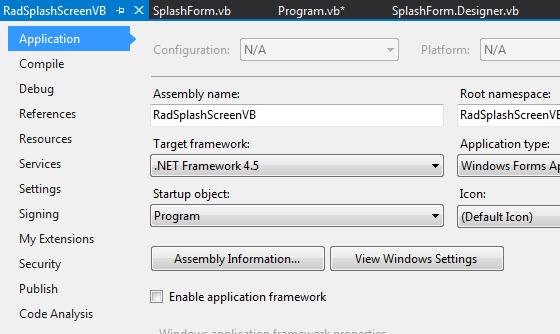
For VisualBasic you will have to create a new Module named Program, go to your project settings -> Application -> Uncheck “Enable application framework” -> from the dropdown above (“Startup objects”) choose Program:
Module Program

    Public splashForm As SplashForm = Nothing

    Public Sub Main()

        Application.EnableVisualStyles()
        Application.SetCompatibleTextRenderingDefault(False)

        Dim splashThread As New Thread(
        New ThreadStart(Sub()
                            SplashForm = New SplashForm()
                            Application.Run(SplashForm)
                        End Sub))

        splashThread.SetApartmentState(ApartmentState.STA)
        splashThread.Start()

        Dim mainForm As MainForm = New MainForm()
        AddHandler mainForm.Load, AddressOf mainForm_Load

        Application.Run(mainForm)

    End Sub

    Private Sub mainForm_Load(sender As Object, e As EventArgs)
        'close splash
        If splashForm Is Nothing Then
            Return
        End If

        splashForm.Invoke(Sub() splashForm.Close())
        splashForm.Dispose()
        splashForm = Nothing
    End Sub

End Module
A complete solution in C# and VB.NET can be found here.