Custom Speech Recognizer
The RadSpeechToTextButton allows you to use a custom speech recognizer by implementing the IRadSpeechRecognizer interface. This enables you to integrate third-party speech recognition services or create custom implementations tailored to your specific requirements.
Implementing Custom Speech Recognizer
To create a custom speech recognizer, you need to create a CustomSpeechRecognizer class that implements the IRadSpeechRecognizer interface, which defines the contract for speech recognition functionality.
The following example demonstrates a basic custom speech recognizer implementation:
Example: Implementing IRadSpeechRecognizer
public class CustomSpeechRecognizer : IRadSpeechRecognizer
{
    private const string MockText = "This is a mocked speech recognizer response for testing purposes and it will not really do a voice transcription in your system.";

    private SpeechRecognizerState state;
    private int reportingSessionId;

    public SpeechRecognizerState State
    {
        get => this.state;
        private set
        {
            if (this.state != value)
            {
                this.state = value;
                this.StateChanged?.Invoke(this, EventArgs.Empty);
            }
        }
    }

    public event EventHandler StateChanged;
    public event EventHandler<SpeechRecognizerErrorOccurredEventArgs> ErrorOccurred;
    public event EventHandler<SpeechRecognizerSpeechRecognizedEventArgs> SpeechRecognized;

    public Task Init(SpeechRecognizerInitializationContext context)
    {
        this.State = SpeechRecognizerState.Ready;
        this.reportingSessionId++;
        return Task.CompletedTask;
    }

    public Task StartListening()
    {
        this.State = SpeechRecognizerState.StartingListening;
        this.reportingSessionId++;
        int localSessionId = this.reportingSessionId;

        Task.Run(() =>
        {
            this.State = SpeechRecognizerState.Listening;
            int i = 0;
            string[] words = MockText.Split(' ', (char)StringSplitOptions.RemoveEmptyEntries);
            string fullText = string.Empty;

            while (true)
            {
                string word = words[i % words.Length];
                fullText += $" {word}";
                i++;

                Thread.Sleep(333);

                if (localSessionId != this.reportingSessionId)
                {
                    break;
                }

                this.SpeechRecognized?.Invoke(this, new SpeechRecognizerSpeechRecognizedEventArgs(fullText));
            }
        });

        return Task.CompletedTask;
    }

    public async Task StopListening()
    {
        this.State = SpeechRecognizerState.Ready;
        this.reportingSessionId++;
        await Task.Yield();
    }

    public Task Reset()
    {
        this.State = SpeechRecognizerState.NotInitialized;
        this.reportingSessionId++;
        return Task.CompletedTask;
    }

    public void Dispose()
    {
        this.reportingSessionId++;
        this.State = SpeechRecognizerState.Disposed;
        this.StateChanged = null;
        this.ErrorOccurred = null;
        this.SpeechRecognized = null;
    }
}
Applying the Custom Recognizer
To use your custom speech recognizer with the RadSpeechToTextButton, set the SpeechRecognizerCreator property. This property accepts a factory function that creates and returns an instance of your custom recognizer.
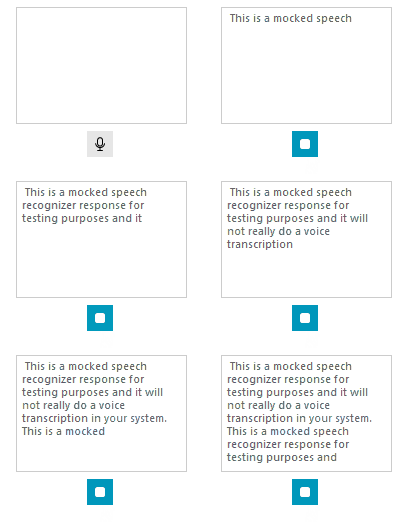
this.radSpeechToTextButton1.SpeechRecognizerCreator = () => new CustomSpeechRecognizer();This is the result of implementing the custom recognizer above:
Set the
SpeechRecognizerCreatoras early as possible to ensure your custom recognizer is used from the start.