Drag and Drop from Another Control
Similar approach is demonstrated in the Demos, section Scheduler >> Drag&Drop.
RadScheduler supports drag and drop and it can be implemented so that appointments are dragged from another control, in our case a ListBox. It is necessary to set the AllowDrop property to true.
Drag and Drop from ListBox to RadScheduler
Firstly, we should start the drag and drop operation using the ListBox.MouseMove event when the left mouse button is pressed. Afterwards, allow dragging over the RadScheduler via the Effect argument of the DragEventArgs in the RadScheduler.DragEnter event handler:
Handle ListBox MouseMove
void listBox1_MouseMove(object sender, MouseEventArgs e)
{
    if (e.Button != MouseButtons.Left)
        return;

    if (this.isDragging)
        return;

    Point currentPosition = e.Location;
    if ((Math.Abs((currentPosition.X - this.mouseDownPosition.X)) >= SystemInformation.DragSize.Width) ||
        (Math.Abs((currentPosition.Y - this.mouseDownPosition.Y)) >= SystemInformation.DragSize.Height))
    {
        this.isDragging = true;
        DragObject dragObject = new DragObject();
        int index = this.listBox1.IndexFromPoint(e.X, e.Y);
        if (index > -1 && index < this.listBox1.Items.Count)
        {
            string itemText = this.listBox1.Items[index].ToString();

            if (itemText != string.Empty)
            {
                dragObject.Values.Add(AppointmentFields.Summary, itemText);
                dragObject.Status = AppointmentFields.Summary;
                //start the drag and drop operation
                (sender as ListBox).DoDragDrop(dragObject, DragDropEffects.Copy);
            }
        }
    }
}

private void radScheduler1_DragEnter(object sender, DragEventArgs e)
{
    DragObject dragObject = e.Data.GetData(typeof(DragObject)) as DragObject;
    //allow dragging over the RadScheduler
    e.Effect = dragObject == null ? DragDropEffects.None : DragDropEffects.Copy;
}
In order to use this feature, we will need to find the scheduler cell when the item is dropped onto the scheduler surface. Once you have the scheduler cell you can get the date and create an appointment for it.
Figure 1: Dragging from a ListBox
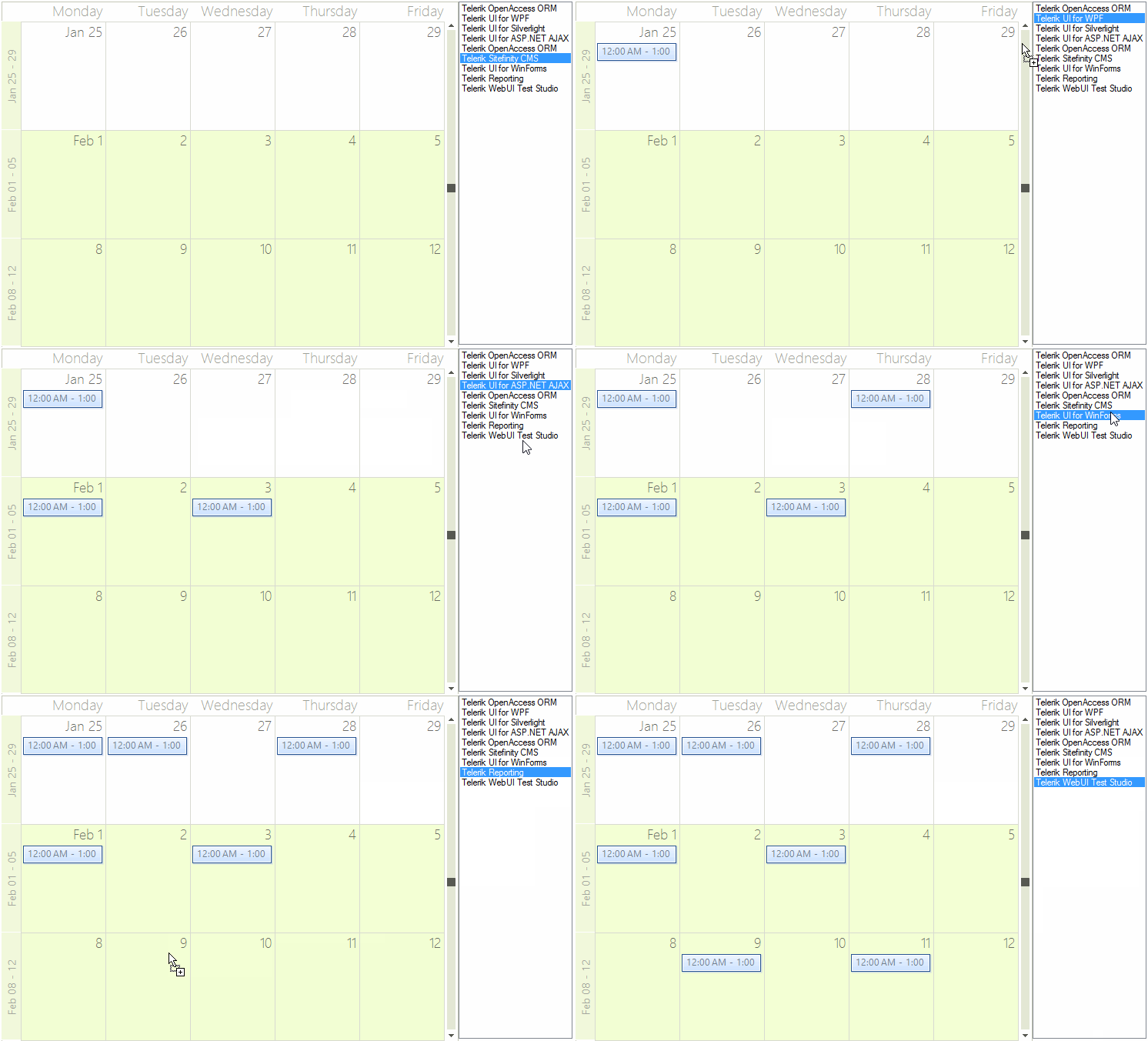
In the RadScheduler DragDrop event handler you need to get the location of the mouse and convert it to a point that the scheduler can use to get the cell element underneath the mouse. This MonthCellElement is passed to a private method GetCellAppointment() that we will write next.
Handle RadScheduler DragDrop
private Point mouseDownPosition;
private bool isDragging;

private void radScheduler1_DragDrop(object sender, DragEventArgs e)
{
    Point point = this.radScheduler1.PointToClient(new Point(e.X, e.Y));
    SchedulerCellElement schedulerCell = SchedulerUIHelper.GetCellAtPoint(point, this.radScheduler1);

    if (schedulerCell != null)
    {
        DragObject dragObject = e.Data.GetData(typeof(DragObject)) as DragObject;
        if (dragObject != null)
        {
            this.radScheduler1.Appointments.BeginUpdate();
            Appointment appointment = CreateAppointment(schedulerCell.Date, dragObject);
            this.radScheduler1.Appointments.Add(appointment);
            this.radScheduler1.Appointments.EndUpdate();
        }
    }

    this.mouseDownPosition = Point.Empty;
    this.isDragging = false;
}
The helper method CreateAppointment() creates an appontment starting at the cell where the ListBox item is dropped. This appointment gets its data from the dragged item.
Create Appointment
private Appointment CreateAppointment(DateTime currentDate, DragObject dragObject)
{
    Appointment appointment = new Appointment();
    DateTime startDate = currentDate;
    DateTime endDate = currentDate.AddHours(1);
    switch (dragObject.Status)
    {
        case AppointmentFields.Summary:
            appointment.Summary = dragObject.Values[dragObject.Status] as string;
            break;
        case AppointmentFields.Row:
            appointment.Summary = dragObject.Values[AppointmentFields.Summary] as string;
            appointment.Description = dragObject.Values[AppointmentFields.Description] as string;
            appointment.BackgroundId = (int)dragObject.Values[AppointmentFields.Background];
            appointment.StatusId = (int)dragObject.Values[AppointmentFields.Status];
            appointment.Location = dragObject.Values[AppointmentFields.Location] as string;

            startDate = (DateTime)dragObject.Values[AppointmentFields.Start];
            endDate = (DateTime)dragObject.Values[AppointmentFields.End];

            TimeSpan range = endDate - startDate;
            endDate = currentDate + range;
            startDate = currentDate;

            break;
    }
    appointment.Start = startDate;
    appointment.End = endDate;
    return appointment;
}
Drag and Drop from RadScheduler to ListBox
In order to enable dragging an appointment from RadScheduler and dropping it onto the ListBox, it is necessary to set the ListBox.AllowDrop property to true. Use the RadScheduler.MouseMove event to start the drag and drop operation. In the ListBox.DragOver event you should allow the drop operation:
Handle RadScheduler MouseMove
private void radScheduler1_MouseMove(object sender, MouseEventArgs e)
{
    if (e.Button != MouseButtons.Left)
        return;

    if (this.isDragging)
        return;

    AppointmentElement appointmentElement = this.radScheduler1.ElementTree.GetElementAtPoint(e.Location) as AppointmentElement;
    if (appointmentElement == null)
    {
        return;
    }

    this.isDragging = true;
    DragObject dragObject = new DragObject();
    dragObject.Values.Add(AppointmentFields.Summary, appointmentElement.Appointment.Summary);
    dragObject.Status = AppointmentFields.Summary;
    //start drag and drop operation
    (sender as RadScheduler).DoDragDrop(dragObject, DragDropEffects.Copy);
}

private void listBox1_DragOver(object sender, DragEventArgs e)
{
    DragObject dragObject = e.Data.GetData(typeof(DragObject)) as DragObject;
    //allow dragging over the ListBox
    e.Effect = dragObject == null ? DragDropEffects.None : DragDropEffects.Copy;
}
Finally, perform the exact drag and drop operation via inserting a new item in the ListBox in the DragDrop event:
Handle ListBox MouseMove
private void listBox1_DragDrop(object sender, DragEventArgs e)
{
    Point point = this.listBox1.PointToClient(new Point(e.X, e.Y));
    DragObject dragObject = e.Data.GetData(typeof(DragObject)) as DragObject;
    if (dragObject != null)
    {
        string itemText = dragObject.Values[AppointmentFields.Summary] as string;
        if (!this.listBox1.Items.Contains(itemText))
        {
            int index = this.listBox1.IndexFromPoint(point);
            if (index > -1 && index < this.listBox1.Items.Count)
            {
                this.listBox1.Items.Insert(index, itemText);
            }
            else
            {
                this.listBox1.Items.Add(itemText);
            }
        }
    }

    this.isDragging = false;
}Figure 2: Dragging from a RadScheduler