EditRecurrenceDialog
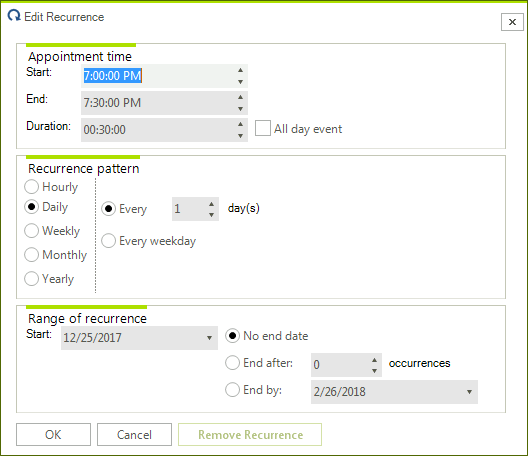
The EditRecurrenceDialog is shown when you click the Recurrence button in the EditAppointmentDialog. It allows you to create a new or edit an existing recurrence rule.
Figure 1. EditRecurrenceDialog
Create a custom EditRecurrenceDialog
The EditRecurrenceDialog inherits the RadSchedulerDialog class and implements the IEditRecurrenceDialog interface. The IEditRecurrenceDialog interface requires implementing the ShowDialog method and the ThemeName property. As a derivative of RadSchedulerDialog which inherits RadForm, the ShowDialog method and the ThemeName property are already available.
In the following example, we will create a completely new dialog which will replace the default EditRecurrenceDialog. It demonstrates a sample approach how to customize the dialog. It allows managing HourlyRecurrenceRule and DailyRecurrenceRule. Note that it can be extended to handle all recurrence rules. However, for simplicity of the example we will handle only these two recurrence rules.
1. Create a class which inherits the RadSchedulerDialog class and implements the IEditRecurrenceDialog interface. 2. Add one RadDropDownList, two RadLabels, two RadSpinEditors and three RadButtons as it is shown in the below screenshot:
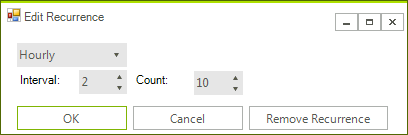
3. Manage the recurrence rule of the appointment by the added controls on the form:
public partial class MyEditRecurrenceDialog : RadSchedulerDialog, IEditRecurrenceDialog
{
    private IEvent Appointment;
    RecurrenceRule recurrenceRule = null;

    public MyEditRecurrenceDialog()
    {
        InitializeComponent();

        this.radButton1.Click += radButton1_Click;
        this.radButton2.Click += radButton2_Click;
        this.radButton3.Click += radButton3_Click;
    }

    public MyEditRecurrenceDialog(IEvent targetEvent)
        : this()
    {
        this.Appointment = targetEvent;

        this.radDropDownList1.DropDownStyle = RadDropDownStyle.DropDownList;
        this.radDropDownList1.Items.Add(new RadListDataItem()
        {
            Text = "Hourly",
            Value = new HourlyRecurrenceRule(this.Appointment.Start, 1)
        });

        this.radDropDownList1.Items.Add(new RadListDataItem()
        {
            Text = "Daily",
            Value = new DailyRecurrenceRule(this.Appointment.Start, 1, 5)
        });
        this.radDropDownList1.SelectedIndexChanged += radDropDownList1_SelectedIndexChanged;
        this.radDropDownList1.SelectedIndex = 0;

        this.radSpinEditor1.ValueChanged += radSpinEditor1_ValueChanged;
        this.radSpinEditor2.ValueChanged += radSpinEditor2_ValueChanged;

        this.radSpinEditor1.Maximum = this.radSpinEditor2.Maximum = int.MaxValue;
        this.LoadSettingsFromEvent(this.Appointment);
    }

    private void radButton3_Click(object sender, EventArgs e)
    {
        if (this.Appointment.RecurrenceRule != null)
        {
            this.Appointment.RecurrenceRule = null;
        }
        else if (this.Appointment.MasterEvent != null)
        {
            this.Appointment.MasterEvent.RecurrenceRule = null;
        }

        this.DialogResult = DialogResult.OK;
        this.Close();
    }

    private void radButton2_Click(object sender, EventArgs e)
    {
        this.DialogResult = DialogResult.Cancel;
        this.Close();
    }

    private void radSpinEditor2_ValueChanged(object sender, EventArgs e)
    {
        this.recurrenceRule.Count = (int)this.radSpinEditor2.Value;
    }

    private void radSpinEditor1_ValueChanged(object sender, EventArgs e)
    {
        this.recurrenceRule.Interval = (int)this.radSpinEditor1.Value;
    }

    private void radDropDownList1_SelectedIndexChanged(object sender, Telerik.WinControls.UI.Data.PositionChangedEventArgs e)
    {
        this.recurrenceRule = this.radDropDownList1.SelectedItem.Value as RecurrenceRule;
    }

    private void LoadSettingsFromEvent(IEvent targetEvent)
    {
        if (targetEvent.RecurrenceRule != null)
        {
            this.recurrenceRule = targetEvent.RecurrenceRule;
            HourlyRecurrenceRule hourlyRecurrenceRule = targetEvent as HourlyRecurrenceRule;
            DailyRecurrenceRule dailyRecurrenceRule = targetEvent as DailyRecurrenceRule;
            if (hourlyRecurrenceRule != null)
            {
                this.radDropDownList1.SelectedIndex = 0;
            }
            else if (dailyRecurrenceRule != null)
            {
                this.radDropDownList1.SelectedIndex = 1;
            }
            this.radSpinEditor1.Value = targetEvent.RecurrenceRule.Interval;
            this.radSpinEditor2.Value = targetEvent.RecurrenceRule.Count;
        }
    }

    private void radButton1_Click(object sender, EventArgs e)
    {
        this.ApplySettingsToEvent(this.Appointment);

        this.DialogResult = DialogResult.OK;
        this.Close();
    }

    protected override void LocalizeDialog(Telerik.WinControls.UI.Localization.RadSchedulerLocalizationProvider localizationProvider)
    {
        base.LocalizeDialog(localizationProvider);

        this.Text = localizationProvider.GetLocalizedString(Telerik.WinControls.UI.Localization.RadSchedulerStringId.RecurrenceDialogTitle);
        this.radButton1.Text = localizationProvider.GetLocalizedString(Telerik.WinControls.UI.Localization.RadSchedulerStringId.RecurrenceDialogOK);
        this.radButton2.Text = localizationProvider.GetLocalizedString(Telerik.WinControls.UI.Localization.RadSchedulerStringId.RecurrenceDialogCancel);
        this.radButton3.Text = localizationProvider.GetLocalizedString(Telerik.WinControls.UI.Localization.RadSchedulerStringId.RecurrenceDialogRemoveRecurrence);
        this.radLabel1.Text = "Interval:";
        this.radLabel2.Text = "Count:";
    }

    public void ApplySettingsToEvent(IEvent targetEvent)
    {
        this.recurrenceRule.Interval = (int)this.radSpinEditor1.Value;
        this.recurrenceRule.Count = (int)this.radSpinEditor2.Value;
        this.Appointment.RecurrenceRule = this.recurrenceRule;
    }
}
4. Now, you can replace the default EditRecurrenceDialog with the custom one by using the RadScheduler.RecurrenceEditDialogShowing event:
private void radScheduler1_RecurrenceEditDialogShowing(object sender, RecurrenceEditDialogShowingEventArgs e)
{
    e.RecurrenceEditDialog = new MyEditRecurrenceDialog(e.Appointment);
}