DeleteRecurringAppointmentDialog
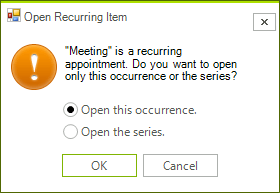
The DeleteRecurringAppointmentDialog is shown when you try to delete a recurring appointment.
Figure 1. DeleteRecurringAppointmentDialog
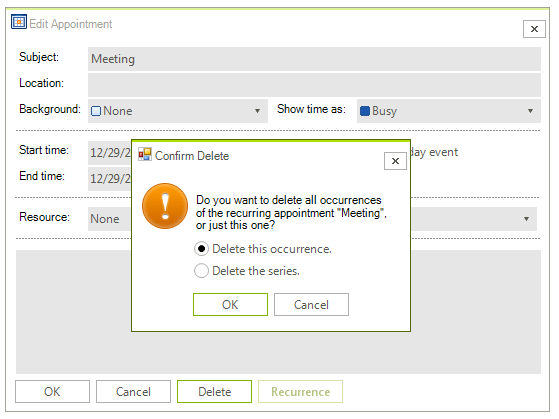
It will pop up when you press the Delete key while a recurring appointment is selected. Alternatively, you can show it by pressing the Delete button in the EditAppointmentDialog while editing a single occurrence.
Figure 2. Delete button in the EditAppointmentDialog
Create a custom DeleteRecurringAppointmentDialog
You can extend the default DeleteRecurringAppointmentDialog and add custom fields or replace some of the existing ones. Alternatively, you can create a completely new dialog according to any specific requirements. For this purpose, it is necessary to create a class that inherits RadSchedulerDialog and implements the IDeleteRecurringAppointmentDialog interface. The IDeleteRecurringAppointmentDialog interface requires implementing the following methods and properties:
- DialogResult ShowDialog()
- string EventName
- bool DeleteSeries
- string ThemeName
As a derivative of RadSchedulerDialog which inherits RadForm, the ShowDialog method and the ThemeName property are already available. It is left to implement the EventName and DeleteSeries properties.
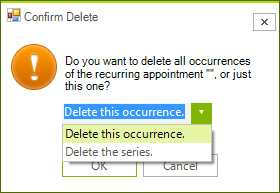
In the following example, we will create a derivative of the DeleteRecurringAppointmentDialog which contains RadDropDownList instead of two RadRadioButton controls for choosing to delete the occurrence/series.
Figure 3. Custom DeleteRecurringAppointmentDialog
public partial class CustomDeleteRecurringAppointmentDialog : DeleteRecurringAppointmentDialog
{
    Telerik.WinControls.UI.Localization.RadSchedulerLocalizationProvider localizationProvider;
    RadDropDownList deleteSelection;

    public CustomDeleteRecurringAppointmentDialog()
    {
        InitializeComponent();

        this.Text = localizationProvider.GetLocalizedString(Telerik.WinControls.UI.Localization.RadSchedulerStringId.DeleteRecurrenceDialogTitle);
    }
    protected override void OnLoad(EventArgs e)
    {
        base.OnLoad(e);
        this.radioDeleteOccurrence.Visible = false;
        this.radioDeleteSeries.Visible = false;

        if (deleteSelection == null)
        {
            deleteSelection = new RadDropDownList();
            deleteSelection.Width = 150;
            this.Controls.Add(deleteSelection);
            deleteSelection.Items.Add(this.radioDeleteOccurrence.Text);
            deleteSelection.Items.Add(this.radioDeleteSeries.Text);
            deleteSelection.SelectedIndex = 0;
            deleteSelection.Location = this.radioDeleteOccurrence.Location;
        }
    }

    public override bool DeleteSeries
    {
        get
        {
            return this.deleteSelection.SelectedIndex == 1;
        }
    }

    protected override void LocalizeDialog(Telerik.WinControls.UI.Localization.RadSchedulerLocalizationProvider localizationProvider)
    {
        base.LocalizeDialog(localizationProvider);
        this.localizationProvider = localizationProvider;
    }
}Now, you can replace the default DeleteRecurringAppointmentDialog with the custom one by using the RadScheduler.RecurrenceDeleteDialogShowing event:
CustomDeleteRecurringAppointmentDialog myDialog;

private void radScheduler1_RecurrenceDeleteDialogShowing(object sender, RecurrenceDeleteDialogShowingEventArgs e)
{
    if (myDialog == null)
    {
        myDialog = new CustomDeleteRecurringAppointmentDialog();
    }
    myDialog.EventName = e.Appointment.Summary;
    e.DeleteDialog = myDialog;
}