Getting Started with WinForms RichTextEditor
This tutorial will help you to quickly get started using the control.
Adding Telerik Assemblies Using NuGet
To use RadRichTextEditor when working with NuGet packages, install the Telerik.UI.for.WinForms.AllControls package. The package target framework version may vary.
If you don’t need all controls, you can instead install a more lightweight package targeting only RadRichTextEditor: UI.for.WinForms.RichTextEditor. This package has a dependency on the following NuGets, that will be automatically installed when adding the RichTextEditor NuGet.
- UI.for.WinForms.Common
- Telerik.Windows.Documents.Core
Read more about NuGet installation in the Install using NuGet Packages article.
With the 2025 Q1 release, the Telerik UI for WinForms has a new licensing mechanism. You can learn more about it here.
Adding Assembly References Manually
When dragging and dropping a control from the Visual Studio (VS) Toolbox onto the Form Designer, VS automatically adds the necessary assemblies. However, if you're adding the control programmatically, you'll need to manually reference the following assemblies:
- Telerik.Licensing.Runtime
- Telerik.WinControls
- Telerik.WinControls.RichTextEditor
- Telerik.WinControls.UI
- Telerik.Windows.Documents.Core
- TelerikCommon
The Telerik UI for WinForms assemblies can be install by using one of the available installation approaches.
Defining the RadRichTextEditor
RadRichTextEditor is a control that allows you to display and edit rich text content including sections, paragraphs, spans, italic text, bold text, inline images, tables etc. This topic will help you to quickly get started using the control. It will focus on the following:
Creating a RadRichTextEditor
You can declare a new RadRichTextEditor as any normal WinForms control.
private RadRichTextEditor radRichTextEditor1 = new RadRichTextEditor();
Formatting via a sample UI
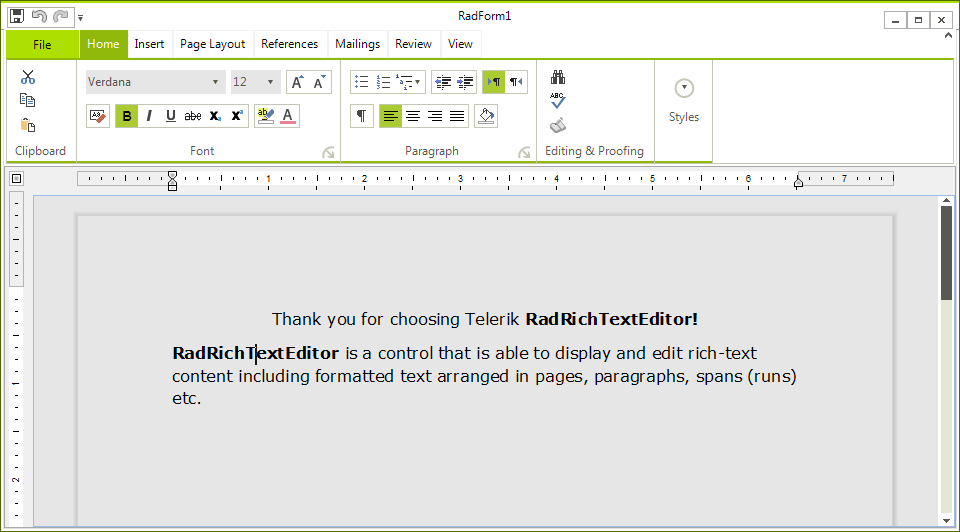
If you want to allow the user to edit and format the content of RadRichTextEditor, you have to create UI and use the API exposed by RadRichTextEditor. The API exposes methods (like ToggleBold(), ToggleItalic() etc.) that modify the text in the control when called. Here is an example of using the API for making the text bold, italic and underlined.
private void BoldButton_Click(object sender, RoutedEventArgs e)
{
    this.radRichTextEditor1.ToggleBold();
    this.radRichTextEditor1.Focus(); //return focus to the control
}
private void ItalicButton_Click(object sender, RoutedEventArgs e)
{
    this.radRichTextEditor1.ToggleItalic();
    this.radRichTextEditor1.Focus(); //return focus to the control
}
private void UnderlineButton_Click(object sender, RoutedEventArgs e)
{
    this.radRichTextEditor1.ToggleUnderline();
    this.radRichTextEditor1.Focus(); //return focus to the control
}
The UI should also respond when the caret is on a document position where the text is modified. For example, the BoldButton should be toggled if the caret is on bold text. This can be done by handling the ToggleStateChanged event. Here is an example:
void Main_Load(object sender, EventArgs e)
{
    this.radRichTextEditor1.Commands.ToggleBoldCommand.ToggleStateChanged += new EventHandler<Telerik.WinForms.Documents.RichTextBoxCommands.StylePropertyChangedEventArgs<bool>>(this.ToggleBoldCommand_ToggleStateChanged);
    this.radRichTextEditor1.Commands.ToggleItalicCommand.ToggleStateChanged += new EventHandler<Telerik.WinForms.Documents.RichTextBoxCommands.StylePropertyChangedEventArgs<bool>>(this.ToggleItalicCommand_ToggleStateChanged);
    this.radRichTextEditor1.Commands.ToggleUnderlineCommand.ToggleStateChanged += new EventHandler<Telerik.WinForms.Documents.RichTextBoxCommands.StylePropertyChangedEventArgs<bool>>(this.ToggleUnderlineCommand_ToggleStateChanged);
}
private void ToggleBoldCommand_ToggleStateChanged(object sender, Telerik.WinForms.Documents.RichTextBoxCommands.StylePropertyChangedEventArgs<bool> e)
{
    this.BoldButton.IsChecked = e.NewValue;
}
private void ToggleUnderlineCommand_ToggleStateChanged(object sender, Telerik.WinForms.Documents.RichTextBoxCommands.StylePropertyChangedEventArgs<bool> e)
{
    this.UnderlineButton.IsChecked = e.NewValue;
}
private void ToggleItalicCommand_ToggleStateChanged(object sender, Telerik.WinForms.Documents.RichTextBoxCommands.StylePropertyChangedEventArgs<bool> e)
{
    this.ItalicButton.IsChecked = e.NewValue;
}
Creating a Document at run time
One of the common uses of RadRichTextEditor is to create a document programatically and show it in the editor. The root element - RadDocument can contain several other elements:
The whole hierarchy of the elements can be found here.
Here is an example of a document created from code-behind:
RadDocument document = new RadDocument();
Section section = new Section();
Paragraph paragraph1 = new Paragraph();
paragraph1.TextAlignment = Telerik.WinForms.Documents.Layout.RadTextAlignment.Center;
Span span1 = new Span("Thank you for choosing Telerik");
paragraph1.Inlines.Add(span1);
Span span2 = new Span();
span2.Text = " RadRichTextEditor!";
span2.FontWeight = Telerik.WinControls.RichTextEditor.UI.FontWeights.Bold;
paragraph1.Inlines.Add(span2);
section.Blocks.Add(paragraph1);
Paragraph paragraph2 = new Paragraph();
Span span3 = new Span("RadRichTextEditor");
span3.FontWeight = Telerik.WinControls.RichTextEditor.UI.FontWeights.Bold;
paragraph2.Inlines.Add(span3);
Span span4 = new Span(" is a control that is able to display and edit rich-text content including formatted text arranged in pages, paragraphs, spans (runs) etc.");
paragraph2.Inlines.Add(span4);
section.Blocks.Add(paragraph2);
Table table = new Table();
table.LayoutMode = TableLayoutMode.AutoFit;
table.StyleName = RadDocumentDefaultStyles.DefaultTableGridStyleName;
TableRow row1 = new TableRow();
TableCell cell1 = new TableCell();
Paragraph p1 = new Paragraph();
Span s1 = new Span();
s1.Text = "Cell 1";
p1.Inlines.Add(s1);
cell1.Blocks.Add(p1);
row1.Cells.Add(cell1);
TableCell cell2 = new TableCell();
Paragraph p2 = new Paragraph();
Span s2 = new Span();
s2.Text = "Cell 2";
p2.Inlines.Add(s2);
cell2.Blocks.Add(p2);
row1.Cells.Add(cell2);
table.Rows.Add(row1);
TableRow row2 = new TableRow();
TableCell cell3 = new TableCell();
cell3.ColumnSpan = 2;
Paragraph p3 = new Paragraph();
Span s3 = new Span();
s3.Text = "Cell 3";
p3.Inlines.Add(s3);
cell3.Blocks.Add(p3);
row2.Cells.Add(cell3);
table.Rows.Add(row2);
section.Blocks.Add(table);
section.Blocks.Add(new Paragraph());
document.Sections.Add(section);
this.radRichTextEditor1.Document = document;
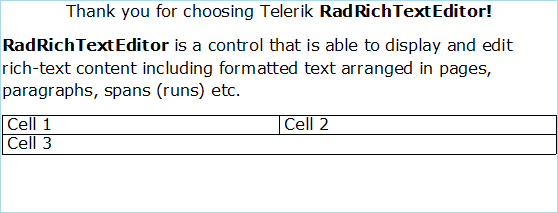
This document is editable. To make it read only you have to set the IsReadOnly property of the RadRichTextEditor to true.
To learn more about the read only feature read this topic.
See Also
Telerik UI for WinForms Learning Resources
- Telerik UI for WinForms RichTextEditor Component
- Getting Started with Telerik UI for WinForms Components
- Telerik UI for WinForms Setup
- Telerik UI for WinForms Application Modernization
- Telerik UI for WinForms Visual Studio Templates
- Deploy Telerik UI for WinForms Applications
- Telerik UI for WinForms Virtual Classroom(Training Courses for Registered Users)
- Telerik UI for WinForms License Agreement)