New to Telerik UI for WinForms? Start a free 30-day trial
Set RadRibbonBar in Titlebar Mode
Updated on May 7, 2026
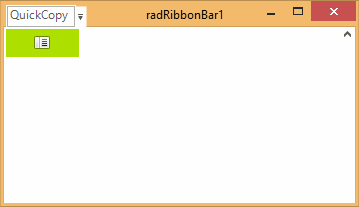
In order to remove the tabstrip part of RadRibbonBar and leave only the titlebar part visible (together with the Start button, and QuickAccess menu), you need to set the following properties:
TitleBar Mode
C#
this.radRibbonBar1.RibbonBarElement.TabStripElement.Visibility = Telerik.WinControls.ElementVisibility.Collapsed;
this.radRibbonBar1.StartButtonImage = new Bitmap(this.radRibbonBar1.StartButtonImage, new Size(15, 15));The result is shown on the screenshot below:
Figure 1: Titlebar Mode