New to Telerik UI for WinForms? Start a free 30-day trial
Custom Tiles
Updated on Aug 27, 2026
This article demonstrates how you can create custom tiles. The bellow sample code adds four elements to the tile. The result is shown in following screenshot.
Figure 1: Custom Title
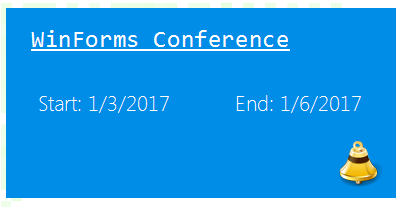
The code snippet bellow illustrates how the layout is achieved. There is a GridLayout which is taking care of the items arrangement. Four LightVisualElements are added to the grid layout. The first is used for the subject, the second and third for the start/end dates and the forth is used for the icon. The back color is changed in the class constructor.
Custom Tile Class
C#
class CustomTileElement : RadTileElement
{
    LightVisualElement subject;
    LightVisualElement startTime;
    LightVisualElement endTime;
    LightVisualElement alarmIcon;
    GridLayout layoutPanel;

    protected override void CreateChildElements()
    {
        base.CreateChildElements();

        layoutPanel = new GridLayout();
        layoutPanel.Columns.Clear();
        layoutPanel.Rows.Clear();

        layoutPanel.StretchHorizontally = false;
        layoutPanel.StretchVertically = false;

        //add columns
        layoutPanel.Columns.Add(new GridLayoutColumn()
        {
            SizingType = GridLayoutSizingType.Proportional,
            ProportionalWidthWeight = 50
        });
        layoutPanel.Columns.Add(new GridLayoutColumn()
        {
            SizingType = GridLayoutSizingType.Proportional,
            ProportionalWidthWeight = 50
        });
        //add rows
        layoutPanel.Rows.Add(new GridLayoutRow()
        {
            SizingType = GridLayoutSizingType.Proportional,
            ProportionalHeightWeight = 33
        });
        layoutPanel.Rows.Add(new GridLayoutRow()
        {
            SizingType = GridLayoutSizingType.Proportional,
            ProportionalHeightWeight = 33
        });
        layoutPanel.Rows.Add(new GridLayoutRow()
        {
            SizingType = GridLayoutSizingType.Proportional,
            ProportionalHeightWeight = 34
        });

        subject = new LightVisualElement();
        subject.Text = "WinForms Conference";
        subject.Font = new System.Drawing.Font("Consolas", 18, FontStyle.Underline);
        subject.BackColor = Color.Aqua;
        subject.TextAlignment = ContentAlignment.MiddleLeft;
        subject.Padding = new System.Windows.Forms.Padding(20, 0, 0, 0);
        subject.SetValue(GridLayout.RowIndexProperty, 0);
        subject.SetValue(GridLayout.ColumnIndexProperty, 0);
        subject.SetValue(GridLayout.ColSpanProperty, 2);

        startTime = new LightVisualElement();
        startTime.Text = "Start: " + DateTime.Now.ToShortDateString();

        startTime.SetValue(GridLayout.RowIndexProperty, 1);
        startTime.SetValue(GridLayout.ColumnIndexProperty, 0);

        endTime = new LightVisualElement();
        endTime.Text = "End: " + DateTime.Now.AddDays(3).ToShortDateString();
        endTime.SetValue(GridLayout.RowIndexProperty, 1);
        endTime.SetValue(GridLayout.ColumnIndexProperty, 1);

        alarmIcon = new LightVisualElement();
        alarmIcon.Image = Image.FromFile(@"../../bell.png").GetThumbnailImage(35, 35, null, IntPtr.Zero);
        alarmIcon.ImageLayout = System.Windows.Forms.ImageLayout.None;
        alarmIcon.Padding = new System.Windows.Forms.Padding(0, 0, 10, 0);
        alarmIcon.ImageAlignment = ContentAlignment.MiddleRight;
        alarmIcon.SetValue(GridLayout.RowIndexProperty, 2);
        alarmIcon.SetValue(GridLayout.ColumnIndexProperty, 1);

        this.layoutPanel.Children.Add(subject);
        this.layoutPanel.Children.Add(startTime);
        this.layoutPanel.Children.Add(endTime);
        this.layoutPanel.Children.Add(alarmIcon);
        this.Children.Add(layoutPanel);
    }

    public CustomTileElement()
    {
        this.BackColor = ColorTranslator.FromHtml("#008de7");
    }

    protected override Type ThemeEffectiveType
    {
        get
        {
            return typeof(RadTileElement);
        }
    }
}
You can use the new tile with the following code:
Add the new tile to RadPanorama
C#
CustomTileElement tile = new CustomTileElement();
tile.RowSpan = 2;
tile.ColSpan = 4;
radPanorama1.Items.Add(tile);