WinForms ContextMenu Overview
Updated on Aug 27, 2026
To add context menus in your application, you can use RadContextMenu. The control is a non-visual component that sits in the component tray located below the form design surface. RadContextMenu, like RadMenu, can be themed and has Items collection that accepts RadMenuItem, RadMenuComboBoxItem, RadMenuSeparatorItem and RadMenuContextItem. You can subscribe to the Click event of each menu item and execute the desired logic.
 Start Free Trial
Figure 1: RadContextMenu
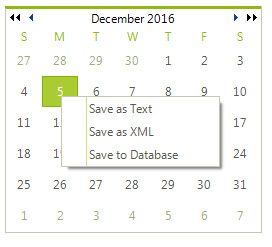
There are two ways to attach a context menu to a given control or portion of a control:
- For those RadControls that have a ContextMenu or RadContextMenu properties you can assign the RadContextMenu in the designer or in code.
Assigning a RadContextMenu
C#
radTreeView1.Nodes[0].ContextMenu = radContextMenu1;The ContextMenuStrip property refers to a Windows standard control. This property drop down will not display RadMenu or RadContextMenu components that exist on the form.
- Handle the mouse down event for the control that requires the context menu and call the RadContextMenu.Show() method.
Handling the MouseDown event
C#
void radCalendar1_MouseDown(object sender, MouseEventArgs e)
{
    if (e.Button == MouseButtons.Right)
    {
        Point p = (sender as Control).PointToScreen(e.Location);
        radContextMenu1.Show(p.X, p.Y);
    }
}Telerik UI for WinForms Learning Resources
- Telerik UI for WinForms ContextMenu Homepage
- Get Started with the Telerik UI for WinForms ContextMenu
- Telerik UI for WinForms API Reference
- Getting Started with Telerik UI for WinForms Components
- Telerik UI for WinForms Virtual Classroom (Training Courses for Registered Users)
- Telerik UI for WinForms Forum
- Telerik UI for WinForms Knowledge Base
Telerik UI for WinForms Additional Resources
- Telerik UI for WinForms Product Overview
- Telerik UI for WinForms Blog
- Telerik UI for WinForms Videos
- Telerik UI for WinForms Roadmap
- Telerik UI for WinForms Pricing
- Telerik UI for WinForms Code Library
- Telerik UI for WinForms Support
- What’s New in Telerik UI for WinForms