Route
Please note that Bing Maps will be deprecated effective June 30, 2025. As an alternative, users can refer to the SDK example available in our GitHub repository, which demonstrates how to create a custom provider using the Azure Maps API. A valid Azure Maps subscription key is required to use this functionality.
RadMap provides a unified route search architecture which uses functionality of the different routing services. This allows you to calculate a route between different locations on the map. The routing is achieved by an IMapRouteProvider. The BingRestMapProvider implements the IMapRouteProvider interface.
Figure 1: Bing routing
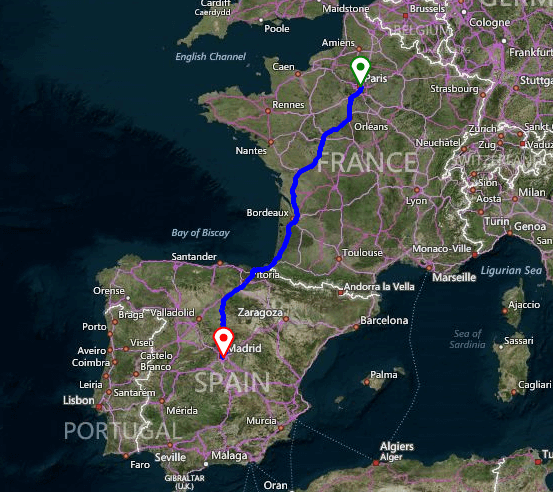
The whole information that is necessary for calculating the route, like start/end points, the distance unit, mode, optimization etc., is stored in a RouteRequest. Subscribe to the IMapRouteProvider.CalculateRouteCompleted event where you can add MapPins and MapRoute to the MapLayer for the route results.
RouteRequest
The RouteRequest offers the following public properties:
- Options - represents the RouteOptions used to define the route request.
- Waypoints - required parameter which represents a collection where each element represents a stop in the route.
- RoutePoints - represents a collection where each element represents a stop in the route.
RouteOptions
The RouteOptions contains properties used to define a route service request:
- Mode - type of directions to return. The default value is TravelMode.Driving.
- Optimization - represents the calculation method to use. The default value is RouteOptimization.MinimizeTime.
- RouteAttributes - specifies whether to include or exclude parts of the routes response. The default value is RouteAttributes.ExcludeItinerary.
- RouteAvoidance - represents the value specifying how traffic information is used in the route calculation. The default value is TrafficUsage.None.
- DistanceBeforeFirstTurn - specifies the distance before the first turn is allowed in the route. This option only applies to the driving travel mode.
- Heading - an integer value between 0 and 359 that represents degrees from north where north is 0 degrees and the heading is specified clockwise from north.
- Tolerances - specifies a series of tolerance values. Each value produces a subset of points that approximates the route that is described by the full set of points.
- DateTime - when specified and the route is optimized for timeWithTraffic, predictive traffic data is used to calculate the best route for the specified date time.
- MaxSolutions - specifies the maximum number of driving routes to return.
The following code snippet demonstrates how to build a route from Madrid to Paris.
Bing routing
public void RunRouteRequest()
{
    //add a layer to display the route
    this.radMap1.MapElement.Layers.Add(new MapLayer());

    RouteRequest request = new RouteRequest();
    request.DistanceUnit = DistanceUnit.Kilometer;
    request.Options.Mode = TravelMode.Driving;
    request.Options.Optimization = RouteOptimization.Time;
    request.Options.RouteAttributes = RouteAttributes.RoutePath;
    request.Options.RouteAvoidance = RouteAvoidance.None;
    request.RoutePoints.Add(new Waypoint("Paris, France"));
    request.RoutePoints.Add(new Waypoint("Madrid, Spain"));

    BingRestMapProvider bingProvider = this.radMap1.Providers[0] as BingRestMapProvider;
    bingProvider.CalculateRouteCompleted += BingProvider_RoutingCompleted;
    bingProvider.CalculateRouteAsync(request);
}

private void BingProvider_RoutingCompleted(object sender, RoutingCompletedEventArgs e)
{
    List<Telerik.WinControls.UI.Map.PointG> points = new List<Telerik.WinControls.UI.Map.PointG>();
    foreach (var route in e.Routes)
    {
        foreach (double[] coordinatePair in route.RoutePath.Line.Coordinates)
        {
            Telerik.WinControls.UI.Map.PointG point = new Telerik.WinControls.UI.Map.PointG(coordinatePair[0], coordinatePair[1]);
            points.Add(point);
        }

        Telerik.WinControls.UI.Map.RectangleG boundingRectangle = new Telerik.WinControls.UI.Map.RectangleG(route.BBox[2],
            route.BBox[1], route.BBox[0], route.BBox[3]);
        MapRoute routeElement = new MapRoute(points, boundingRectangle);
        routeElement.BorderColor = Color.Blue;
        routeElement.BorderWidth = 5;
        MapPin start = new MapPin(new Telerik.WinControls.UI.Map.PointG(route.RouteLegs[0].ActualStart.Coordinates[0],
            route.RouteLegs[0].ActualStart.Coordinates[1]));
        start.BackColor = Color.White;
        start.BorderColor = Color.Green;
        start.BorderWidth = 2f;
        MapPin end = new MapPin(new Telerik.WinControls.UI.Map.PointG(route.RouteLegs[route.RouteLegs.Length - 1].ActualEnd.Coordinates[0],
            route.RouteLegs[route.RouteLegs.Length - 1].ActualEnd.Coordinates[1]));
        end.BackColor = Color.White;
        end.BorderColor = Color.Red;
        end.BorderWidth = 2f;

        this.radMap1.MapElement.Layers[0].Add(routeElement);
        this.radMap1.MapElement.Layers[0].Add(start);
        this.radMap1.MapElement.Layers[0].Add(end);
    }

}
The RouteRequest class also supports ViaWayPoints objects. These route points allow a particular leg to be divided into separate sub legs. The Bing REST Serivices documentation provides additional information what a waypoint and a viaWayPoint represents.
Creating a Route with ViaWayPoints
RouteRequest viaWayPointsRequest = new RouteRequest();
viaWayPointsRequest.DistanceUnit = DistanceUnit.Kilometer;
viaWayPointsRequest.Options.Mode = TravelMode.Driving;
viaWayPointsRequest.Options.Optimization = RouteOptimization.Time;
viaWayPointsRequest.Options.RouteAttributes = RouteAttributes.RoutePath;
viaWayPointsRequest.Options.RouteAvoidance = RouteAvoidance.None;

viaWayPointsRequest.RoutePoints.Add(new Waypoint("47.6062, -122.3321")); //Seattle
viaWayPointsRequest.RoutePoints.Add(new ViaWaypoint("40.7306, -73.9352")); //New York
viaWayPointsRequest.RoutePoints.Add(new Waypoint("25.789, -80.2264")); //Miami

BingRestMapProvider bingProvider = this.radMap1.Providers[0] as BingRestMapProvider;
bingProvider.CalculateRouteAsync(viaWayPointsRequest);