BingRestMapProvider
Please note that Bing Maps will be deprecated effective June 30, 2025. As an alternative, users can refer to the SDK example available in our GitHub repository, which demonstrates how to create a custom provider using the Azure Maps API. A valid Azure Maps subscription key is required to use this functionality.
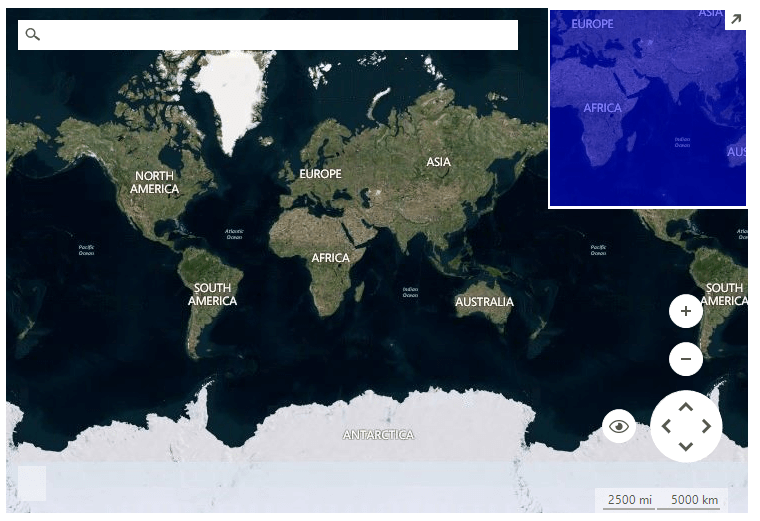
RadMap can visualize tile data from the Bing Maps REST service. You can enable tile caching to a local folder by setting a new LocalFileCacheProvider to the BingRestMapProvider.CacheProvider property.
Figure 1: BingRestMapProvider
You must provide a Bing Maps Key to the provider for it to work. To get your free Bing Maps Key, please refer to the following link: Getting a Bing Maps Key.
Only billable transactions count towards the free-use limits for Basic keys, and Enterprise keys are only charged for billable transactions. Non-billable transactions do not incur charges and do not count towards free-use limits. You can find additional information in the following link: Billable versus non-billable transactions.
BingRestMapProvider internally loads tile data from the Bing Maps REST service which requires TLS 1.2 coming automatically with .NET Framework 4.7. For older .NET Frameworks, or because of some other Windows settings, it may be necessary to explicitly choose TLS 1.2 for your application by setting the System.Net.ServicePointManager.SecurityProtocol property to SecurityProtocolType.Tls12. More information is available here: Transport Layer Security (TLS) best practices with the .NET Framework.
Using BingRestMapProvider
string cacheFolder = @"..\..\cache";

BingRestMapProvider bingProvider = new Telerik.WinControls.UI.BingRestMapProvider();
bingProvider.UseSession = true;
bingProvider.BingKey = bingKey;

LocalFileCacheProvider cache = new LocalFileCacheProvider(cacheFolder);
bingProvider.CacheProvider = cache;

this.radMap1.Providers.Add(bingProvider);If you use RadMap with .Net Framework 2.0 and you don't have an installation of the Telerik UI for WinForms suite on the current machine, it is necessary to add a reference to the Newtonsoft.Json assembly which can be found in the \Bin folder of the Telerik_UI_For_WinForms_[version]_Dev_dlls.zip. If you are using .Net Framework 4.0 this is not required.
Properties
| Property | Description |
|---|---|
| BingKey | Gets or sets the Bing key. |
| UseSession | Gets or sets a value indicating whether to use session key. |
| SessionId | Gets the session identifier. |
| ImagerySet | Gets or sets the imagery set. The possible values are: Aerial, AerialWithLabels, AerialWithLabelsOnDemand,Road, RoadOnDemand, CanvasDark, CanvasLight, CanvasGray, OrdnanceSurvey. 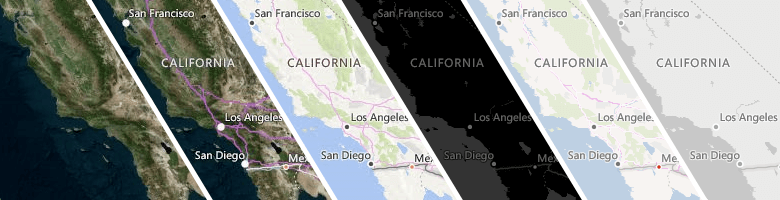 |
| Initializing | Gets or sets a value indicating whether this BingRestMapProvider is currently in the initialization process. |
| Initialized | Gets or sets a value indicating whether this BingRestMapProvider is initialized. |
| MaxZoomLevel | Gets or sets the maximum zoom level. |
| MinZoomLevel | Gets or sets the minimum zoom level. |
| TileSize | Gets the tile size. |
| CacheProvider | Gets or sets the provider used for data caching. |
| EnableCaching | Gets or set a value whether the caching is enabled. |
| TileDownloader | Gets or sets the tile downloader. |
The ImagerySet.OrdnanceSurvey is only visible in the Great Britain area and in between zoom levels of 10 and 17.
Methods
| Method | Description |
|---|---|
| Initialize | Initializes this provider. |
| GetTile | Gets the tile uri. |
| GetTileImage | Gets the tile image. |
| CalculateRouteAsync | Calculates the route asynchronously. |
| SearchAsync | Performs search request asynchronously. |
| CalculateElevationAsync | Calculates the elevation asynchronously. |
| GetSupportedViews | Gets the supported views. BingRestMapProvider supports Aerial and Road MapViewInfo. |
| SetView | Sets the view in the BingRestMapProvider. |
Events
| Event | Description |
|---|---|
| InitializationComplete | Fires when the initialization is completed. |
| InitializationError | Fires when an error during the initialization occurs. |
| ProviderUpdated | Fires when the provider has been updated, e.g. when a tile is downloaded. |
| CalculateRouteCompleted | Fires when the route calculation is completed. |
| CalculateRouteError | Fires when an error occurs during route calculating. |
| SearchCompleted | Fires when the search request has completed. |
| SearchError | Fires when an error |
| CalculateElevationCompleted | Fires when the elevation calculations is completed. |
| CalculateElevationError | Fire when an error occurs duriong elevation calculating. |