Sorting
Sorting is possible in two ways either programmatically by adding the appropriate SortDescriptor to the SortDescriptors collection of RadListView, or by enabling the user to sort by clicking a column header in DetailsView.
Enabling sorting on header click is done by setting both EnableSorting and EnableColumnSort property to true.
Enable column sorting
radListView1.EnableSorting = true;
radListView1.EnableColumnSort = true;
The following code snippet demonstrates how to add a SortDescriptor to RadListView:
Adding SortDescriptors
radListView1.EnableSorting = true;
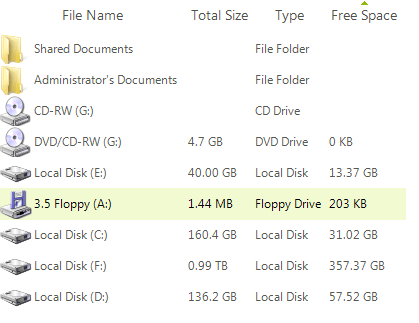
SortDescriptor sort = new SortDescriptor("Free Space", ListSortDirection.Ascending);
radListView1.SortDescriptors.Add(sort);
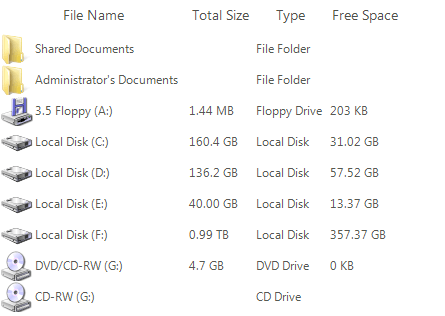
Here is the sorted data:
| Before Sorting | After Sorting |
|---|---|
 |  |
Custom sorting
RadListView provides a flexible mechanism for achieving custom sorting by creating a custom comparer. The following code snippet demonstrates this. Although a SortDescriptor for the Number column is added, the items are sorted considering the Freight value:
Custom sorting
private void Form_Load(object sender, EventArgs e)
{
    this.radListView1.ViewType = ListViewType.DetailsView;
    this.radListView1.Columns.Add("Number");
    this.radListView1.Columns.Add("Freight");
    Random rand = new Random();
    for (int i = 0; i < 10; i++)
    {
        ListViewDataItem item = new ListViewDataItem();
        this.radListView1.Items.Add(item);
        item[0] = i;
        item[1] = (decimal)(rand.NextDouble() * Int32.MaxValue);
    }

    this.radListView1.SortDescriptors.Add(new Telerik.WinControls.Data.SortDescriptor("Number", ListSortDirection.Ascending));
    this.radListView1.ListViewElement.DataView.Comparer = new ListViewCustomComparer(this.radListView1.ListViewElement);
    this.radListView1.EnableSorting = true;
}

public class ListViewCustomComparer : IComparer<ListViewDataItem>
{
    RadListViewElement listViewElement;

    public ListViewCustomComparer(RadListViewElement listViewElement)
    {
        this.listViewElement = listViewElement;
    }

    public int Compare(ListViewDataItem x, ListViewDataItem y)
    {
        decimal row1Freight = (decimal)x["Freight"];
        decimal row2Freight = (decimal)y["Freight"];
        if (row1Freight > row2Freight)
        {
            return 1;
        }
        else if (row1Freight < row2Freight)
        {
            return -1;
        }
        else
        {
            return 0;
        }
    }
}
| Basic Sorting | Custom Sorting |
|---|---|
|  |
Note that the entire sort operation is defined by this comparer. This means that you should take into account the contents of the SortDescriptors collection the RadListView when implementing this custom comparer (that is why the RadListViewElement is passed as an argument to the constructor of the above comparer).