New to Telerik UI for WinForms? Start a free 30-day trial
Painting and drawing in cells
Updated on Aug 27, 2026
There are cases when you need to manually draw in a cell in order to extend the cell appearance and/or provide additional information to the user about the cell data. RadGridView supports this case via the CellPaint event. To enable the event firing just set EnableCustomDrawing to true.
When handling this event, you should access the cell through the parameters of the event handler, rather than access the cell directly.
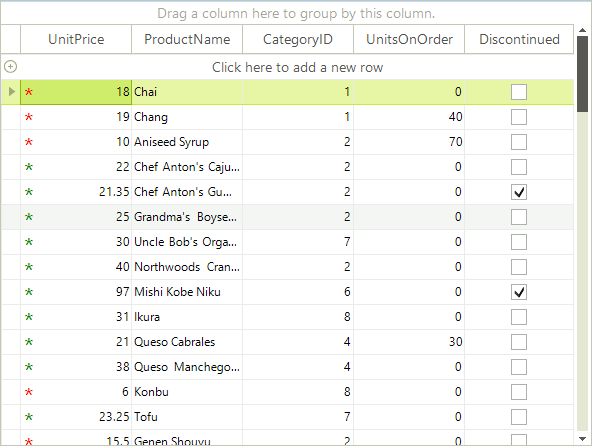
The following example demonstrates how to use the CellPaint event to change the appearance of the cells in a "UnitPrice" column. We would like to add a custom drawn red asterisk to values less than 20, a green asterisk to values higher than 20, and no asterisk when the cell's value is zero:
C#
void radGridView1_CellPaint(object sender, Telerik.WinControls.UI.GridViewCellPaintEventArgs e)
{
    if (e.Cell != null && e.Cell.RowInfo is GridViewDataRowInfo && e.Cell.ColumnInfo.Name == "UnitPrice")
    {
        double value = Convert.ToDouble(e.Cell.Value);
        if (value == 0)
        {
            return;
        }

        Brush brush = value < 20 ? Brushes.Red : Brushes.Green;
        using (Font font = new Font("Segoe UI", 17))
        {
            e.Graphics.DrawString("*", font, brush, Point.Empty);
        }
    }
}Figure 1: Painting in cells