Display Row Numbers in RadGridView
By default, RadGridView shows the current row indicator in the row header as an arrow. If you also want to display the row number, handle the ViewCellFormatting event and set the row header text for each data row.
This article shows the basic formatting approach, explains how paging affects row numbering, and shows how to make room for both the row number and the current row indicator.
RadGridView row header that shows row numbers next to the current row indicator.
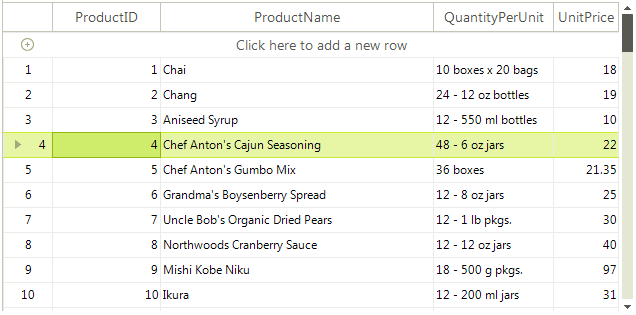
Show Row Numbers in the Row Header
Handle ViewCellFormatting when you need to update the row header text as each row is rendered. In the handler, check whether the formatted cell is a GridRowHeaderCellElement for a GridViewDataRowInfo row, then assign the row number.
The example also sets TextImageRelation to ImageBeforeText so the arrow indicator remains visible next to the number.
Handle the ViewCellFormatting Event
private void radGridView1_ViewCellFormatting(object sender, CellFormattingEventArgs e)
{
    if (e.CellElement is GridRowHeaderCellElement && e.Row is GridViewDataRowInfo)
    {
        e.CellElement.Text = (e.CellElement.RowIndex + 1).ToString();
        e.CellElement.TextImageRelation = TextImageRelation.ImageBeforeText;
    }
    else
    {
        e.CellElement.ResetValue(LightVisualElement.TextImageRelationProperty, ValueResetFlags.Local);
    }
}
Keep Row Numbers Correct When Paging Is Enabled
RowIndex uses the ChildRows collection internally. ChildRows contains only the rows that RadGridView is currently displaying, in the current grouped, sorted, or filtered order. When paging is enabled, that collection includes only the rows on the current page. The collection is modified whenever a data operation (grouping, sorting, or filtering) occurs. Similar to filtering, sorting, and grouping, the ChildRows collection is affected by paging as well and it contains only the records on the current page. A common scenario is to access the real row index when the paging is enabled, in the order the items appear in the grid.
If you use
RowIndexwhile paging is enabled, the row numbers restart on each page becauseChildRowscontains only the visible records for that page. If you need the row number in the full visible order of the grid, useRadGridView.MasterTemplate.DataView.Indexer.Items. This collection reflects the current grouped, sorted, and filtered order across the full data view, so it is a better source for row numbering when users move through pages.
Use GridDataView.Indexer for Paged Data
private void radGridView1_ViewCellFormatting(object sender, Telerik.WinControls.UI.CellFormattingEventArgs e)
{
    if (e.CellElement is GridRowHeaderCellElement && e.Row is GridViewDataRowInfo)
    {
        GridDataView dataView = this.radGridView1.MasterTemplate.DataView as GridDataView;
        e.CellElement.Text = (dataView.Indexer.Items.IndexOf(e.Row) + 1).ToString();
        e.CellElement.TextImageRelation = TextImageRelation.ImageBeforeText;
    }
    else
    {
        e.CellElement.ResetValue(LightVisualElement.TextImageRelationProperty, ValueResetFlags.Local);
    }
}Increase the Row Header Width
Increase TableElement.RowHeaderColumnWidth so the row header has enough space for both the row number and the current row indicator.
Adjust the RowHeaderColumnWidth
this.radGridView1.TableElement.RowHeaderColumnWidth = 50;