New to Telerik UI for WinForms? Start a free 30-day trial
Properties
Updated on Aug 27, 2026
| Property | Description | Picture |
|---|---|---|
| CenterOffsetY | Controls the RadRadialGauge's offset in vertical direction. | 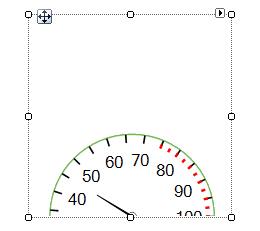 |
| CenterOffsetX | Controls the RadRadialGauge's offset in horizontal direction. | 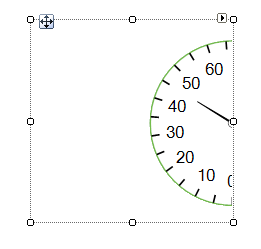 |
| Value | Specifies the gauge's value | |
| RangeEnd | Specifies the gauge's end. On the picture to the right, the RangeEnd is 100. | 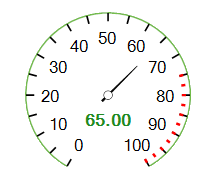 |
| RangeStart | Specifies the gauge's start. On the picture to the right, the RangeStart is 0. | |
| SweepAngle | Determines the angle value starting from the StartAngle to draw an arc in clockwise direction. On the picture to the SweepAngle is 270 | 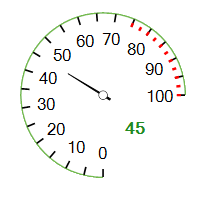 |
| StartAngle | Determines the angle value starting from the StartAngle to draw an arc in clockwise direction. On the picture to the StartAngle is 90. | |
| XmlSerializationInfo | Gets the serialization info for RadRadialGauge used by Save/Load loyout methods to persist grid settings to/from XML. By default, or when set to null the ComponentXmlSerializationInfo provided by GetDefaultXmlSerializationInfo() will be used. |
Events
| Event | Description |
|---|---|
| ValueChanged | The ValueChanged event fires when the value is modified. |
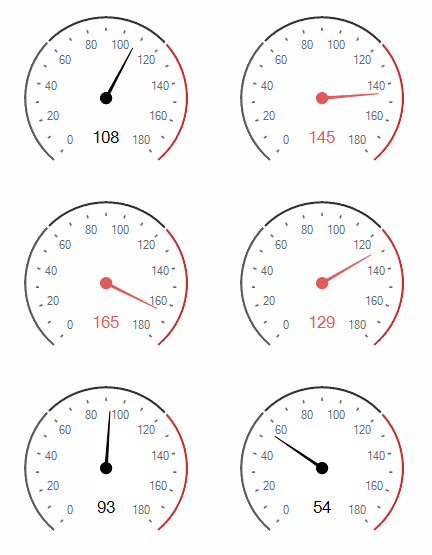
The ValueChanged event fires when the value is modified. You can perform changes to the gauge's elements in order to indicate low/high values. The following code snippet demonstrates how to color the needle and the single label in red color, when the RadRadialGauge.Value gets greater than 120.
Figure 1: ValueChanged Event
Change Value
C#
Timer timer1 = new Timer();
float step = 0f;

public RadialGaugePropertiesAndEvents()
{
    InitializeComponent();

    step = -(float)(radRadialGauge1.RangeEnd - radRadialGauge1.RangeStart) / 10f;
    this.radRadialGauge1.ValueChanged += radRadialGauge1_ValueChanged;
    timer1.Interval = 1000;
    timer1.Tick += timer1_Tick;
    timer1.Start();
}

private void radRadialGauge1_ValueChanged(object sender, EventArgs e)
{
    if (this.radRadialGauge1.Value >= 120)
    {
        this.radialGaugeNeedle1.BackColor = Color.FromArgb(224, 90, 90);
        this.radialGaugeNeedle1.BackColor2 = Color.FromArgb(224, 90, 90);
        this.radialGaugeSingleLabel1.ForeColor = Color.FromArgb(224, 90, 90);
    }
    else
    {
        this.radialGaugeNeedle1.BackColor = Color.Black;
        this.radialGaugeNeedle1.BackColor2 = Color.Black;
        this.radialGaugeSingleLabel1.ForeColor = Color.Black;
    }
}

private void timer1_Tick(object sender, EventArgs e)
{
    if (radRadialGauge1.Value + step > radRadialGauge1.RangeEnd || radRadialGauge1.Value + step < radRadialGauge1.RangeStart)
    {
        step = -step;
    }
    AnimatedPropertySetting setting = new AnimatedPropertySetting(RadRadialGaugeElement.ValueProperty,
        this.radRadialGauge1.Value, radRadialGauge1.Value + step, 12, 40);
    setting.ApplyEasingType = RadEasingType.OutBounce;
    setting.ApplyValue(radRadialGauge1.GaugeElement);
}