New to Telerik UI for WinForms? Start a free 30-day trial
Creating custom blocks
Updated on Sep 1, 2026
The RadTextBoxControl allows not only appearance customizations via the formatting event, but also a replacement of the default UI block representation. The CreateTextBlock event exposes this possibility.
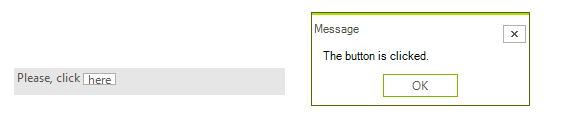
You should create a custom text block that inherits from ITextBlock and any inheritor of RadElement. Let’s create a button text block that should be created for each occurrence of the string here:
First, you should create a button that implements ITextBlock interface:
C#
public class ButtonTextBlock : RadButtonElement, ITextBlock
{
    private int index;
    private int offset;

    public ButtonTextBlock()
    {
        this.index = 0;
        this.offset = 0;
        this.MaxSize = new Size(0, 12);
    }

    protected override Type ThemeEffectiveType
    {
        get
        {
            return typeof(RadButtonElement);
        }
    }

    public int Index
    {
        get
        {
            return this.index;
        }
        set
        {
            this.index = value;
        }
    }

    public int Length
    {
        get
        {
            return 1;
        }
    }

    public int Offset
    {
        get
        {
            return this.offset;
        }
        set
        {
            this.offset = value;
        }
    }

    public int GetCharacterIndexFromX(float x)
    {
        RectangleF bounds = this.ControlBoundingRectangle;
        float median = bounds.X + bounds.Width / 2;
        return x <= median ? 0 : 1;
    }

    public RectangleF GetRectangleFromCharacterIndex(int index, bool trailEdge)
    {
        Rectangle bounds = this.ControlBoundingRectangle;

        if (index == 1)
        {
            bounds.X = bounds.Right;
            bounds.Width = 0;
        }

        return bounds;
    }

    protected override void OnClick(EventArgs e)
    {
        base.OnClick(e);
        RadMessageBox.Show("The button is clicked.", "Message");
    }
}
Then you should subscribe to the CreateTextBlock event before initializing the Text property:
C#
radTextBoxControl1.CreateTextBlock += new CreateTextBlockEventHandler(radTextBoxControl1_CreateTextBlock);
C#
void radTextBoxControl1_CreateTextBlock(object sender, CreateTextBlockEventArgs e)
{
    if (e.Text == "here")
    {
        e.TextBlock = new ButtonTextBlock();
    }
}
Finally, the Text property should be set:
C#
this.radTextBoxControl1.Text = "Please, click here";
Figure 1: The "here" word is replaced with a button.