Tweak Increment Step
The rich API of RadDateTimePicker allows you to change the increment/decrement step for each date/time part of the datetime value. For example, you can allow the end-user to increment/decrement the minutes value only by 5 and not by 1 as it is by default. The example below demonstrates how to do this:
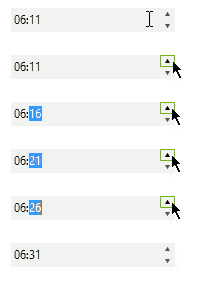
Increasing increment/decrement step example
When the user clicks the up/down arrow buttons or presses the arrow keys, the ValueChanged event is fired. We need to handle this event for several reasons. First, we need to understand if the value of the RadDateTimePicker is increased or decreased. Second, we use ValueChanged event to additionally modify the changed value of RadDateTimePicker in the appropriate direction (up or down). Since we are changing a value in ValueChanged event, we need to set and reset a boolean flag, this is necessary because setting the value in the code will trigger the event as well.
As a prerequisite for the example, RadDateTimePicker should of course show minutes and to demonstrate the full power of the example, we also may want to show up/down arrow buttons instead of a dropdown button. To these customizations, we need to add the following code:
this.radDateTimePicker1.CustomFormat = "hh:mm";
this.radDateTimePicker1.Format = System.Windows.Forms.DateTimePickerFormat.Custom;
this.radDateTimePicker1.ShowUpDown = true;Here is the approach divided into separate steps:
1. In the form's Load event handler subscribe to the ValueChanged event of RadDateTimePicker. Define a DateTime variable globally which holds the initial value:
DateTime initialDateTime;

private void Form1_Load(object sender, EventArgs e)
{
    initialDateTime = this.radDateTimePicker1.Value;

    this.radDateTimePicker1.ValueChanged += new EventHandler(radDateTimePicker1_ValueChanged);
}2. Here comes the ValueChanged handler implementation. In this part we are first checking whether the new value of RadDateTimePicker is bigger than the old one or not. Then, we are getting the MaskDateTimeProvider responsible for the navigation between the date/time parts - hours, minutes, etc. If the provider states that the currently selected time part is minutes, we, depending on the the direction in which we want to change the value, call the Up/Down method four times, so that we can have a step of 5 minutes as a result. Please note that we are setting and resetting the boolean flag suspendValueChanged so that we can safely call Up/Down methods:
bool suspendValueChanged = false;

void radDateTimePicker1_ValueChanged(object sender, EventArgs e)
{
    DateTime dt = this.radDateTimePicker1.Value;
    TimeSpan sp = dt - initialDateTime;

    if (!suspendValueChanged)
    {
        MaskDateTimeProvider provider = (this.radDateTimePicker1.DateTimePickerElement.TextBoxElement.Provider as MaskDateTimeProvider);
        if (provider.List[provider.SelectedItemIndex].type == PartTypes.Minutes)
        {
            suspendValueChanged = true;

            if (sp.Ticks < 0)
            {
                for (int i = 0; i < 4; ++i)
                {
                    this.radDateTimePicker1.DateTimePickerElement.TextBoxElement.Down();
                }
            }

            if (sp.Ticks > 0)
            {
                for (int i = 0; i < 4; ++i)
                {
                    this.radDateTimePicker1.DateTimePickerElement.TextBoxElement.Up();
                }
            }

            initialDateTime = this.radDateTimePicker1.Value;

            suspendValueChanged = false;
        }
    }
}The result is shown below. Just with a single click of the up arrow key, we increase the value of the minutes by 5:
See Also
Design Time Free Form Date Time Parsing MaskDateTimeProvider Properties Structure