New to Telerik UI for WinForms? Start a free 30-day trial
Sorting
Updated on Sep 30, 2025
SortStyle
RadDropDownList supports sorting of its pop-up items. You can control how the items in the RadDropDownList are sorted by specifying the SortStyle property.
-
Ascending: indicates ascending sorting.
-
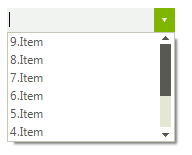
Descending: indicates descending sorting.
-
None: indicates no sorting. Items appear in the order of inserting.
Figure 1: SortStyle.Descending
SortStyle
C#
this.radDropDownList1.SortStyle = Telerik.WinControls.Enumerations.SortStyle.Descending;
Customizing sort order
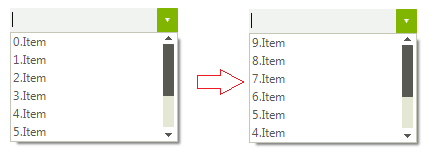
When the SortStyle property is set to Ascending or Descending you can manipulate how the items are ordered by specifying the ItemsSortComparer property. You should create a class that implements the IComparer<RadListDataItem> interface. The following example demonstrates how to order the items considering the RadListDataItem.Value property instead of the RadListDataItem.Text property:
Figure 2: Custom sort order
Custom comparer
C#
public DropDownListSorting()
{
    InitializeComponent();

    for (int i = 0; i < 10; i++)
    {
        RadListDataItem item = new RadListDataItem();
        item.Value = 10 - i;
        item.Text = i + ".Item";
        this.radDropDownList1.Items.Add(item);
    }
    this.radDropDownList1.SortStyle = Telerik.WinControls.Enumerations.SortStyle.Ascending;
    this.radDropDownList1.ItemsSortComparer = new CustomComparer();
}

public class CustomComparer : IComparer<RadListDataItem>
{
    public int Compare(RadListDataItem x, RadListDataItem y)
    {
        int xId = 0;
        int yId = 0;
        if (int.TryParse(x.Value.ToString(), out xId) && int.TryParse(y.Value.ToString(), out yId))
        {
            return xId.CompareTo(yId);
        }
        return x.Value.ToString().CompareTo(y.Value.ToString());
    }
}