New to Telerik UI for WinForms? Start a free 30-day trial
Populating with data
Updated on Aug 27, 2026
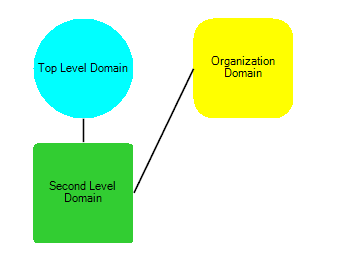
This article will demonstrate how to define shapes and connections programmatically and how to load predefined layout by XML.
Adding items in code behind
Below you can find a code snippet which creates three shapes and connections between them:
C#
RadDiagramShape shape1 = new RadDiagramShape()
{
    Text = "Second Level Domain",
    ElementShape = new RoundRectShape(4),
    BackColor = Color.LimeGreen
};
shape1.Position = new Telerik.Windows.Diagrams.Core.Point(100, 100);
radDiagram1.Items.Add(shape1);

RadDiagramShape shape2 = new RadDiagramShape()
{
    Text = "Top Level Domain",
    ElementShape = new RoundRectShape(50),
    BackColor = Color.Cyan
};
shape2.Position = new Telerik.Windows.Diagrams.Core.Point(400, 100);
radDiagram1.Items.Add(shape2);

RadDiagramShape shape3 = new RadDiagramShape()
{
    Text = "Organization Domain",
    ElementShape = new RoundRectShape(20),
    BackColor = Color.Yellow
};
shape3.Position = new Telerik.Windows.Diagrams.Core.Point(400, 400);
radDiagram1.Items.Add(shape3);

RadDiagramConnection connection1 = new RadDiagramConnection()
{ Name = "connection1" };
connection1.Source = shape1;
connection1.Target = shape2;
radDiagram1.Items.Add(connection1);

RadDiagramConnection connection2 = new RadDiagramConnection()
{
    Name = "connection2"
};
connection2.Source = shape1;
connection2.Target = shape3;
radDiagram1.Items.Add(connection2);
Load items from XML
You can load items in RadDiagram from XML. Here is a sample code snippet:
C#
OpenFileDialog openFileDialog1 = new OpenFileDialog();

openFileDialog1.InitialDirectory = "c:\\";
openFileDialog1.Filter = "xml files (*.xml)|*.xml|All files (*.*)|*.*";
openFileDialog1.RestoreDirectory = true;

if (openFileDialog1.ShowDialog() == DialogResult.OK)
{
    string filename = openFileDialog1.FileName;

    string filelines = File.ReadAllText(filename);
    try
    {
        radDiagram1.DiagramElement.Items.Clear();
        radDiagram1.DiagramElement.Load(filelines);
    }
    catch (Exception ex)
    {
        MessageBox.Show("Unable to load " + filename + "\nError: " + ex.Message);
    }
}
RadDiagramRibbonBar introduces UI for save to XML and load from XML functionality. In the code behind you can use the DiagramElement. Load and DiagramElement. Save methods.
Here is a sample xml file for storing two shapes and a connection between them:
XML
<?xml version="1.0" encoding="utf-8"?>
<RadDiagram Version="2015.1">
  <Metadata Type="Telerik.WinControls.UI.RadDiagramElement" Id="42311b7f-35b5-49a5-b92b-6d149d8bcf4d" Position="0;0">
    <Title>Diagram [4/6/2015 4:30:25 PM]</Title>
    <Description></Description>
  </Metadata>
  <Groups />
  <Shapes QNs="Telerik.WinControls.RadDiagram, Version=2015.1.331.40, Culture=neutral, PublicKeyToken=5bb2a467cbec794e;">
    <RadDiagramShape Type="Telerik.WinControls.UI.RadDiagramShape" Id="b44facd3-cddb-43d7-a253-b66ba024567b" ZIndex="0" Position="150;136" Size="70;54" RotationAngle="0" MinWidth="0" MinHeight="0" MaxWidth="INF" MaxHeight="INF" UseDefaultConnectors="True" ElementShape="Telerik.WinControls.RoundRectShape|5" InternalElementColor="#25A0DA" ShapeText="" QN="0">
      <Connectors QNs="Telerik.WinControls.RadDiagram, Version=2015.1.331.40, Culture=neutral, PublicKeyToken=5bb2a467cbec794e;">
        <RadDiagramConnector Type="Telerik.WinControls.UI.Diagrams.RadDiagramConnector" Name="Auto" Offset="0.5;0.5" Width="4" Height="4" QN="0" />
        <RadDiagramConnector Type="Telerik.WinControls.UI.Diagrams.RadDiagramConnector" Name="Left" Offset="0;0.5" Width="4" Height="4" QN="0" />
        <RadDiagramConnector Type="Telerik.WinControls.UI.Diagrams.RadDiagramConnector" Name="Top" Offset="0.5;0" Width="4" Height="4" QN="0" />
        <RadDiagramConnector Type="Telerik.WinControls.UI.Diagrams.RadDiagramConnector" Name="Right" Offset="1;0.5" Width="4" Height="4" QN="0" />
        <RadDiagramConnector Type="Telerik.WinControls.UI.Diagrams.RadDiagramConnector" Name="Bottom" Offset="0.5;1" Width="4" Height="4" QN="0" />
      </Connectors>
    </RadDiagramShape>
    <RadDiagramShape Type="Telerik.WinControls.UI.RadDiagramShape" Id="f4a29125-a536-42e1-aeb0-463f4cfb4571" ZIndex="0" Position="337;137" Size="70;54" RotationAngle="0" MinWidth="0" MinHeight="0" MaxWidth="INF" MaxHeight="INF" UseDefaultConnectors="True" ElementShape="Telerik.WinControls.EllipseShape" InternalElementColor="#25A0DA" ShapeText="" QN="0">
      <Connectors QNs="Telerik.WinControls.RadDiagram, Version=2015.1.331.40, Culture=neutral, PublicKeyToken=5bb2a467cbec794e;">
        <RadDiagramConnector Type="Telerik.WinControls.UI.Diagrams.RadDiagramConnector" Name="Auto" Offset="0.5;0.5" Width="4" Height="4" QN="0" />
        <RadDiagramConnector Type="Telerik.WinControls.UI.Diagrams.RadDiagramConnector" Name="Left" Offset="0;0.5" Width="4" Height="4" QN="0" />
        <RadDiagramConnector Type="Telerik.WinControls.UI.Diagrams.RadDiagramConnector" Name="Top" Offset="0.5;0" Width="4" Height="4" QN="0" />
        <RadDiagramConnector Type="Telerik.WinControls.UI.Diagrams.RadDiagramConnector" Name="Right" Offset="1;0.5" Width="4" Height="4" QN="0" />
        <RadDiagramConnector Type="Telerik.WinControls.UI.Diagrams.RadDiagramConnector" Name="Bottom" Offset="0.5;1" Width="4" Height="4" QN="0" />
      </Connectors>
    </RadDiagramShape>
  </Shapes>
  <Connections QNs="Telerik.WinControls.RadDiagram, Version=2015.1.331.40, Culture=neutral, PublicKeyToken=5bb2a467cbec794e;">
    <RadDiagramConnection Type="Telerik.WinControls.UI.RadDiagramConnection" Id="eeea2872-f633-4038-8b39-77b3dcd0f8c1" ZIndex="0" Position="220;162" SourceConnectorPosition="Auto" TargetConnectorPosition="Auto" SourceCapType="None" TargetCapType="None" SourceCapSize="7;7" TargetCapSize="7;7" StartPoint="220;163" Source="b44facd3-cddb-43d7-a253-b66ba024567b" EndPoint="370;162" ConnectionType="Polyline" ConnectionPoints="" IsModified="False" QN="0" />
  </Connections>
</RadDiagram>