Data Binding RadChart to a Generic List of Objects
You can bind to a generic lists of objects that have multiple properties. The example below binds to a list of "Product" objects that contain two properties, one property for "Name" and a second for "QuantityInStock". The Y axis binds to the QuantityInStock and the X axis label binds to the "Name" property.
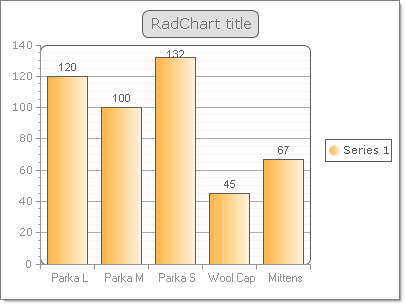
The Product object is defined with a constructor that passes both Name and QuantityInStock:
public class Product
{
    public Product(string name, int quantityInStock)
    {
        _name = name;
        _quantityInStock = quantityInStock;
    }
    private string _name;
    public string Name
    {
        get { return _name; }
        set { _name = value; }
    }
    private int _quantityInStock;
    public int QuantityInStock
    {
        get { return _quantityInStock; }
        set { _quantityInStock = value; }
    }
}
After the Product object is defined the following steps configure and bind to the generic List:
-
A generic List of Product objects is created and assigned to the RadChart DataSource property.
-
The DataYColumn property of the series is assigned the numeric "QuantityInStock" property of the Product object.
-
The XAxisDataLabelsColumn is assigned the "Name" property of the the Product object.
-
The RadChart DataBind() method is called.
RadChart radChart1;
public DataBindingToGenericListOfObject()
{
    InitializeComponent();
    radChart1 = new RadChart();
    this.Controls.Add(radChart1);

    List<Product> products = new List<Product>();
    products.Add(new Product("Parka L", 120));
    products.Add(new Product("Parka M", 100));
    products.Add(new Product("Parka S", 132));
    products.Add(new Product("Wool Cap", 45));
    products.Add(new Product("Mittens", 67));
    radChart1.DataSource = products;
    radChart1.DataBound += new EventHandler<EventArgs>(radChart1_DataBound);
}
void radChart1_DataBound(object sender, EventArgs e)
{
    radChart1.Series[0].DataYColumn = "QuantityInStock";
    radChart1.PlotArea.XAxis.DataLabelsColumn = "Name";
    radChart1.PlotArea.XAxis.Appearance.TextAppearance.TextProperties.Font = new System.Drawing.Font("Ariel", 8);
}