or
4 answers
281 views
I want the user to only be able to set the data by clicking on the calander itself and the textbox that displays the text to be readonly.
If I set the control to IsReadOnly then the whole onctrol does not set the data so that will not work. I also could not find a property with wich I can set this behavior.
If I set the control to IsReadOnly then the whole onctrol does not set the data so that will not work. I also could not find a property with wich I can set this behavior.

Mark
Top achievements
 Rank 1
Rank 1
answered
on
13 Jan 2013
2 answers
230 views
HI,
If I have GridView multi-level grouping how can I remove the empty "Group Name" levels, See the attachment.
Thanks in advance...
Regards,
Mina
Mohamed Hussain Nabhan Hussain
Top achievements
Rank 1
Rank 1
answered
on
13 Jan 2013
2 answers
146 views
Hi,
how to add buttons in Rowdetalis?
Like this :
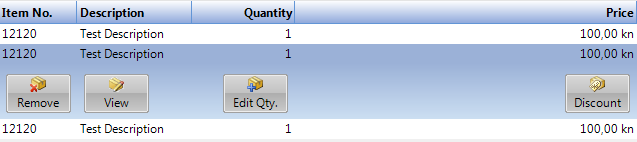
Thx.
how to add buttons in Rowdetalis?
Like this :
Thx.
Zdero Pero
Top achievements
Rank 1
Rank 1
answered
on
12 Jan 2013
4 answers
157 views
I have a QueryableDataServiceCollectionView bound to a RadGridView and RadDataPager. Working good so far. Except, when I try to pop down the filtering menu, I get a Distinct is not supported error from WCF Data Services. Which makes a lot of sense. WCF Data Services doesn't support Distinct.
So why are you guys trying to use Distinct? The control should be smart enough to know that it's not supported, and do it some other way...
So why are you guys trying to use Distinct? The control should be smart enough to know that it's not supported, and do it some other way...
Jerome
Top achievements
Rank 1
Rank 1
answered
on
11 Jan 2013
2 answers
132 views
I have been having some issues trying to use an impersonated application with telerik controls in it, especially the RadGridView.
It shows a access denied in one of the resources for the grid.
I have linked to a sample project where you can test it. It requires that someone with no access to the current PC login through the application.
It uses windows authentication for the credentials.
Here is the sample code
http://sdrv.ms/SSQ3UD
Thanks for your help
It shows a access denied in one of the resources for the grid.
I have linked to a sample project where you can test it. It requires that someone with no access to the current PC login through the application.
It uses windows authentication for the credentials.
Here is the sample code
http://sdrv.ms/SSQ3UD
Thanks for your help
1 answer
118 views
Hi,
Below error is seen after upgrading to latest Telerik Release 2012.3.1207.40
"Recursive call to Automation Peer API is not valid."
Call Stack location
Telerik.Windows.Controls.Navigation.dll!Telerik.Windows.Controls.RadOutlookBarAutomationPeer.GetChildrenCore() Line 88 + 0x9 bytes.
Kindly advise whether there is going to be any fix for this sooner/ or any work around / use the previous version.
Thank you,
Phani.
Phani Kumar
Top achievements
Rank 1
Rank 1
answered
on
11 Jan 2013
2 answers
68 views
I have a RadPanel which won't float when you right click its header and click "Float". CanFloat is true.
Has anyone encountered this?
Chris
Has anyone encountered this?
Chris
Christopher
Top achievements
Rank 1
Rank 1
answered
on
11 Jan 2013
1 answer
106 views
(sorry for my bad english)
With a List<T> where T is:
how can I create a chart like the image attached?
Looking on the sample it is clear that if I create 2 collections, one returning Product/Quantity and another returning Product/Reserved, I can accomplish that. But is it possible with only one collection with all the data?
With a List<T> where T is:
class Data{ public string Product { get; set; } public decimal Quantity { get; set; } public decimal Reserved { get; set; }}how can I create a chart like the image attached?
Looking on the sample it is clear that if I create 2 collections, one returning Product/Quantity and another returning Product/Reserved, I can accomplish that. But is it possible with only one collection with all the data?
Missing User
answered
on
11 Jan 2013
1 answer
167 views
The Working with RadSplitButton Items webpage shows a DefaultItem property for RadSplitButton. Is this available in the WPF RadSplitButton? It doesn't appear so.
I have the need for this functionality in our MVVM WPF application (using Caliburn Micro as our MVVM framework).
In the Style for this control, I can set a property as shown below:
<Setter Property="cal:Message.Attach" Value="[Event Click]=[Action CreateNewLink2]"/>
CreateNewLink2 is fired when I click the button without dropping down the control, but if I create a guard property for this method, the entire control is disabled. I need the dropdown to dropdown even when the guard property prevents executing the command (CreateNewLink2) since there are commands on the dropdown that can be enabled even when the CreateNewLink2 (command for the button) is disabled.
Can this be done?
I have the need for this functionality in our MVVM WPF application (using Caliburn Micro as our MVVM framework).
In the Style for this control, I can set a property as shown below:
<Setter Property="cal:Message.Attach" Value="[Event Click]=[Action CreateNewLink2]"/>
CreateNewLink2 is fired when I click the button without dropping down the control, but if I create a guard property for this method, the entire control is disabled. I need the dropdown to dropdown even when the guard property prevents executing the command (CreateNewLink2) since there are commands on the dropdown that can be enabled even when the CreateNewLink2 (command for the button) is disabled.
Can this be done?
Pavel R. Pavlov
Telerik team

answered
on
11 Jan 2013
1 answer
261 views
Hi,
I try to build a layout defined in the sample image attached.
The principle is that each module has a fixed position, but the size can be changed by the user, in a min / max range.
Here is my code :
Is this the good way to achieve this?
How can I specify the min and max size (height or width) for the RadPaneGroup ? (the given example has unexpected behaviour, as in the second capture)
Regards
Philippe
I try to build a layout defined in the sample image attached.
The principle is that each module has a fixed position, but the size can be changed by the user, in a min / max range.
Here is my code :
<Window x:Class="WpfApplication2.MainWindow" xmlns:telerik="http://schemas.telerik.com/2008/xaml/presentation" Title="MainWindow"> <Window.Resources> <Style x:Key="DefaultRadPaneStyle" TargetType="telerik:RadPane"> <Setter Property="Focusable" Value="False" /> <Setter Property="PaneHeaderVisibility" Value="Collapsed" /> <Setter Property="CanUserClose" Value="False" /> <Setter Property="CanFloat" Value="False" /> <Setter Property="CanDockInDocumentHost" Value="False" /> <Setter Property="CanUserPin" Value="False" /> <Setter Property="IsPinned" Value="True" /> <Setter Property="ContextMenuTemplate" Value="{x:Null}" /> </Style> </Window.Resources> <Grid> <telerik:RadDocking x:Name="docking" AllowUnsafeMode="True"> <telerik:RadDocking.DocumentHost> <Grid /> </telerik:RadDocking.DocumentHost> <telerik:RadSplitContainer Orientation="Vertical" InitialPosition="DockedLeft" Width="300" MinWidth="100" MaxWidth="400"> <telerik:RadPaneGroup MinHeight="100" MaxHeight="300"> <telerik:RadPane Style="{StaticResource DefaultRadPaneStyle}" /> </telerik:RadPaneGroup> <telerik:RadPaneGroup> <telerik:RadPane Style="{StaticResource DefaultRadPaneStyle}" /> </telerik:RadPaneGroup> <telerik:RadPaneGroup> <telerik:RadPane Style="{StaticResource DefaultRadPaneStyle}" /> </telerik:RadPaneGroup> </telerik:RadSplitContainer> <telerik:RadSplitContainer Orientation="Horizontal" InitialPosition="DockedBottom" Height="300" MinHeight="100" MaxHeight="400"> <telerik:RadPaneGroup> <telerik:RadPane Style="{StaticResource DefaultRadPaneStyle}"> </telerik:RadPane> </telerik:RadPaneGroup> <telerik:RadPaneGroup> <telerik:RadPane Style="{StaticResource DefaultRadPaneStyle}"> </telerik:RadPane> </telerik:RadPaneGroup> <telerik:RadPaneGroup> <telerik:RadPane Style="{StaticResource DefaultRadPaneStyle}"> </telerik:RadPane> </telerik:RadPaneGroup> </telerik:RadSplitContainer> </telerik:RadDocking> </Grid></Window>Is this the good way to achieve this?
How can I specify the min and max size (height or width) for the RadPaneGroup ? (the given example has unexpected behaviour, as in the second capture)
Regards
Philippe
Vladi
Telerik team
answered
on
11 Jan 2013








