or
0 answers
105 views
I have grid(inline editing, popup editing etc), scatter chart, slider, autocomplete, Rich Text Field on the same page.
I was using an old version initially.
For the Grid (Inline editing with date and time) i had to add a newer version plugin file.
Now when i try to add another Grid, it is not working properly.
Please suggest the best version of the plugin to be used here.
Should i use plugin files from the same version?
I was using an old version initially.
For the Grid (Inline editing with date and time) i had to add a newer version plugin file.
Now when i try to add another Grid, it is not working properly.
Please suggest the best version of the plugin to be used here.
Should i use plugin files from the same version?
1 answer
1.3K+ views
I use combobox,I want to know whether user input value already exist in combobox's option
i use $('#select option[value='input vale']') , but can't
i use $('#select option[value='input vale']') , but can't
1 answer
81 views
my code :
<div data-role='view'>
<header>
.....
</header>
<div data-role='content'>
<ul>
.<li></li>....
<li>
<input type='text' />
</li>
.<li></li>....
</ul>
</div>
</div>
issue: scroll to the bottom touch the input , the keyboard show, and the content will scroll up , but it can not scroll to back when keyboard hide.
config: android:windowSoftInputMode="stateAlwaysHidden"
<div data-role='view'>
<header>
.....
</header>
<div data-role='content'>
<ul>
.<li></li>....
<li>
<input type='text' />
</li>
.<li></li>....
</ul>
</div>
</div>
issue: scroll to the bottom touch the input , the keyboard show, and the content will scroll up , but it can not scroll to back when keyboard hide.
config: android:windowSoftInputMode="stateAlwaysHidden"

Ken
Top achievements
 Rank 1
Rank 1
answered
on
26 Nov 2012
1 answer
139 views
hi everyone, In the demo on this page: http://demos.kendoui.com/mobile/application/index.html a click on the "buy music " button directs me to a new page, but i've imported this example on my pc and i've tried it and it doesn't work. I'm I missing something?
Christopher Tallos
Top achievements
Rank 1
Rank 1
answered
on
25 Nov 2012
2 answers
245 views
Hey,
This isn't the most pressing issue here, but I was curious about something.
Does KendoUI include some kind of style for an overlay "loading" div? I know it's fairly easy to create my own, but it would be better if I had one that stayed consistent with the telerik themes.
Thanks,
Andrey
This isn't the most pressing issue here, but I was curious about something.
Does KendoUI include some kind of style for an overlay "loading" div? I know it's fairly easy to create my own, but it would be better if I had one that stayed consistent with the telerik themes.
Thanks,
Andrey

Andrey
Top achievements
Rank 1
Rank 1
answered
on
25 Nov 2012
2 answers
1.1K+ views
How do you change the width of each of the tabs on a TabStrip?
This style change has no effect. Thanks
div#tabs li.k-item { width:300px; color: red;}This style change has no effect. Thanks

1 answer
1.9K+ views
if I wanted to have a column with just visual icons, png files representing the status of a ticket on each row for open or closed states, what's the best way to go about doing that with the kendo grid?
if I were to use templates it'd be something like this
<td>{{status}}</td>
<td><img src="img/{{status}}.png" class="{{status}}" /></td>
if I were to use templates it'd be something like this
<td>{{status}}</td>
<td><img src="img/{{status}}.png" class="{{status}}" /></td>
0 answers
111 views
Hello,
Why DatePicker allowed to enter text in date fieldtext ????
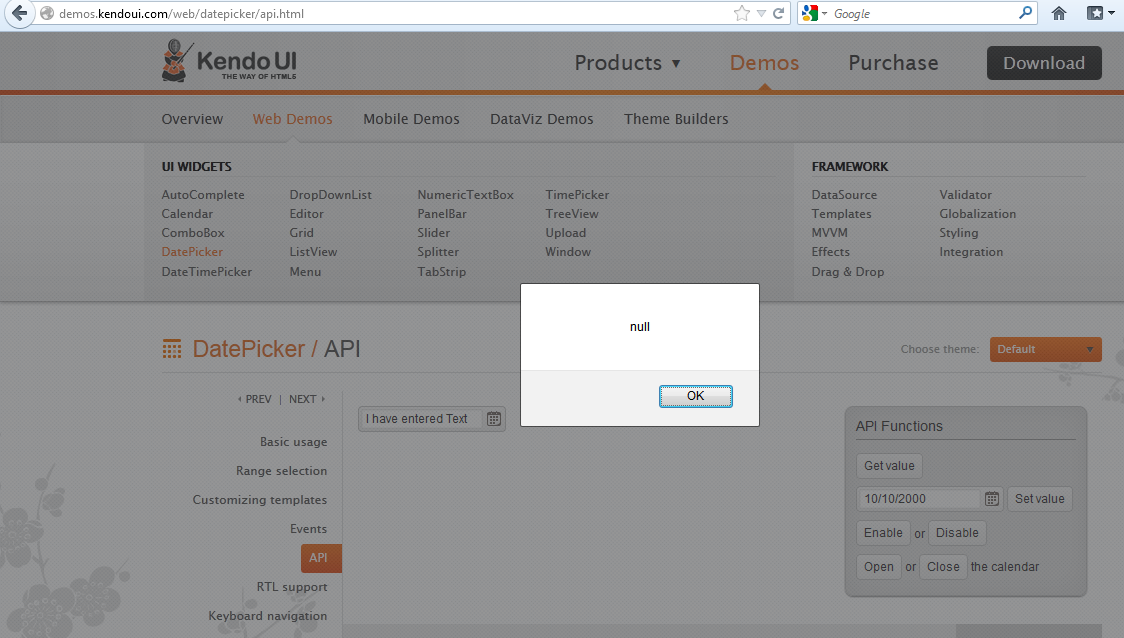
Thanks,
Jayesh Goyani
Why DatePicker allowed to enter text in date fieldtext ????
Thanks,
Jayesh Goyani

Jayesh Goyani
Top achievements
 Rank 2
Rank 2
asked
on
24 Nov 2012
0 answers
376 views
**answer found -- Grid has an autoBind property specifically for this**
Team,
I have a situation where I am providing the data source with initial data and providing a read url for all further requests.
In this situation the read request is being call for no reason basically on the page load since I have provided a set of data already. My thought was to cancel the first request via the DataSource's RequestStart event but cannot seem to figure out how to do this. Is there another way to do this?
I found the following post searching the forums from early this year but nothing more current. Is there any update to the following post?
Hello Richard,
Currently it is not possible to cancel the RequestStart event of the DataSource. We will provide such functionality in the future releases. I am sorry for the inconvenience.
All the best,
Petur Subev
the Telerik team
Team,
I have a situation where I am providing the data source with initial data and providing a read url for all further requests.
In this situation the read request is being call for no reason basically on the page load since I have provided a set of data already. My thought was to cancel the first request via the DataSource's RequestStart event but cannot seem to figure out how to do this. Is there another way to do this?
I found the following post searching the forums from early this year but nothing more current. Is there any update to the following post?
Hello Richard,
Currently it is not possible to cancel the RequestStart event of the DataSource. We will provide such functionality in the future releases. I am sorry for the inconvenience.
All the best,
Petur Subev
the Telerik team
Dan
Top achievements
Rank 1
Rank 1
asked
on
24 Nov 2012
17 answers
379 views
Hi,
I'm using the free trial to get familiar with Kendo and see if I can use it for our PhoneGap app. Now I ran into a problem when I combine a tabstrip with a form input text or password field. I think this problem is device-specific, since we had similar problems when using Sencha on my HTC Desire.
Problem:
I have a listview with two input fields: a text field (email) and a password field (password), as shown on screen 134912.
When I tap on one of the fields to provide input, I see a white box where I need to type in, but this box is linked to the wrong field. This is shown on screenshot 134930, where you see that next to the e-mail text there seems to be a passwordfield while it is not. When I type in some text, it is shown next to the e-mail field correctly. If I want to type in the passwordfield the white text box comes up next to the email text.
If I tap back and forth on the fields, I get the problem shown in screenshot 134957.
I don't have this problems when I use the same code without the tabstrip. I think these probems occur because the coordinates of the input field don't take the tabstrip into account.
Specifications:
HTC Desire with Android 2.2.2 and PhoneGap 1.7.0 and Kendo mobile v2012.1.515
I'm using the free trial to get familiar with Kendo and see if I can use it for our PhoneGap app. Now I ran into a problem when I combine a tabstrip with a form input text or password field. I think this problem is device-specific, since we had similar problems when using Sencha on my HTC Desire.
Problem:
I have a listview with two input fields: a text field (email) and a password field (password), as shown on screen 134912.
When I tap on one of the fields to provide input, I see a white box where I need to type in, but this box is linked to the wrong field. This is shown on screenshot 134930, where you see that next to the e-mail text there seems to be a passwordfield while it is not. When I type in some text, it is shown next to the e-mail field correctly. If I want to type in the passwordfield the white text box comes up next to the email text.
If I tap back and forth on the fields, I get the problem shown in screenshot 134957.
I don't have this problems when I use the same code without the tabstrip. I think these probems occur because the coordinates of the input field don't take the tabstrip into account.
Specifications:
HTC Desire with Android 2.2.2 and PhoneGap 1.7.0 and Kendo mobile v2012.1.515
Tom
Top achievements
Rank 1
Rank 1
answered
on
23 Nov 2012





