or
1 answer
111 views
Hi,
I am trying to get this grid to display the TEST message in the detail when I click the expander against the row. Everything looks to be working as expected (I am using state.fetchErrorMsg to provide debug text to prove that state is changing and triggering re-rendering when necessary, I can also confirm that the expander toggles between + and - as expected).
Any ideas what I am doing wrong here? I suspect it is something to do with how I am handling the promise that returns the data, since I can get this working when I use locally built static arrays instead of the fetch.
Cheers
Mike
import React, { useEffect, useState } from 'react';
import { UserInfo, TcbObjMilestoneGrp, TcbObjInfo } from '../../models/models';
import { loadingDiv } from '../../functions/componentFunctions';
import { Grid, GridColumn, GridExpandChangeEvent,  GridDetailRowProps } from '@progress/kendo-react-grid';
import './TcbObjMilestones.css';

type TcbObjMilestonesProps = {
    tcbObj: TcbObjInfo;
    userInf: UserInfo;
}

type TcbObjMilestonesState = {
    milestoneList: TcbObjMilestoneGrp[];
    milestonesFetched: boolean;
    fetchError: boolean;
    fetchErrorMsg: string;
    fetchInProg: boolean;
}

function TcbObjMilestones(props: TcbObjMilestonesProps) {

    const [state, setState] = useState<TcbObjMilestonesState>({
        milestoneList: [],
        milestonesFetched: false,
        fetchError: false,
        fetchErrorMsg: '',
        fetchInProg: false
    });

    useEffect(() => {

        state.fetchErrorMsg = 'FetchInProg';
        state.fetchInProg = true;
        setState({ ...state});

        let url = props.userInf.currProject.apiUrl + '/api/details/GetTcbObjMilestones';

        fetch(url, { method: 'POST', body: JSON.stringify(props.tcbObj), headers: { 'Content-Type': 'application/json', 'Authorization': 'Bearer ' + props.userInf.token } })
            .then(resp => resp.json())
            .then(res => {
                switch (res.callStatus) {
                    case "OK":
                        let ml: Array<TcbObjMilestoneGrp> = res.results;

                        state.fetchErrorMsg = 'Got MilestoneData '
                        state.milestoneList = ml;
                        state.milestonesFetched = true;
                        state.fetchInProg = false;
                        setState({ ...state });

                        break;
                    case "UNAUTH":
                        let uInf: UserInfo = { ...props.userInf, isAuthorised: false };

                        state.fetchInProg = false;
                        setState({ ...state });
                        break;

                    default:
                        state.fetchInProg = false;
                        state.fetchError = true;
                        state.fetchErrorMsg = res.callStatusMessage;

                        setState({ ...state });

                }
            })
            .catch(err => {
                state.fetchInProg = false;
                state.fetchError = true;
                state.fetchErrorMsg = 'Error fetching Item Details - ' + err.toString();
                setState({ ...state });
            });
    }, []);


    const expandGrpChange = (e: GridExpandChangeEvent) => {
        let dr: TcbObjMilestoneGrp = e.dataItem;
        let ml = state.milestoneList;
        let mlg = ml.find(x => x.milestoneId === dr.milestoneId)!;
        mlg.isExpanded = !e.dataItem.isExpanded;


        state.fetchErrorMsg = 'Expanded ' + mlg.isExpanded;
        setState({ ...state});

    }

    const renderMilestoneDetails = (e: GridDetailRowProps) => {
        return (<section><p>TEST</p></section>);

    };


     if (state.fetchInProg)
        return loadingDiv();

        let formatStr = "{0:dd-MMM-yyyy HH:mm }";

        return (
            <>
            <p>{state.fetchErrorMsg}</p>
            <Grid
                data={state.milestoneList}
                detail={renderMilestoneDetails}
                expandField="isExpanded"
                onExpandChange={expandGrpChange}
                resizable
            >
                <GridColumn field="milestoneDesc" title="Milestone" className="TcbObjMilestoneGridMainCell" />
                <GridColumn field="latestMilestoneDate" title="Latest" format={formatStr} width="120px" className="TcbObjMilestoneGridCell" />
                <GridColumn field="latestSource" title="Source" width="90px" className="TcbObjMilestoneGridCell" />
            </Grid>
            </>
        );
    }

export default TcbObjMilestones;
1 answer
147 views
Hello,
I'm running into an issue with a custom GridColumnMenuFilter cell. The component is very simple:
import * as React from "react";
import {
  GridColumnMenuFilter,
  GridColumnMenuProps,
} from "@progress/kendo-react-grid";

export default function ColumnMenu(props: GridColumnMenuProps) {
  return (
    <div>
      <GridColumnMenuFilter {...props} expanded={true} />
    </div>
  );
};
I'm trying to get this to work within the Master headers on a Master/Detail grid. Previously the grid was not a Master/Detail grid and the filter popup was working fine, however when it was refactored to a Master/Detail grid the filter popups are not being displayed when the sideways elipsis is clicked. Unfortunately no js errors are being reported in the browser console, there is just a warning about a stylesheet not loading in time. My question is, are custom GridColumnMenuFilter cells, or any filtering at all, supported in a Master/Detail grid? If so, is there anything specific we would need to do to enable this?
Any assistance is definitely appreciated.
Thanks,
Paul Johnson
1 answer
108 views
Hello, I have been trying to change a simple Input Custom that I call from the <Field /> but it does'nt allow FillMode ={"outline"} and I could'nt change it from scss either. I don't know if I am having any direct problems from kendo material, any example? maybe I'm doing it wrong. (The Textbox component allows me but I'm not using it in the form)
1 answer
197 views
I wanted to add data grid in my existing project. where all the dependencies are installed with yarn
so I installed the kendo-react-grid dependency with yarn and i am getting the error.
here is the code.
import * as React from "react";import * as ReactDOM from "react-dom";import { Grid, GridColumn } from "@progress/kendo-react-grid";import products from "./products.json";
export const KindoRactApp = () => {  return (    <Grid style={{ height: "400px" }} data={products}>      <GridColumn field="ProductID" title="ID" width="40px" />      <GridColumn field="ProductName" title="Name" width="250px" />      <GridColumn field="Category.CategoryName" title="CategoryName" />      <GridColumn field="UnitPrice" title="Price" />      <GridColumn field="UnitsInStock" title="In stock" />    </Grid>  );};
this is the error

Vessy
Telerik team

answered
on
05 Feb 2024
1 answer
117 views
Hello,
When the scheduler is configured with the timezone, the Day View should show the today's date of the timezone when clicking on the Today button at the top left calendar but it's showing 1 day less.
Stackblitz demo

Wissam
Telerik team
answered
on
02 Feb 2024
0 answers
104 views
I have found a perfection for my requirements
- A dropdown of selection insert none-editable peace of text
- The text should not be change
- The text should be style able
But there is a problem, when select the uneditable span when stand alone in a line. It cannot be styled. I think it's because of the contenteditable dissmiss with user-selection:none dismiss any style change.
Here is thee related question. You can scroll down at the end to find the solution.
Custom dropdownlist in toolbar of Kendo React Editor in KendoReact | Telerik Forums
0 answers
134 views
I wanted to add data grid in my existing project. where all the dependencies are installed with yarn
so I installed the kendo-react-grid dependency with yarn and i am getting the error.
here is the code.
this is the error
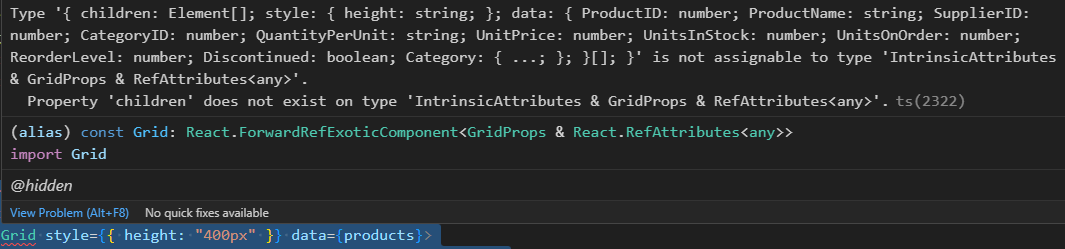
so I installed the kendo-react-grid dependency with yarn and i am getting the error.
here is the code.
import * as React from "react"; import * as ReactDOM from "react-dom"; import { Grid, GridColumn } from "@progress/kendo-react-grid"; import products from "./products.json";export const KindoRactApp = () => {return (<Grid style={{ height: "400px" }} data={products}><GridColumn field="ProductID" title="ID" width="40px" /><GridColumn field="ProductName" title="Name" width="250px" /><GridColumn field="Category.CategoryName" title="CategoryName" /><GridColumn field="UnitPrice" title="Price" /><GridColumn field="UnitsInStock" title="In stock" /></Grid>);};
this is the error
Prafulla
Top achievements
 Rank 1
Rank 1
asked
on
01 Feb 2024
1 answer
119 views
Hello,
We recently upgraded Kendo packages to fix some weird behaviors but have noticed that the styling of MenuItems and the associated arrows changed despite our CSS styles not changing. As can be observed, the arrow has gone transparent and we are unable to determine how to try to change its style to white. We are able to still change the font color and background, but the arrow remains unaffected.
Pre Upgrade:
Post Upgrade:
Douglas
Top achievements
Rank 1
 Iron
Iron
Rank 1
Iron
answered
on
01 Feb 2024
1 answer
140 views
Greetings,
Is there a way to use a custom dropdown component for the filter fields (similar to the FieldSetting filter prop) when adding an expression?
In my case there will be hundreds of possible filter fields and ideally I'd like to use either a grouped DropDownList or a DropDownTree component to display the filter fields.
I haven't seen that this is possible from the API or demos, nor have I seen many forum threads for the Data Tools Filter in general.
If this isn't supported, is this a feature that may be added in the future?
Thanks,
Alexa
Filip
Telerik team
answered
on
01 Feb 2024
1 answer
498 views
Greetings,
I have an issue where the grid height does not change correctly when the row height is increased which causes the table to not display all information. User requires to scroll to see the rest of the information (Please see the attached image for example).
The grid is displaying correctly if the row height is using the default value.
Is there a way to make the table size to size-to-fit? Thanks!
Jason
Konstantin Dikov
Telerik team
answered
on
31 Jan 2024








