This question is locked. New answers and comments are not allowed.
Please can anyone send me a sample that's helps me to change RadGrid view row colors : On Mouse Over and selected ...etc
I want to change the orange and white colors when a cell or a row or a header is selected.
Waiting forward for your answer.
KAROUI Haythem
I want to change the orange and white colors when a cell or a row or a header is selected.
Waiting forward for your answer.
KAROUI Haythem
7 Answers, 1 is accepted
0

Haythem
Top achievements
 Rank 1
Rank 1
answered on 11 Jun 2013, 11:53 AM
I wanted to change title to RadGridView Selected row and header style.
i want to customize the style of selected row and header exactly ... i want to change the color from orange to blue for example
and i want to change the elements put in red rectangle in the image attached.
please i need your help :(.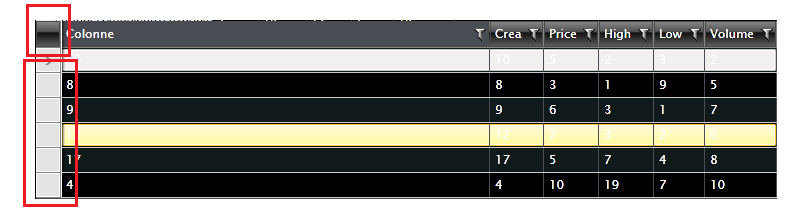
and the selected colors of the items below
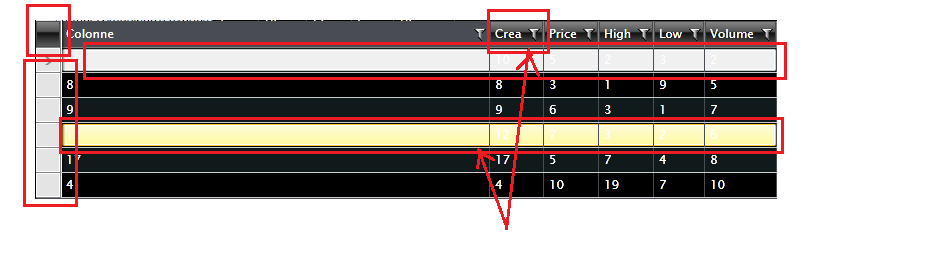
i want to customize the style of selected row and header exactly ... i want to change the color from orange to blue for example
and i want to change the elements put in red rectangle in the image attached.
please i need your help :(.
and the selected colors of the items below
0


Hello,
Yoan
Telerik
You can check this help article, which shows you how to override the default RadGridView styles. As for the indent cells, I would suggest you to check this help article.
I hope this helps.
Yoan
Telerik
Explore the entire Telerik portfolio by downloading Telerik DevCraft Ultimate.
0
0
Hello,
Regards,
Yoan
Telerik
You can do this very easily with a simple style targeting the FrozenColumnsSplitter. Please check the following code snippet for a reference:
<Style TargetType="telerik:FrozenColumnsSplitter"><Setter Property="Background" Value="Red"/></Style>Regards,
Yoan
Telerik
Explore the entire Telerik portfolio by downloading Telerik DevCraft Ultimate.
0
Haythem
Top achievements
Rank 1
Rank 1
answered on 12 Jun 2013, 01:52 PM
Thank you for your quick response but in my gridview i have only the attribute FrozenColumnsSplitterVisibility.
i don't have FrozenColumnsSplitterStyle to refer it ...
what can i do ?
i don't have FrozenColumnsSplitterStyle to refer it ...
what can i do ?
0
Hello,
Regards,
Yoan
Telerik
You can define this style in RadGridView's Resources:
<telerik:RadGridView Grid.Row="0" Name="clubsGrid" ItemsSource="{Binding Clubs}" AutoGenerateColumns="False" RowDetailsTemplate="{StaticResource RowDetailsTemplate}" Margin="5"> <telerik:RadGridView.Resources> <Style TargetType="telerik:FrozenColumnsSplitter"> <Setter Property="Background" Value="Red"/> </Style> </telerik:RadGridView.Resources> <telerik:RadGridView.Columns> <telerik:GridViewToggleRowDetailsColumn/> <telerik:GridViewDataColumn DataMemberBinding="{Binding Name}"/> <telerik:GridViewDataColumn DataMemberBinding="{Binding Established}" Header="Est." DataFormatString="{}{0:yyyy}"/> <telerik:GridViewDataColumn DataMemberBinding="{Binding StadiumCapacity}" Header="Stadium" DataFormatString="{}{0:N0}"/> </telerik:RadGridView.Columns> </telerik:RadGridView>Regards,
Yoan
Telerik
Explore the entire Telerik portfolio by downloading Telerik DevCraft Ultimate.
0
Haythem
Top achievements
Rank 1
Rank 1
answered on 12 Jun 2013, 03:46 PM
Thank you very much .. you are awsome :)
Best regards
KAROUI Haythem
Best regards
KAROUI Haythem