If Field
IfField is a Field element that compares two values and inserts the text appropriate to the result of the comparison.
Field Syntax
The following table shows the syntax of an If field:
| Syntax |
|---|
| { IF Expression1 Operator Expression2 TrueText FalseText } |
Operators
The following table lists all the comparison operators.
| Operator | Description |
|---|---|
| = | Equal to |
| <> | Not equal to |
| > | Greater than |
| < | Less than |
| >= | Greater than or equal to |
| <= | Less than or equal to |
Expression1, Expression2
Values to compare.
TrueText, FalseText
Text that results when the comparison is true (TrueText) or false (FalseText). If FalseText is not specified and the comparison is false, the IF field has no result. Each string containing multiple words must be enclosed in quotation marks.
Inserting
You can insert an If field through the InsertField() method of RadFlowDocumentEditor. The method accepts code as first argument and result as second argument.
Example 1: Insert a Money bookmark and an IF field that shows a minimum amount message when the value is below 100
editor.InsertText("Wallet: ");
editor.InsertInline(new Run(document));
Run wallet = editor.InsertText("99");
editor.InsertBookmark("Money", wallet, wallet);
editor.InsertBreak(BreakType.LineBreak);

editor.InsertField("IF Money >= 100 \"Buy\" \"The minimum required amount is 100\"", "«T-shirt»");
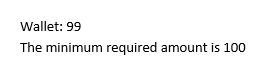
The result of the above snippet is illustrated in Figure 1.
Figure 1: If field in a document