Timeout Mechanism in Document Processing Libraries
Environment
| Version | Product | Author |
|---|---|---|
| Q4 2024 | Document Processing Libraries | Desislava Yordanova |
Description
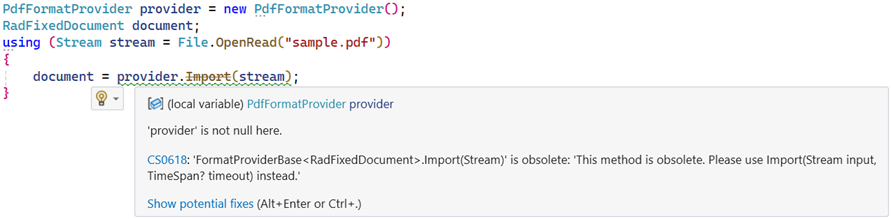
After upgrading to Q4 2024 (or a later version) of Telerik Document Processing Libraries, one of the following warning messages may occur when you build a project that contains any logic for importing or exporting documents:

The Compiler Warning (level 2) CS0618 indicates that an obsolete Import or Export method is used:
Solution
Starting with Q4 2024, Telerik Document Processing Libraries introduce a new timeout mechanism for importing and exporting documents. The Import and Export methods of the format providers have a mandatory TimeSpan? timeout parameter. After the specified interval elapses, the operation is canceled and an OperationCanceledException is thrown:
This is valid for WordsProcessing, PdfProcessing and SpreadProcessing.
Import XLSX (Excel Workbook) File
 using (Stream input = new FileStream("input-file.xlsx", FileMode.Open))
 {
     XlsxFormatProvider formatProvider = new XlsxFormatProvider();
     TimeSpan timeoutInterval = TimeSpan.FromSeconds(10);
     Workbook workbook = formatProvider.Import(input, timeoutInterval);
 }
The TimeSpan interval depends on the developer and must account for environment-specific configurations. When developing a web application, set a timeout interval value that is safe enough to protect the application from potential DDoS attacks. If the application is delivered directly to end-users, you can use
TimeSpan=nullas well.
There is a Visual Studio setting that controls whether the warnings are treated as errors:
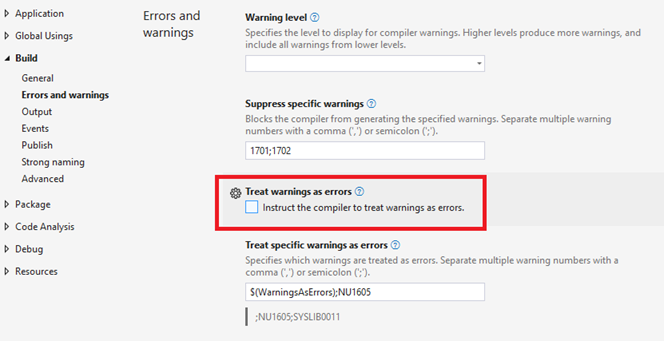
Make sure that this setting is not toggled. Otherwise, the application does not compile due to the obsolete API.
Handling the OperationCanceledException
        static void Main(string[] args)
        {
         string outputFilePath = "output.xlsx";
         File.Delete(outputFilePath);
         IWorkbookFormatProvider formatProvider = new Telerik.Windows.Documents.Spreadsheet.FormatProviders.OpenXml.Xlsx.XlsxFormatProvider();

         bool exceptionThrown = false;
         string exceptionStack = string.Empty;
         try
         {
             using (Stream output = new FileStream(outputFilePath, FileMode.Create))
             {
                 formatProvider.Export(workbook, output, TimeSpan.FromMilliseconds(1));
             }
             Process.Start(new ProcessStartInfo() { FileName = outputFilePath, UseShellExecute = true });
         }
         catch (OperationCanceledException ex)
         {
             exceptionThrown = true;
             exceptionStack = ex.StackTrace;
         }
         catch (Exception ex)
         {
             Exception inner = FindInnermostException(ex);
             if (!(inner is OperationCanceledException))
             {
                 throw;
             }
             else
             {
                 exceptionThrown = true;
                 exceptionStack = inner.StackTrace;
             }
         }
        }

     private static Exception FindInnermostException(Exception ex)
     {
         while (ex.InnerException != null)
         {
             ex = ex.InnerException;
         }

         return ex;
     }