Preventing Text with Special Characters from Being Cut Off when Converting HTML to PDF
Environment
| Version | Product | Author |
|---|---|---|
| 2024.3.806 | RadWordsProcessing | Desislava Yordanova |
Description
When you convert HTML documents to PDF format by using RadWordsProcessing and its PdfFormatProvider, text that contains special characters such as å, ä, or ö gets cut off. This issue occurs because the library requires explicit access to font data, which is not automatically available in the .NET Standard version of Telerik Document Processing.
This KB article also answers the following questions:
- How can I include special characters in PDFs using RadWordsProcessing?
- What steps are needed to support non-standard fonts in PDF conversion?
- How do I ensure all text displays correctly when converting HTML to PDF?
| Before | After |
|---|---|
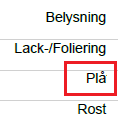 | 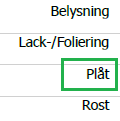 |
Solution
To resolve the text cut-off issue and ensure all characters display correctly, implement a custom FontsProvider. This provider supplies the necessary font data to the PdfProcessing library and enables it to render all characters correctly.
- Implement a custom FontsProvider by extending
FontsProviderBaseand override theGetFontDatamethod. This method returns the font data for the required fonts, including those with special characters.
The following example shows how to handle Tahoma, Arial, and Segoe UI fonts. When you use other fonts, modify and extend the custom implementation with the respective fonts.
    internal class FontsProvider : Telerik.Windows.Documents.Extensibility.FontsProviderBase
    {
        private readonly string fontFolder = Environment.GetFolderPath(Environment.SpecialFolder.Fonts);

        public override byte[] GetFontData(Telerik.Windows.Documents.Core.Fonts.FontProperties fontProperties)
        {
            string fontFamilyName = fontProperties.FontFamilyName;
            bool isBold = fontProperties.FontWeight == Telerik.Documents.Core.Fonts.FontWeights.Bold;
            if (fontFamilyName == "Tahoma" && isBold)
            {
                return GetFontDataFromFontFolder("tahomabd.ttf");
            }
            else if (fontFamilyName == "Tahoma")
            {
                return GetFontDataFromFontFolder("tahoma.ttf");
            }
            else if (fontFamilyName == "Arial" && isBold)
            {
                return GetFontDataFromFontFolder("arialbd.ttf");
            }
            else if (fontFamilyName == "Arial")
            {
                return GetFontDataFromFontFolder("arial.ttf");
            }
            else if (fontFamilyName == "Segoe UI")
            {
                return GetFontDataFromFontFolder("segoeui.ttf");
            }

            return null;
        }

        private byte[] GetFontDataFromFontFolder(string fontFileName)
        {
            using (FileStream fileStream = File.OpenRead(this.fontFolder + "\\" + fontFileName))
            {
                using (MemoryStream memoryStream = new MemoryStream())
                {
                    fileStream.CopyTo(memoryStream);
                    return memoryStream.ToArray();
                }
            }
        }
}- Before you convert the HTML document to PDF, set the custom
FontsProviderto theFontsProviderproperty of theFixedExtensibilityManager.
    Telerik.Windows.Documents.Extensibility.FontsProviderBase fontsProvider = new FontsProvider();
    Telerik.Windows.Documents.Extensibility.FixedExtensibilityManager.FontsProvider = fontsProvider;
These steps provide access to the necessary font data and ensure all characters, including special ones, render correctly in the PDF document.