New to Telerik Document Processing? Start a free 30-day trial
How to Generate a PDF Document from Images with FixedContentEditor
Updated on Jun 9, 2026
Environment
| Version | Product | Author |
|---|---|---|
| 2024.1.124 | RadPdfProcessing | Desislava Yordanova |
Description
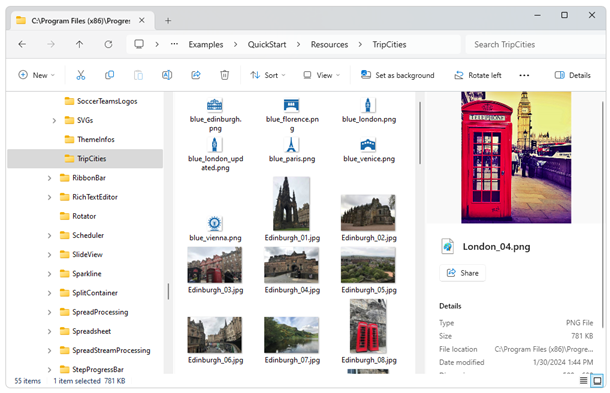
This article demonstrates how to generate a PDF document from a collection of images located in a local folder.
Solution
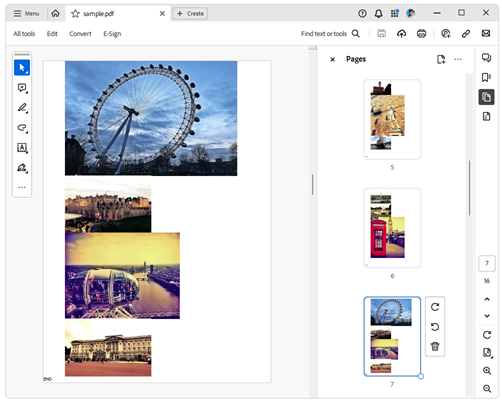
To create the PDF document, use a FixedContentEditor which is always associated with a single RadFixedPage. The editor maintains an internal Position inside the page at which the image block element is inserted and drawn. The Position is adjusted after the image is rendered. If there is no remaining space on the page to draw the next image, a new page is created and the editor position moves to the beginning of the new page.
csharp
        private static void GeneratePdfFromImagesWithFixedContentEditor(string imageFolderPath)
        {
            Size pageSize = new Size(Unit.MmToDip(210), Telerik.Windows.Documents.Media.Unit.MmToDip(297));
            Padding pageMarginsValue = new Telerik.Windows.Documents.Primitives.Padding(
                Unit.MmToDip(20),//left
                 Unit.MmToDip(0),//top
                  Unit.MmToDip(0),//right
                   Unit.MmToDip(0));//bottom
            RadFixedDocument fixedDocument = new RadFixedDocument();
            RadFixedPage fixedPage = fixedDocument.Pages.AddPage();
            fixedPage.Size = pageSize;
            FixedContentEditor fixedEditor = new FixedContentEditor(fixedPage);
            double currentYposition = pageMarginsValue.Top;
            double pageYLimit = pageSize.Height - pageMarginsValue.Bottom;
            string[] imageFiles = Directory.GetFiles(imageFolderPath);

            foreach (string imageFilePath in imageFiles)
            {
                Block imageBlock = new Block();
                imageBlock.SpacingAfter = 0;
                imageBlock.HorizontalAlignment = HorizontalAlignment.Center;
                FileStream fileStream = new FileStream(imageFilePath, FileMode.Open);
                var _imageSource = new Telerik.Windows.Documents.Fixed.Model.Resources.ImageSource(fileStream);
                imageBlock.InsertImage(_imageSource);
                Size imageBlockDesiredSize = imageBlock.Measure();

                double desiredYLocationToDraw = currentYposition + imageBlockDesiredSize.Height;
                if (desiredYLocationToDraw > pageYLimit)
                {
                    //indicate the page end [optional]
                    fixedEditor.Position.Translate(0, pageYLimit - Unit.MmToDip(5));
                    fixedEditor.DrawText("END");
                    //above code is just for testing purposes

                    currentYposition = pageMarginsValue.Top;
                    fixedPage = fixedDocument.Pages.AddPage();
                    fixedPage.Size = pageSize;
                    fixedEditor = new FixedContentEditor(fixedPage);
                    //move the cursor to the beginning of the new page
                    fixedEditor.Position.Translate(pageMarginsValue.Left, currentYposition);
                }
                fixedEditor.DrawBlock(imageBlock);
                currentYposition += imageBlock.ActualSize.Height;
                fixedEditor.Position.Translate(pageMarginsValue.Left, currentYposition);
            }

            PdfFormatProvider provider = new PdfFormatProvider();
            string outputFilePath = @"..\..\sample.pdf";
            File.Delete(outputFilePath);
            using (Stream output = File.OpenWrite(outputFilePath))
            {
                provider.Export(fixedDocument, output);
            }
            Process.Start(outputFilePath);
        }
The following screenshot shows the produced document: