New to Telerik Document Processing? Start a free 30-day trial
Inserting Special Symbols in PDF using RadPdfProcessing
Updated on Jun 5, 2026
Environment
| Version | Product | Author |
|---|---|---|
| 2024.1.124 | RadPdfProcessing | Desislava Yordanova |
Description
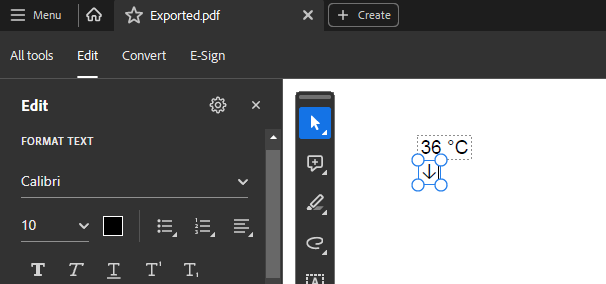
Learn how to insert special symbols, such as "↓", in a PDF document using RadPdfProcessing.
Solution
When you use the Telerik Document Processing .NET Standard assemblies or NuGet packages and export a document to PDF format, the PdfProcessing library needs access to the specific font data so that it can read and add it to the PDF file. To allow the library to create and use fonts, provide an implementation of the FontsProviderBase abstract class and set this implementation to the FontsProvider property of FixedExtensibilityManager.
csharp
using System.Diagnostics;
using Telerik.Documents.Core.Fonts;
using Telerik.Windows.Documents.Fixed.FormatProviders.Pdf;
using Telerik.Windows.Documents.Fixed.Model;
using Telerik.Windows.Documents.Fixed.Model.Editing;
using Telerik.Windows.Documents.Fixed.Model.Editing.Tables;

Telerik.Windows.Documents.Extensibility.FontsProviderBase fontsProvider = new FontsProvider();
Telerik.Windows.Documents.Extensibility.FixedExtensibilityManager.FontsProvider = fontsProvider;

RadFixedDocument document = new RadFixedDocument();
RadFixedDocumentEditor editor = new RadFixedDocumentEditor(document);

Table table = new Table();
TableRow row = table.Rows.AddTableRow();
TableCell valueCell = row.Cells.AddTableCell();
Block valueCellBlock = valueCell.Blocks.AddBlock();
valueCellBlock.InsertText(new FontFamily("Arial"),"36 °C");
row = table.Rows.AddTableRow();
valueCell = row.Cells.AddTableCell();
valueCellBlock = valueCell.Blocks.AddBlock();
valueCellBlock.InsertText(new FontFamily("Calibri"), "↓");
editor.InsertTable(table);

string outputdDocumentName = "Exported.pdf";
if (File.Exists(outputdDocumentName))
{
    File.Delete(outputdDocumentName);
}

PdfFormatProvider provider = new PdfFormatProvider();
using (Stream stream = new FileStream(outputdDocumentName, FileMode.OpenOrCreate))
{
    provider.Export(document, stream);
}

Process.Start(new ProcessStartInfo() { FileName = outputdDocumentName, UseShellExecute = true });

internal class FontsProvider : Telerik.Windows.Documents.Extensibility.FontsProviderBase
{
    private readonly string fontFolder = Environment.GetFolderPath(Environment.SpecialFolder.Fonts);

    public override byte[] GetFontData(Telerik.Windows.Documents.Core.Fonts.FontProperties fontProperties)
    {
        string fontFamilyName = fontProperties.FontFamilyName;
        bool isBold = fontProperties.FontWeight == Telerik.Documents.Core.Fonts.FontWeights.Bold;
        string fontFolder = Environment.GetFolderPath(Environment.SpecialFolder.Fonts);
        if (fontFamilyName == "Arial" && isBold)
        {
            using (FileStream fileStream = File.OpenRead(fontFolder + "\\arialbd.ttf"))
            {
                using (MemoryStream memoryStream = new MemoryStream())
                {
                    fileStream.CopyTo(memoryStream);
                    return memoryStream.ToArray();
                }
            }
        }
        else if (fontFamilyName == "Arial")
        {
            return this.GetFontDataFromFontFolder("arial.ttf");
        }
        else if (fontFamilyName == "Calibri" && isBold)
        {
            return this.GetFontDataFromFontFolder("calibrib.ttf");
        }
        else if (fontFamilyName == "Calibri")
        {
            return this.GetFontDataFromFontFolder("calibri.ttf");
        }
        else if (fontFamilyName == "Segoe UI")
        {
            return this.GetFontDataFromFontFolder("segoeui.ttf");
        }

        return null;
    }

    private byte[] GetFontDataFromFontFolder(string fontFileName)
    {
        using (FileStream fileStream = File.OpenRead(this.fontFolder + "\\" + fontFileName))
        {
            using (MemoryStream memoryStream = new MemoryStream())
            {
                fileStream.CopyTo(memoryStream);
                return memoryStream.ToArray();
            }
        }
    }
}