New to Telerik Document Processing? Start a free 30-day trial
Generating a PDF Product Catalog
Updated on Jun 5, 2026
Environment
| Version | Product | Author |
|---|---|---|
| 2025.3.806 | RadPdfProcessing | Desislava Yordanova |
Description
This article shows how to generate a PDF catalog from business objects, including images, text, and prices.
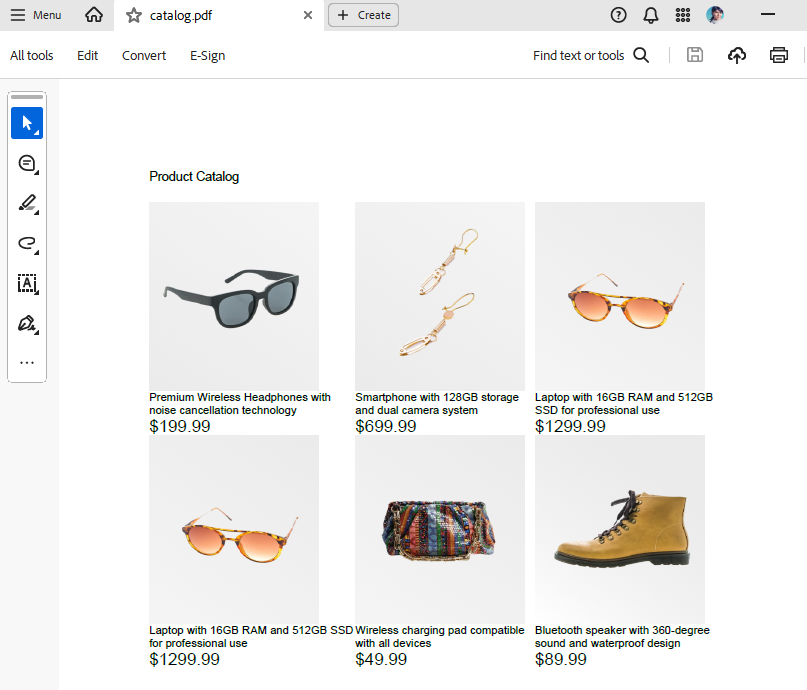
Solution
To achieve this, use the Telerik PdfProcessing library, which supports creating and modifying PDF documents. The following sample implementation generates a PDF catalog with the RadFixedDocumentEditor:
Code Example
csharp
internal class Program
{
    static void Main(string[] args)
    {
        Telerik.Documents.ImageUtils.ImagePropertiesResolver defaultImagePropertiesResolver = new Telerik.Documents.ImageUtils.ImagePropertiesResolver();
        Telerik.Windows.Documents.Extensibility.FixedExtensibilityManager.ImagePropertiesResolver = defaultImagePropertiesResolver;

        // Create a list of Item objects
        var items = CreateSampleItems();

        // Generate PDF with table
        GeneratePdfCatalog(items, "catalog.pdf");

        Console.WriteLine("PDF catalog generated successfully!");
    }

    private static List<Item> CreateSampleItems()
    {
        return new List<Item>
        {
            new Item
            {
                Image = "product-image-1.png",
                Description = "Premium Wireless Headphones with noise cancellation technology",
                Price = 199.99m
            },
            new Item
            {
                Image = "product-image-2.png",
                Description = "Smartphone with 128GB storage and dual camera system",
                Price = 699.99m
            },
            new Item
            {
                Image = "product-image-4.png",
                Description = "Laptop with 16GB RAM and 512GB SSD for professional use",
                Price = 1299.99m
            }
        };
    }

    private static void GeneratePdfCatalog(List<Item> items, string fileName)
    {
        var document = new RadFixedDocument();

        using (var editor = new RadFixedDocumentEditor(document))
        {
            // Add title
            editor.InsertRun("Product Catalog");
            editor.InsertLineBreak();
            editor.InsertLineBreak();

            // Create table
            var table = new Table();

            // Add data rows
            foreach (var item in items)
            {
                var row = table.Rows.AddTableRow();
                var itemCell = row.Cells.AddTableCell();

                // Insert image
                var imageBlock = itemCell.Blocks.AddBlock();
                if (!string.IsNullOrEmpty(item.Image) && File.Exists(item.Image))
                {
                    using (FileStream fileStream = new FileStream(item.Image, FileMode.Open))
                    {
                        ImageSource imageSrc = new ImageSource(fileStream);
                        imageBlock.InsertImage(imageSrc, 180, 200);
                    }
                }
                else
                {
                    imageBlock.InsertText("No Image Available");
                }

                // Insert description
                var descriptionBlock = itemCell.Blocks.AddBlock();
                descriptionBlock.TextProperties.FontSize = 12;
                descriptionBlock.InsertText(item.Description ?? "No Description");

                // Insert price
                var priceBlock = itemCell.Blocks.AddBlock();
                priceBlock.TextProperties.FontSize = 18;
                priceBlock.InsertText($"${item.Price:F2}");

                // Add editable field for price
                var textField = new TextBoxField("PriceField", $"${item.Price:F2}")
                {
                    Width = 100,
                    Height = 20
                };
                document.AcroForm.FormFields.Add(textField);
            }

            // Insert the table into the document
            editor.InsertTable(table);
        }

        // Save the document
        using (var output = File.Create(fileName))
        {
            var provider = new PdfFormatProvider();
            provider.Export(document, output);
        }

        Console.WriteLine($"PDF saved to {fileName}");
    }

    public class Item
    {
        public string Image { get; set; }
        public string Description { get; set; }
        public decimal Price { get; set; }
    }
}