Handling TIFF Images for DOCX to PDF Conversion in Telerik WordsProcessing
Environment
| Version | Product | Author |
|---|---|---|
| 2026.2.723 | RadWordsProcessing | Desislava Yordanova |
Description
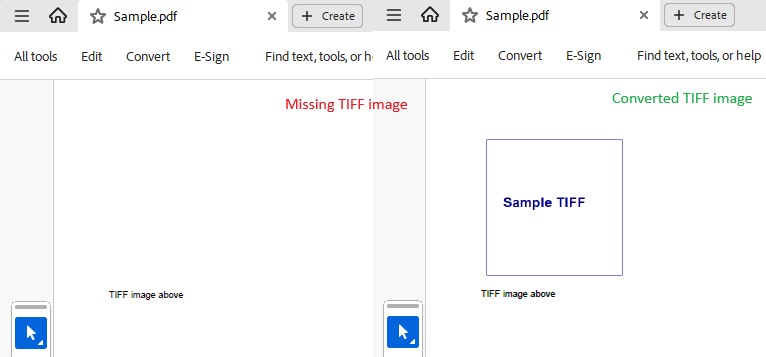
DOCX to PDF conversion can fail with a NotSupportedImageFormatException in .NET Standard when the source document contains TIFF images. This article shows how to handle that limitation in Telerik WordsProcessing with a custom ImagePropertiesResolver.
This knowledge base article also answers the following questions:
- How to handle TIFF images in Telerik WordsProcessing for PDF export?
- Why does the PdfFormatProvider throw NotSupportedImageFormatException for TIFF?
- How to convert DOCX with unsupported images to PDF in .NET Standard?
Solution
DOCX to PDF conversion with TIFF images works differently in .NET Framework and .NET Standard. In .NET Framework, RadPdfProcessing includes built-in image conversion support. In .NET Standard, you must configure custom image handling through FixedExtensibilityManager.ImagePropertiesResolver or FixedExtensibilityManager.JpegImageConverter, but those extensibility points do not add native TIFF support on their own. As a result, TIFF images can still trigger NotSupportedImageFormatException unless you provide a custom resolver that reads the TIFF data explicitly.
To resolve this issue, register a custom ImagePropertiesResolver that detects TIFF images and provides the raw image data needed during PDF export. Follow the steps below:
- Implement a custom
ImagePropertiesResolverto handle TIFF images:
using System;
using System.Drawing;
using System.Drawing.Imaging;
using System.IO;
using System.Runtime.InteropServices;
using Telerik.Documents.ImageUtils;
using Telerik.Documents.Primitives;

public sealed class TiffOnlyImagePropertiesResolver : ImagePropertiesResolverBase
{
    private readonly ImagePropertiesResolver fallback = new();

    public override Size GetImageSize(byte[] imageData)
    {
        if (!IsTiff(imageData))
        {
            return fallback.GetImageSize(imageData);
        }

        using var bitmap = LoadBitmap(imageData);
        return new Size(bitmap.Width, bitmap.Height);
    }

    public override bool TryGetRawImageData(byte[] imageData, out byte[] rawRgbData, out byte[] rawAlpha, out Size size)
    {
        if (!IsTiff(imageData))
        {
            return fallback.TryGetRawImageData(imageData, out rawRgbData, out rawAlpha, out size);
        }

        using var bitmap = LoadBitmap(imageData);

        size = new Size(bitmap.Width, bitmap.Height);
        var rect = new Rectangle(0, 0, bitmap.Width, bitmap.Height);
        var data = bitmap.LockBits(rect, ImageLockMode.ReadOnly, PixelFormat.Format32bppArgb);

        try
        {
            int height = bitmap.Height;
            int width = bitmap.Width;
            int stride = Math.Abs(data.Stride);

            var pixels = new byte[stride * height];
            Marshal.Copy(data.Scan0, pixels, 0, pixels.Length);

            rawRgbData = new byte[width * height * 3];
            rawAlpha = new byte[width * height];

            for (int y = 0; y < height; y++)
            {
                int srcRow = y * stride;
                int rgbRow = y * width * 3;
                int alphaRow = y * width;

                for (int x = 0; x < width; x++)
                {
                    int src = srcRow + (x * 4);

                    // BGRA -> RGB
                    rawRgbData[rgbRow + (x * 3) + 0] = pixels[src + 2];
                    rawRgbData[rgbRow + (x * 3) + 1] = pixels[src + 1];
                    rawRgbData[rgbRow + (x * 3) + 2] = pixels[src + 0];
                    rawAlpha[alphaRow + x] = pixels[src + 3];
                }
            }

            return true;
        }
        finally
        {
            bitmap.UnlockBits(data);
        }
    }

    private static bool IsTiff(byte[] imageData)
    {
        return imageData.Length >= 4 &&
               ((imageData[0] == 0x49 && imageData[1] == 0x49 && imageData[2] == 0x2A && imageData[3] == 0x00) ||
                (imageData[0] == 0x4D && imageData[1] == 0x4D && imageData[2] == 0x00 && imageData[3] == 0x2A));
    }

    private static Bitmap LoadBitmap(byte[] imageData)
    {
        using var ms = new MemoryStream(imageData);
        return new Bitmap(ms);
    }
}- Configure the custom resolver in your application:
using Telerik.Windows.Documents.Extensibility;

FixedExtensibilityManager.ImagePropertiesResolver = new TiffOnlyImagePropertiesResolver();- Convert the DOCX file to PDF:
using System.IO;
using Telerik.Windows.Documents.Flow.FormatProviders.Docx;
using Telerik.Windows.Documents.Flow.FormatProviders.Pdf;
using Telerik.Windows.Documents.Flow.Model;

string inputPath = "path/to/your/input.docx";
string outputPath = "path/to/your/output.pdf";

RadFlowDocument document;
var docxFormatProvider = new DocxFormatProvider();

using (FileStream inputStream = File.OpenRead(inputPath))
{
    document = docxFormatProvider.Import(inputStream);
}

var pdfFormatProvider = new PdfFormatProvider();
using (FileStream outputStream = File.Create(outputPath))
{
    pdfFormatProvider.Export(document, outputStream);
}
This approach lets the export process read TIFF image data during DOCX to PDF conversion without failing on unsupported image formats.