New to Telerik Document Processing? Start a free 30-day trial
Adding Alternating Row Colors to PDF Tables with RadPdfProcessing
Updated on Oct 28, 2026
Use RadPdfProcessing to style table headers and alternate the background colors of data rows.
Environment
| Version | Product | Author |
|---|---|---|
| 2025.3.806 | RadPdfProcessing | Desislava Yordanova |
Description
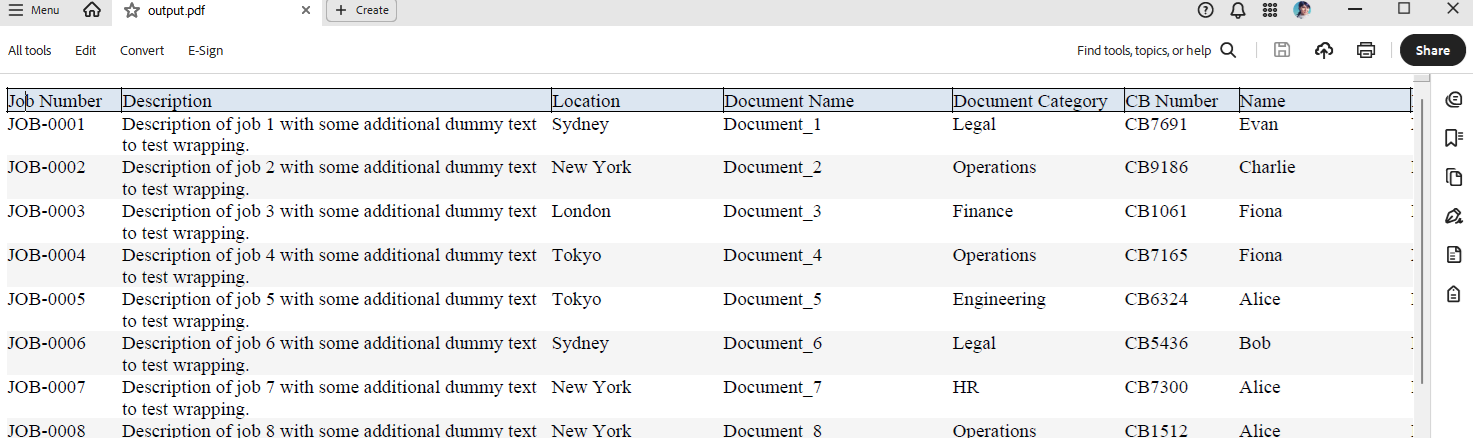
This article shows how to generate a PDF table with styled header cells that include borders and background color. The data rows use an alternating row color style.
You can produce a similar design with the following approach:
Solution
To achieve Alternating Row Style for Tables using RadPdfProcessing, follow these steps:
- Generate placeholder report data.
- Create a PDF document and generate a table using the sample data records.
csharp
     internal class Report
    {
        public string? JobNumber { get; set; }
        public string? Description { get; set; }
        public string? Location { get; set; }
        public string? DocName { get; set; }
        public string? DocCategory { get; set; }
        public string? CBNumber { get; set; }
        public string? Name { get; set; }
        public string? DocType { get; set; }
        public string? Status { get; set; }
        public string? Pages { get; set; }
        public DateTime? StatusDate { get; set; }
    }

    internal static class ReportFactory
    {
        public static List<Report> Generate(int count, int seed = 123)
        {
            var list = new List<Report>(count);
            var rnd = new Random(seed);
            string[] locations = { "New York", "Berlin", "London", "Tokyo", "Sydney" };
            string[] categories = { "Engineering", "Finance", "HR", "Operations", "Legal" };
            string[] names = { "Alice", "Bob", "Charlie", "Diana", "Evan", "Fiona" };
            string[] docTypes = { "PDF", "DOCX", "XLSX", "DWG" };
            string[] statuses = { "Draft", "In Review", "Approved", "Rejected" };

            for (int i = 1; i <= count; i++)
            {
                list.Add(new Report
                {
                    JobNumber = $"JOB-{i:0000}",
                    Description = $"Description of job {i} with some additional dummy text to test wrapping.",
                    Location = locations[rnd.Next(locations.Length)],
                    DocName = $"Document_{i}",
                    DocCategory = categories[rnd.Next(categories.Length)],
                    CBNumber = $"CB{rnd.Next(1000, 9999)}",
                    Name = names[rnd.Next(names.Length)],
                    DocType = docTypes[rnd.Next(docTypes.Length)],
                    Status = statuses[rnd.Next(statuses.Length)],
                    Pages = rnd.Next(1, 40).ToString(),
                    StatusDate = DateTime.Today.AddDays(-rnd.Next(0, 365))
                });
            }
            return list;
        }
    }

        private static void GeneratedDummyTable()
        {
            FontBase defaultFont = FontsRepository.TimesRoman;
            FontFamily fontFamily = new FontFamily(defaultFont.Name);

            int index = 0;
            List<Report> reports = ReportFactory.Generate(20);

            while (index < reports.Count)
            {
                // Build table for this page
                var table = new Telerik.Windows.Documents.Fixed.Model.Editing.Tables.Table();
                table.LayoutType = TableLayoutType.AutoFit;

                // Header row
                var headerRow = table.Rows.AddTableRow();

                string[] headers = new[] {
               "Job Number", "Description", "Location", "Document Name",
               "Document Category", "CB Number", "Name", "Document Type",
               "Status", "Pages", "Status Date"
           };

                double[] preferredWidths = new double[] {
               80, 300, 120, 160, 120, 80, 120, 100, 80, 50, 100
           };

                for (int h = 0; h < headers.Length; h++)
                {
                    var headerCell = headerRow.Cells.AddTableCell();
                    headerCell.PreferredWidth = preferredWidths[h];
                    var headerBlock = headerCell.Blocks.AddBlock();
                    headerBlock.TextProperties.Font = defaultFont;
                    headerBlock.InsertText(headers[h]);

                    // Header cell styling
                    headerCell.Background = new RgbColor(220, 230, 241);
                    headerCell.Borders = new TableCellBorders(
                        new Border(1, new RgbColor(0, 0, 0)), // Top
                        new Border(1, new RgbColor(0, 0, 0)), // Right
                        new Border(1, new RgbColor(0, 0, 0)), // Bottom
                        new Border(1, new RgbColor(0, 0, 0))  // Left
                    );
                }

                while (index < reports.Count)
                {
                    var reportItem = reports[index];

                    var row = table.Rows.AddTableRow();
                    var c0 = row.Cells.AddTableCell();
                    c0.PreferredWidth = preferredWidths[0];
                    Block block1 = c0.Blocks.AddBlock();
                    block1.TextProperties.Font = defaultFont;
                    block1.InsertText(reportItem.JobNumber ?? string.Empty);

                    var c1 = row.Cells.AddTableCell();
                    c1.Blocks.AddBlock().InsertText(fontFamily, reportItem.Description ?? string.Empty);

                    var c2 = row.Cells.AddTableCell();
                    c2.Blocks.AddBlock().InsertText(fontFamily, reportItem.Location ?? string.Empty);

                    var c3 = row.Cells.AddTableCell();
                    c3.Blocks.AddBlock().InsertText(fontFamily, reportItem.DocName ?? string.Empty);

                    var c4 = row.Cells.AddTableCell();
                    c4.Blocks.AddBlock().InsertText(fontFamily, reportItem.DocCategory ?? string.Empty);

                    var c5 = row.Cells.AddTableCell();
                    c5.Blocks.AddBlock().InsertText(fontFamily, reportItem.CBNumber ?? string.Empty);

                    var c6 = row.Cells.AddTableCell();
                    c6.Blocks.AddBlock().InsertText(fontFamily, reportItem.Name ?? string.Empty);

                    var c7 = row.Cells.AddTableCell();
                    c7.Blocks.AddBlock().InsertText(fontFamily, reportItem.DocType ?? string.Empty);

                    var c8 = row.Cells.AddTableCell();
                    c8.Blocks.AddBlock().InsertText(fontFamily, reportItem.Status ?? string.Empty);

                    var c9 = row.Cells.AddTableCell();
                    c9.Blocks.AddBlock().InsertText(fontFamily, reportItem.Pages ?? string.Empty);

                    var c10 = row.Cells.AddTableCell();
                    c10.Blocks.AddBlock().InsertText(fontFamily, reportItem.StatusDate?.ToString("dd/MM/yyyy") ?? string.Empty);


                    for (var i = 0; i < row.Cells.Count; i++)
                    {
                        var cell = row.Cells[i];
                        // Alternating row colors
                        cell.Background = (index % 2 == 0) ? new RgbColor(255, 255, 255) : new RgbColor(245, 245, 245);
                        cell.PreferredWidth = preferredWidths[i];
                    }
                    index++;
                }

                RadFixedDocument fixedDocument = new RadFixedDocument();
                RadFixedPage contentPage = fixedDocument.Pages.AddPage();
                contentPage.Size = new Size(1400, 800);
                FixedContentEditor editor = new FixedContentEditor(contentPage);
                editor.TextProperties.FontSize = 10;
                editor.TextProperties.Font = defaultFont;

                editor.Position.Translate(10, 10);
                editor.DrawTable(table);

                string outputFilePath = "output.pdf";
                File.WriteAllBytes(outputFilePath, new PdfFormatProvider().Export(fixedDocument, TimeSpan.FromSeconds(10)));
                Process.Start(new ProcessStartInfo() { FileName = outputFilePath, UseShellExecute = true });
            }
        }