
How Progress Support uses Agent Engineering to catch escalations earlier and keep AI agents on track
Two internal AI agents monitor customer replies for security and customer-experience risks. Progress Agent Engineering helps the Support team trace and evaluate their decisions, investigate missed or incorrect escalations, track costs and test changes against real cases, so the team can catch issues earlier and improve agent performance over time.
100% of in-scope customer messages
Checked by AI agents for escalation signals.
24/7 automated monitoring
Potential security and customer-experience risks can be surfaced even outside staffed support hours.
95%+ escalation accuracy
Reviewed support cases show that the agents make the expected escalation decision in more than 95% of cases.
50% faster investigation
Trace-level context cuts the time Support needs to understand and verify a flagged interaction by half.
Story in Detail
AI agents that help Support catch issues before they grow
The Progress Support team helps customers resolve product issues and monitors support conversations for cases that may need additional attention. Some issues are straightforward. Others require faster judgment, such as a possible security concern, a frustrated customer, a case that has taken too long to resolve or an interaction that may be heading toward a poor customer outcome.
To help catch those signals earlier, the team uses two internal AI agents. One looks for potential security escalations. The other watches for customer-experience risks. The agents monitor human-handled support interactions, helping the team identify escalation signals across the full support experience. Together, they extend the team’s coverage across incoming messages, including outside staffed support hours, and help specialists focus on cases that need deeper attention.
Their value depends on trust. To rely on the agents with confidence, the Support team needs to know whether the agents are making the right calls, why they made each decision, and whether their behavior changes after a prompt, model or workflow update. Progress Agent Engineering provides that operating view, helping the team observe agent behavior, evaluate decisions and improve performance over time.
Can the team see why an agent made each call, and know whether it made the right one?
That is where Progress Agent Engineering comes in.
From runtime to improvement: every escalation decision is traced, reviewed and reused as a test case.
Want to get started?
Progress Agent Engineering gives you full visibility into your AI agents and LLM-powered applications. It captures traces, measures costs, and evaluates output quality — so you can release AI features with confidence.
Let’s get startedWhy Agent Decisions Need Oversight
An AI agent can return a plausible escalation decision and still get the case wrong. A routine issue might be flagged unnecessarily. A frustrated customer might slip through. A model change could affect behavior that worked yesterday. A model that performs well might also cost more than another model that would make the same decision at lower cost.
The Support team had already deployed two agents to monitor human-written customer support messages for escalation signals. At first, the team reviewed the agents’ flagged cases manually. Each escalation generated an email, and a team member checked whether the agent appeared to have made the right call. That gave the team an initial way to validate agent behavior in production.
But manual review only gave the team a partial view. The final escalation label showed the outcome, not the reasoning behind it. It did not show why the agent reached its decision, whether similar mistakes were happening elsewhere, how much each interaction cost or how the same case would behave after a prompt or model change.
To rely on the agents with more confidence and realize the benefits of scale, the team needed a way to observe their behavior in production, evaluate decisions against real support cases and improve performance over time. Progress Agent Engineering gives the Support team that operating view. Instead of stopping at the final escalation label, the team can inspect the trace behind each decision, review whether the agent’s judgment matched Support expectations, track latency and cost, and reuse reviewed cases as evaluation data.
.jpg?sfvrsn=16746544_1 "progress support")
The agent’s escalation call, with the reasoning it recorded on the ticket.
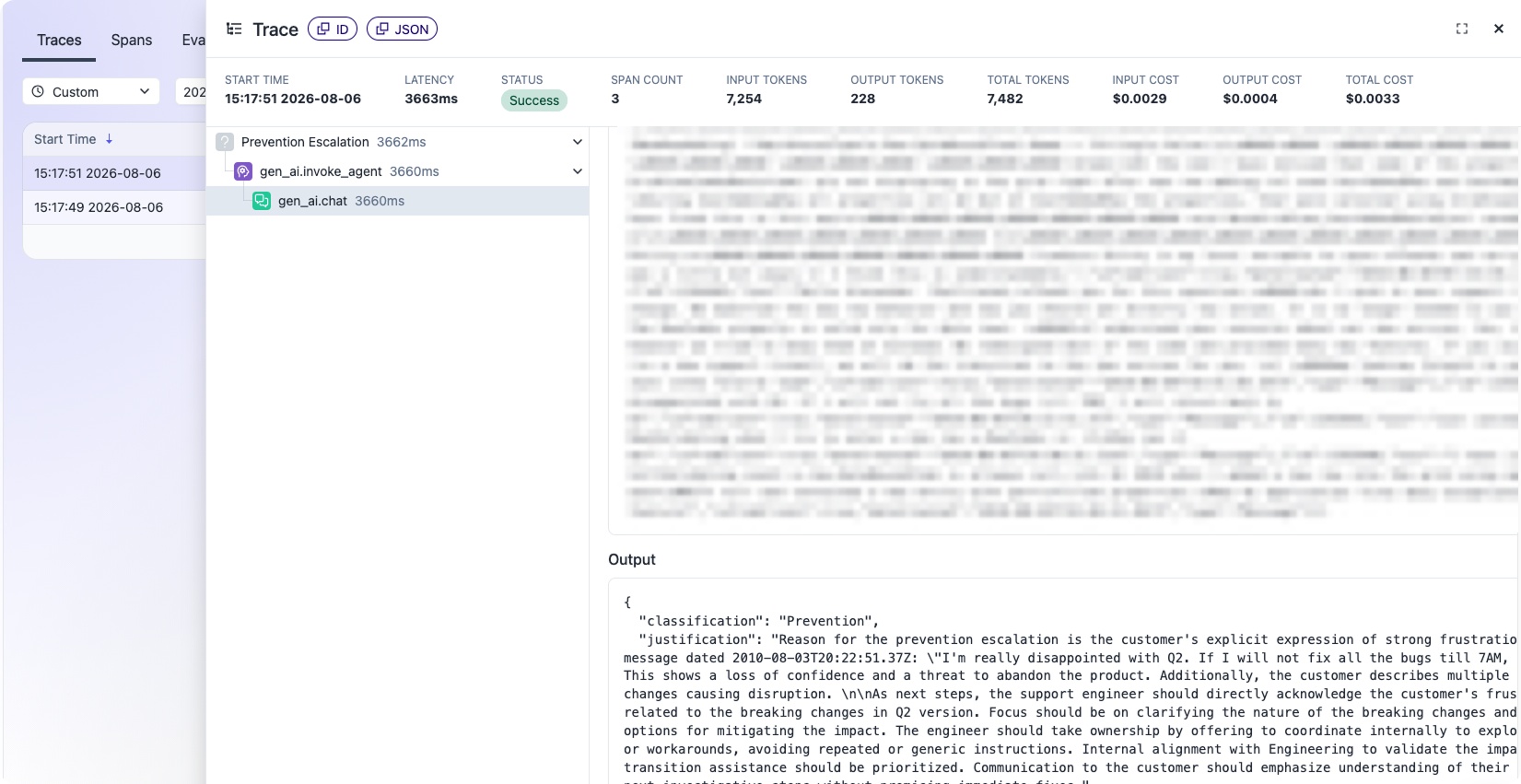
The same interaction in Progress Agent Engineering — latency, tokens, cost and the full output behind the decision.
The agents help us keep an eye on customer conversations and flag cases that may need attention. With Progress Agent Engineering, we can check how they’re behaving and whether the decisions match what we’d expect.
Dragan Grigorov
Progress
See the run behind the escalation
When an agent flags an interaction, the Support team can inspect what happened instead of stopping at the final label. The trace helps the team answer questions they need to answer:- Why did the agent treat this as a security issue?
- Did it interpret the customer’s message correctly?
- Was this a real escalation or an overly cautious call?
- What did this interaction cost to process?
- Are we seeing the same behavior in other conversations?
Those cases are useful. They show where the agent’s judgment differs from the team’s expectations and give the Support team something concrete to test.
Turning Reviewed Cases Into Evals
The team’s first quality system was simple: manually check the agents’ escalations. To turn those reviews into continuous improvement, the team needed a way to convert reviewed support conversations into evaluation cases. Once the team confirms whether a case should or should not have been escalated, that interaction can be added to a dataset and reused whenever the agent changes..
The evaluation question can start simply:
Should this customer interaction have been escalated? Yes or no?
Over time, the dataset can include known security escalations, customer-experience risks, correct non-escalations and difficult edge cases. That gives the team a practical way to check whether a prompt, model or workflow update improves agent quality or introduces a regression. As the dataset grows, the team can make faster, more confident decisions about output quality, performance and cost efficiency.
Test model changes against real support cases
The Support team wanted to answer a practical question: could another model make the same escalation decisions, or better ones, at a lower cost?Using Datasets & Experiments, the team replayed real support tickets through the same prompt and scored the results with the same evaluators. For escalation accuracy, the comparison uses the seven tickets that appeared in both experiment runs.
By testing the same real support cases against two models, the team could compare quality, latency, cost and token usage side by side. The comparison also let the Support team inspect individual disagreements instead of relying only on aggregate scores.
The same production support cases, tested against two models
| Current model | Candidate model | Difference | |
|---|---|---|---|
| Azure OpenAI GPT-5.4-mini | OpenAI GPT-4.1-mini | ||
| Escalation accuracy | 71.4% (5 of 7) | 85.7% (6 of 7) | +14.3 pts |
| Avg. cost / interaction | $0.1235 | $0.1097 | 11.1% lower |
| Avg. latency | 1.38 s | 1.14 s | 17.5% faster |
| Avg. tokens / interaction | 310 | 276 | 11.1% fewer |
Escalation accuracy measures whether the model routed a ticket to a human when policy required it, rather than closing the ticket itself. The seven tickets shown for accuracy are the cases common to both experiment runs. Cost, latency and token figures are the per-item averages recorded for each full run.
How the team ran the comparison
The experiment can be reproduced directly in Progress Agent Engineering:- Open the support-ticket dataset in Improve → Datasets & Experiments.
- Select Run Experiment, choose the production model and keep the existing prompt template and evaluators.
- Run the experiment again with the candidate model, using the same prompt and evaluators.
- Select both experiment runs and choose Compare Selected.
11.1% lower cost, with higher escalation accuracy in the test
On the seven support tickets common to both runs, the candidate model made the expected escalation decision in six cases. The production model did so in five.The misses matter too. Both tickets missed by the production model were closed when support policy required them to be escalated to a human. The candidate model missed one of the seven.
At the same time, the candidate run averaged $0.1097 per interaction compared with $0.1235 for the production model. It also recorded lower average latency and token usage.
Because the team can open every result row by row, a model comparison does not end with an aggregate score. Support can see which tickets changed, where a model made the wrong call and whether the cost difference is worth acting on.
Improving Agents Over Time
A strange interaction does not have to disappear once somebody reviews it.Support can keep the trace, label the expected behavior and add it to the cases used to test the agent later.
That creates a simple improvement loop:
The team gets more value from the same production evidence every time the agent changes.
What changed
The Support team now has a clearer operating view of its AI agents:- Potential security and customer-experience risks can surface earlier, including outside staffed support hours.
- When an escalation looks questionable, Support can inspect the trace behind the decision instead of reviewing the final label alone.
- Reviewed customer interactions can become evaluation cases that are reused after prompt, model or workflow changes.
- Model experiments can compare quality, latency and cost against the same real support cases.
What’s next
The Progress Support team continues to turn real customer interactions into evaluation cases and use them to test future agent changes. This gives the team a repeatable way to check whether updates improve agent quality, introduce regressions or create opportunities to lower model cost.The result is not just earlier escalation detection. It is a process for operating AI agents with visibility, evaluation and continuous improvement.
See how Progress Agent Engineering helps teams understand, evaluate and improve production AI agents.
Explore MoreTalk to our TeamRead Similar Success Stories

Icanpreneur Launches First “Accelerator-as-a-Software” Platform, Leveraging Kendo UI for a Seamless Customer Experience
Read the Whole Story
BAYOOTEC Delivers Integrated Digital Transformation UX 15% Faster with Kendo UI
Read the Whole Story