New to Telerik UI for WinUI? Start a free 30-day trial
Create RadRangeSlider with a Single Thumb
Updated on Mar 26, 2026
The following example demonstrates how to remove the SelectionStart thumb of the slider.
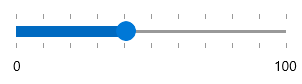
You can use the following namespaces to access RadRangeSlider control and its parts:
xmlns:telerik="using:Telerik.UI.Xaml.Controls.Input" and xmlns:primitives="using:Telerik.UI.Xaml.Controls.Primitives"
You will also have to disable the SelectionMiddleThumb by setting its IsHitTestVisible property to false.
Example 1: Collapsed Top Left Scale
XAML
<telerik:RadRangeSlider Grid.Row="0" Minimum="0" SelectionStart="0" TickFrequency="10" Width="300">
	<telerik:RadRangeSlider.SliderPrimitiveStyle>
	<Style TargetType="primitives:RangeSliderPrimitive">
				<Setter Property="SelectionStartThumbStyle">
					<Setter.Value>
						<Style TargetType="Thumb">
							<Setter Property="Visibility" Value="Collapsed"/>
						</Style>
					</Setter.Value>
				</Setter>
				<Setter Property="SelectionMiddleThumbStyle">
					<Setter.Value>
						<!--The BasedOn is required here to not override the style completely and lose its Template for example-->
						<Style TargetType="Thumb" BasedOn="{StaticResource SelectionMiddleThumbStyle}">
							<Setter Property="IsHitTestVisible" Value="False"/>
						</Style>
					</Setter.Value>
				</Setter>
			</Style>
	</telerik:RadRangeSlider.SliderPrimitiveStyle>
</telerik:RadRangeSlider>