Grouping
PropertyGrid has a grouping feature, which allows you to combine properties into separate groups.
The grouping can be toggled at runtime using the Group Button or by setting the IsGrouped property of RadPropertyGrid.
Setting the IsGrouped property
<telerikControls:RadPropertyGrid IsGrouped="True" /> To determine the group of each PropertyDefinition set its GroupName property.
Setting up the GroupName property
<telerikControls:RadPropertyGrid x:Name="propertyGrid" AutoGeneratePropertyDefinitions="False" IsGrouped="True">
	<telerikControls:RadPropertyGrid.PropertyDefinitions>
		<propertyGrid:PropertyDefinition DisplayName="Id" Binding="{Binding Id}" GroupName="Group A"/>
		<propertyGrid:PropertyDefinition DisplayName="Name" Binding="{Binding Name}" GroupName="Group B"/>
		<propertyGrid:PropertyDefinition DisplayName="Date" Binding="{Binding Date}" GroupName="Group B"/>
	</telerikControls:RadPropertyGrid.PropertyDefinitions>
</telerikControls:RadPropertyGrid>
The previous example uses the following namespaces:
xmlns:telerikControls="using:Telerik.UI.Xaml.Controls"
xmlns:propertyGrid="using:Telerik.UI.Xaml.Controls.Data.PropertyGrid"
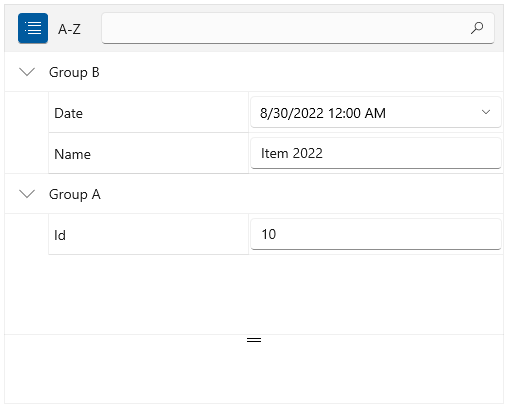
Expand/Collapse Groups Programmatically
To expand or collapse a single group in code, use the ExpandGroup and CollapseGroup methods of RadPropertyGrid.
Expand or collapse a group
// expand a group
this.propertyGrid.ExpandGroup("group name");

// collapse a group
this.propertyGrid.CollapseGroup("group name");
To expand or collapse all groups in code, use the ExpandAllGroups and CollapseAllGroups methods of RadPropertyGrid.
Expand or collapse all groups
// expand all groups
this.propertyGrid.ExpandAllGroups();

// collapse all groups
this.propertyGrid.CollapseAllGroups();
Auto Expand Groups
By default all groups are expanded when the PropertyGrid gets loaded. To change this, and start up the control with all groups collapsed, set the AutoExpandGroups property ot False.
Expand or collapse all groups
<telerikControls:RadPropertyGrid AutoExpandGroups="False" IsGrouped="True"/>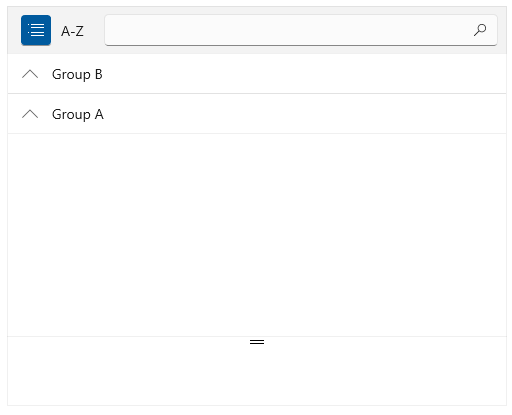
Grouped Event
The Grouped event is raised when the property definitions get grouped.
Grouped event handler
private void RadPropertyGrid_Grouped(object sender, Telerik.UI.Xaml.RadRoutedEventArgs e)
{
}