New to Telerik UI for WinUI? Start a free 30-day trial
Set Column Header Style
Updated on Mar 26, 2026
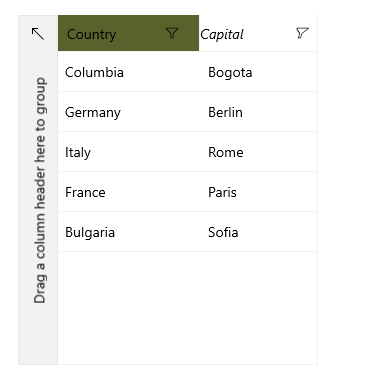
This article describes how to set a column header and its style. The following example sets column headers and changes the background color of the first column and the fontstyle and fontsize of the second column using the HeaderStyle property.
The target type of the style should be
TargetType="gridPrimitives:DataGridColumnHeader"
Wherexmlns:gridPrimitives="using:Telerik.UI.Xaml.Controls.Grid.Primitives"
To begin this example we can create a custom class, that represents our objects and create sample data to populate the RadDataGrid with.
Example 1: Create Sample Data
C#
public sealed partial class MainPage : Page
{
	public MainPage()
	{
		this.InitializeComponent();
		this.grid.ItemsSource = new List<Data>
		{
			new Data { Country = "Columbia", Capital = "Bogota" },
			new Data { Country = "Germany", Capital = "Berlin" },
			new Data { Country = "Italy", Capital = "Rome" },
			new Data { Country = "France", Capital = "Paris" },
			new Data { Country = "Bulgaria", Capital = "Sofia" },
		};
	}
}

public class Data
{
	public string Country { get; set; }
	public string Capital { get; set; }
}
Example 2: Declare RadDataGrid
XAML
<telerikGrid:RadDataGrid x:Name="grid" AutoGenerateColumns="False" Width="300" VerticalAlignment="Center">
	<telerikGrid:RadDataGrid.Columns>
		<telerikGrid:DataGridTextColumn PropertyName="Country" Header="Country">
			<telerikGrid:DataGridTextColumn.HeaderStyle>
				<Style TargetType="gridPrimitives:DataGridColumnHeader">
					<Setter Property="Background" Value="#58622D"/>
				</Style>
			</telerikGrid:DataGridTextColumn.HeaderStyle>
		</telerikGrid:DataGridTextColumn>

		<telerikGrid:DataGridTextColumn PropertyName="Capital" Header="Capital">
			<telerikGrid:DataGridTextColumn.HeaderStyle>
				<Style TargetType="gridPrimitives:DataGridColumnHeader">
					<Setter Property="FontStyle" Value="Italic"/>
					<Setter Property="FontSize" Value="14"/>
				</Style>
			</telerikGrid:DataGridTextColumn.HeaderStyle>
		</telerikGrid:DataGridTextColumn>
	</telerikGrid:RadDataGrid.Columns>
</telerikGrid:RadDataGrid>