New to Telerik UI for WinUI? Start a free 30-day trial
Text Column
Updated on Mar 26, 2026
A DataGridTextColumn converts the content of each associated cell to a System.String object. The DataGridTextColumn provides better performance than a DataGridTemplateColumn.
Key Properties
The Text column provides the CellContentFormat key feature, which gets or sets the custom format for each cell value. The Text column uses the String.Format routine and the format you pass has to be in the form required by this method.
Example
The following example shows how to generate a DataGridTextColumn manually.
- First, create the business object.
Create the Data Model
C#
public class Data
{
	public string Country { get; set; }
	public string Capital { get; set; }
}- The next step is to create some sample data.
Create the Sample Data
C#
public MainPage()
{
	this.InitializeComponent();
	this.DataContext = new List<Data>
	{
		new Data { Country = "Columbia", Capital = "Bogota"},
		new Data { Country = "Germany", Capital = "Berlin"},
		new Data { Country = "Italy", Capital = "Rome"},
		new Data { Country = "France", Capital = "Paris" },
		new Data { Country = "Bulgaria", Capital = "Sofia" },
	};
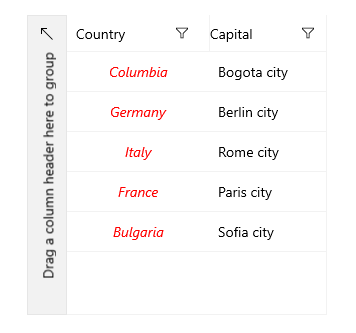
}- This example shows two columns. As you can see, it uses the
CellContentStyleproperty to apply a style to the first column and theCellContentFormatproperty to format the content of the second column. The example also uses thePropertyNameproperty to associate each column with the relevant property from the model.
Define in XAML
XAML
<telerikGrid:RadDataGrid UserEditMode="Inline" x:Name="grid" AutoGenerateColumns="False" ItemsSource="{Binding}" VerticalAlignment="Center" Width="300">
	<telerikGrid:RadDataGrid.Columns>
		<telerikGrid:DataGridTextColumn PropertyName="Country" Header="Country">
			<telerikGrid:DataGridTextColumn.CellContentStyle>
				<Style TargetType="TextBlock">
					<Setter Property="Foreground" Value="Red"/>
					<Setter Property="FontStyle" Value="Italic"/>
					<Setter Property="HorizontalAlignment" Value="Center"/>
					<Setter Property="VerticalAlignment" Value="Center"/>
				</Style>
			</telerikGrid:DataGridTextColumn.CellContentStyle>
		</telerikGrid:DataGridTextColumn>
		<telerikGrid:DataGridTextColumn PropertyName="Capital" Header="Capital" CellContentFormat="{}{0} city"/>
	</telerikGrid:RadDataGrid.Columns>
</telerikGrid:RadDataGrid>
Text Column