New to Telerik UI for WinUI? Start a free 30-day trial
Weather Card
Updated on Mar 26, 2026
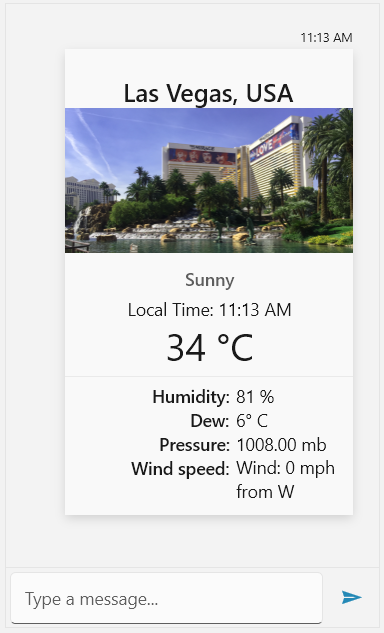
The WeatherCard extends ImageCard by adding options to display weather data. The following set of properties is exposed for this purpose. They are all of the type of string.
TemperatureHumidityDewPressureWind
Defining a WeatherCardMessage
C#
WeatherCardMessage weatherCardMessage = new WeatherCardMessage(this.currentAuthor);
weatherCardMessage.ActionResultsOrientation = Orientation.Vertical;
weatherCardMessage.CardOrientation = CardOrientation.Portrait;
weatherCardMessage.Dew = "6° C";
weatherCardMessage.Humidity = "81 %";
weatherCardMessage.ImageSource = new BitmapImage(new Uri("ms-appx:///MyImage.png", UriKind.Absolute));
weatherCardMessage.Pressure = "1008.00 mb";
weatherCardMessage.Temperature = "34 °C";
weatherCardMessage.Wind = "Wind: 0 mph from W";

weatherCardMessage.SubTitle = "Sunny";

weatherCardMessage.Text = "Local Time: " + DateTime.Now.ToString("hh:mm tt");
weatherCardMessage.Title = "Las Vegas, USA";

this.chat.AddMessage(weatherCardMessage);
RadChat with a WeatherCardMessage