New to Telerik UI for WinUI? Start a free 30-day trial
OhlcSeries
Updated on Mar 26, 2026
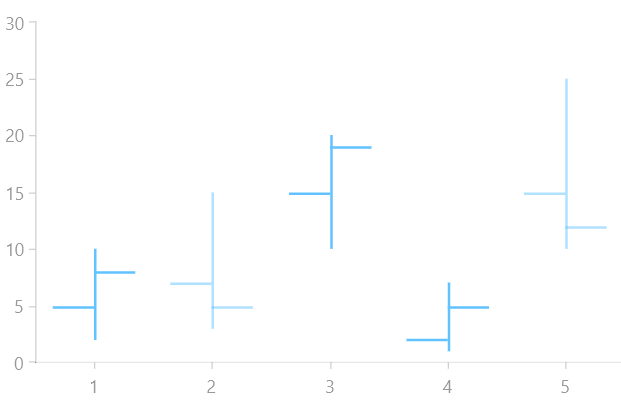
The OhlcSeries are usually used to represent financial data. The data points representation consists of:
- Vertical line: Shows the price range (the highest and lowest prices) over one unit of time.
- Tick marks on each side of the line:
- Left - Indicate the opening price for the time period.
- Right - Indicate the closing price for the time period.
- Color hue - Different color hues could be used to indicate whether prices rose or fell in that period.
The OhlcSeries class inherits from the OhlcSeriesBase class - See the inherited properties.
Example
Examples 1,2 and 3 show how to create a RadCartesianChart with OhlcSeries.
Example 1: Defining the model
C#
public class FinancialData
{
	public double High { get; set; }

	public double Low { get; set; }

	public double Open { get; set; }

	public double Close { get; set; }
}
Example 2: Populating with data
C#
public MainPage()
{
	this.InitializeComponent();
	List<FinancialData> sampleData = new List<FinancialData>();
	sampleData.Add(new FinancialData() { High = 10, Open = 5, Low = 2, Close = 8 });
	sampleData.Add(new FinancialData() { High = 15, Open = 7, Low = 3, Close = 5 });
	sampleData.Add(new FinancialData() { High = 20, Open = 15, Low = 10, Close = 19 });
	sampleData.Add(new FinancialData() { High = 7, Open = 2, Low = 1, Close = 5 });
	sampleData.Add(new FinancialData() { High = 25, Open = 15, Low = 10, Close = 12 });

	this.ohlcSeries.DataContext = sampleData;
}
Example 3: Defining the RadCartesianChart and OhlcSeries
XAML
<Grid xmlns:telerikChart="using:Telerik.UI.Xaml.Controls.Chart">
	<telerikChart:RadCartesianChart x:Name="ohlcSeries">
		<telerikChart:RadCartesianChart.VerticalAxis>
			<telerikChart:LinearAxis/>
		</telerikChart:RadCartesianChart.VerticalAxis>
		<telerikChart:RadCartesianChart.HorizontalAxis>
			<telerikChart:CategoricalAxis/>
		</telerikChart:RadCartesianChart.HorizontalAxis>

		<telerikChart:OhlcSeries ItemsSource="{Binding}">
			<telerikChart:OhlcSeries.HighBinding>
				<telerikChart:PropertyNameDataPointBinding PropertyName="High"/>
			</telerikChart:OhlcSeries.HighBinding>
			<telerikChart:OhlcSeries.LowBinding>
				<telerikChart:PropertyNameDataPointBinding PropertyName="Low"/>
			</telerikChart:OhlcSeries.LowBinding>
			<telerikChart:OhlcSeries.OpenBinding>
				<telerikChart:PropertyNameDataPointBinding PropertyName="Open"/>
			</telerikChart:OhlcSeries.OpenBinding>
			<telerikChart:OhlcSeries.CloseBinding>
				<telerikChart:PropertyNameDataPointBinding PropertyName="Close"/>
			</telerikChart:OhlcSeries.CloseBinding>
		</telerikChart:OhlcSeries>
	</telerikChart:RadCartesianChart>
</Grid>
Figure 1: Result from Example 3