Managing External Styles
ThemeBuilder provides a convenient way to add and manage your existing styles so you do not have to start the styling process from the beginning.
If you have CSS files that apply specific styles, you can add them to your ThemeBuilder project and use them to style the UI components. These styles are called external because you do not create them in ThemeBuilder—you upload them.
Use external styles to provide additional style sets that are bundled alongside the Kendo theme, for example styles that cannot be modified through ThemeBuilder. Do not use external styles to load another Kendo theme. Using two Kendo themes can cause styling conflicts and side effects.
Adding External CSS Styles
-
Open an existing ThemeBuilder project and select Project Settings from the toolbar.
-
In the Project Settings dialog, select the External Styles tab.
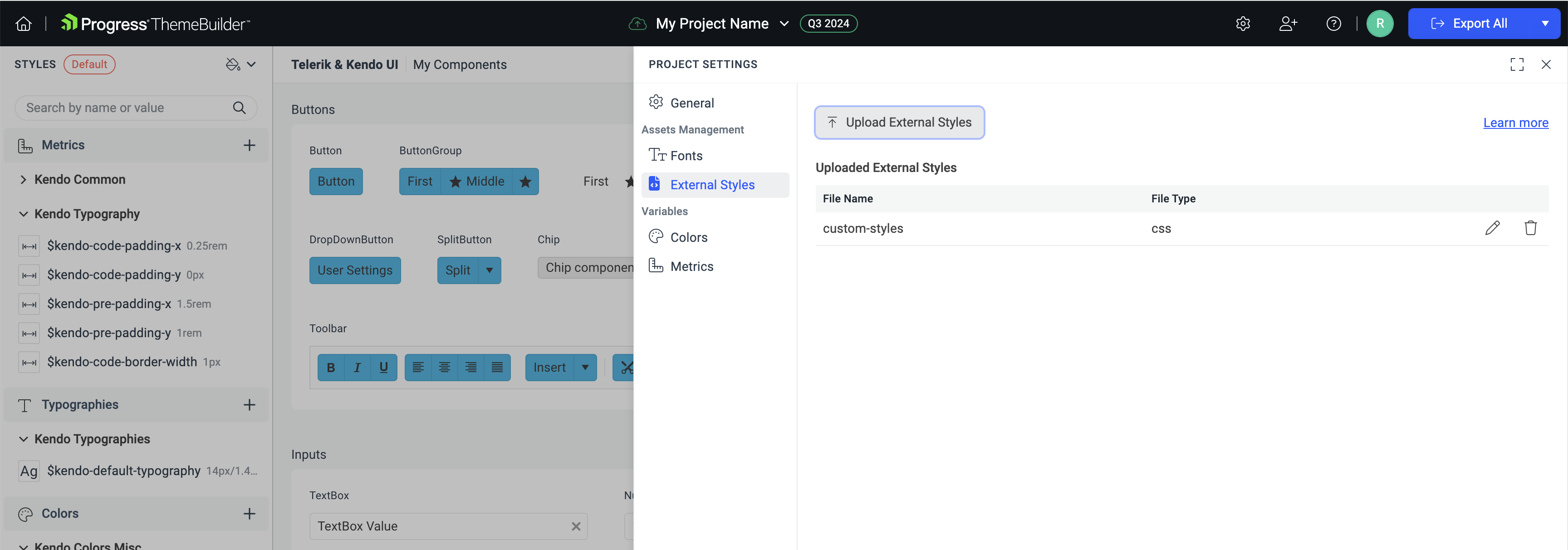
-
In the External Styles tab, select Upload External Styles.
-
Add the files that you want to import in your project.
-
Set the File Name and select the confirmation button to upload the CSS file.
You can rename and delete any uploaded CSS files in the External Styles tab of the Project Settings.
When adding multiple CSS files, ThemeBuilder will evaluate all available styles as a whole. This means that styles with higher specificity will override the already applied styles.
The external CSS feature does not support nested CSS.
Exporting Your External Styles
Once imported in the ThemeBuilder project, the external styles become a part of the styles evaluation process: they affect the look of the components and the selectors of the overridden styles. When you export the styles from ThemeBuilder, the zip output includes SCSS files that import and use your custom CSS. To preserve the same visual effects that you see in ThemeBuilder:
- Don't change the content of the
_externalStyles.scssfile. - Don't change the order of the imports in
index.scss.
When you export the customizations from ThemeBuilder, your external styles are included in the following form:
-
In the compiled CSS of the exported package—your external styles are placed between the Kendo theme styles and the override styles.
-
As individual CSS files used for importing in the SCSS files—your external style CSS files are placed in the
external-stylesfolder.