New to Telerik Test Studio Dev Edition? Start a free 30-day trial
Updated over 1 year ago
The built-in translators are extensions that open up an element to work with Test Studio and allow interaction exposing a rich set of verification options.
In this section of the Project Settings you can set the version of the Telerik and Kendo UI components used to build the application under test so that Test Studio applies the matching translators. From this menu you can review and disable/enable the components for which a translator is available.
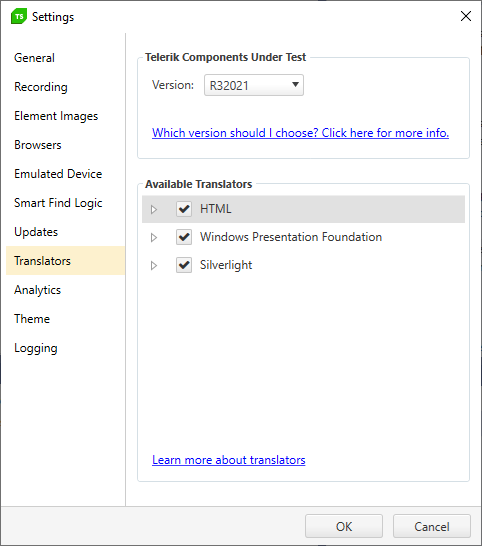
The Telerik Components Under Test section lets you instruct the translators' version to match the version of the UI components in the tested page for this project. This setting applies to both the recording and quick execution flows and allows you to smoothly create tests and run these for various applications. The same setting is exposed in the test list settings and can be set individually per test list.
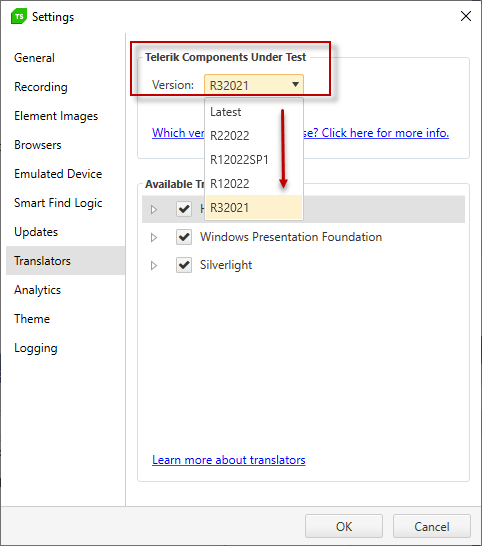
As Quality Assurance Engineer you often don't know what type and version of UI components was used to create the application you need to automate. And since there is no convenient way to identify the version of the components in an already built and deployed application, the most reliable approach is to contact the development team and discuss the topic internally.
In the below grid you can find the versions of the supported UI components matching the translators versions from the list.
| Release | Version |
|---|
| R32021 | 2.27.0 |
| R12022 | 3.0.0 |
| R12022SP1 | 3.1.0 |
| R22022 | 3.3.0 |
| R22022SP1 | 3.4.0 |
| R32022 | 3.6.0 |
| R12023 | 4.0.0 |
| R12023SP1 | 4.1.0 |
| R22023 | 4.3.0 |
| R32023 | 4.6.0 |
| R22024 | 6.0.0 |
| Release | Version |
|---|
| R32021 | 2021.3.914 |
| R12022 | 2022.1.119 |
| R12022SP1 | 2022.1.302 |
| R22022 | 2022.2.511 |
| R22022SP1 | 2022.2.622 |
| R32022 | 2022.3.913 |
| R12023 | 2023.1.117 |
| R12023SP1 | 2023.1.314 |
| R22023 | 2023.2.606 |
| R32023 | 2023.3.1010 |
| R22024 | 2024.2.513 |
| Release | Version |
|---|
| R32021 | 2021.3.914 |
| R12022 | 2022.1.119 |
| R12022SP1 | 2022.1.301 |
| R22022 | 2022.2.510 |
| R22022SP1 | 2022.2.621 |
| R32022 | 2022.3.913 |
| R12023 | 2023.1.117 |
| R12023SP1 | 2023.1.314 |
| R22023 | 2023.2.606 |
| R32023 | 2023.3.1010 |
| R22024 | 2024.2.514 |
| Release R32021 | | |
|---|
| Translator Name | Component Name | Component Version |
| KendoAngularAutoComplete | kendo-angular-dropdowns | 5.4.0 |
| KendoAngularButton | kendo-angular-buttons | 6.3.0 |
| KendoAngularComboBox | kendo-angular-dropdowns | 5.4.0 |
| KendoAngularDialog | kendo-angular-dialog | 5.1.1 |
| KendoAngularDropdownList | kendo-angular-dropdowns | 5.4.0 |
| KendoAngularGrid | kendo-angular-grid | 5.4.0 |
| KendoAngularInputs | kendo-angular-inputs | 7.4.0 |
| KendoAngularPager | kendo-angular-pager | 1.0.0 |
| KendoAngularPanelBar | kendo-angular-layout | 6.3.0 |
| KendoAngularSwitch | kendo-angular-inputs | 7.4.0 |
| KendoAngularTabStrip | kendo-angular-layout | 6.3.0 |
| KendoAngularWindow | kendo-angular-dialog | 5.1.1 |
| Release R12022 | | |
|---|
| Translator Name | Component Name | Component Version |
| KendoAngularAutoComplete | kendo-angular-dropdowns | 6.0.0 |
| KendoAngularButton | kendo-angular-buttons | 7.0.0 |
| KendoAngularComboBox | kendo-angular-dropdowns | 6.0.0 |
| KendoAngularDialog | kendo-angular-dialog | 6.0.0 |
| KendoAngularDropdownList | kendo-angular-dropdowns | 6.0.0 |
| KendoAngularGrid | kendo-angular-grid | 6.0.0 |
| KendoAngularInputs | kendo-angular-inputs | 8.0.0 |
| KendoAngularPager | kendo-angular-pager | 3.0.0 |
| KendoAngularPanelBar | kendo-angular-layout | 6.4.0 |
| KendoAngularSwitch | kendo-angular-inputs | 8.0.0 |
| KendoAngularTabStrip | kendo-angular-layout | 6.4.0 |
| KendoAngularWindow | kendo-angular-dialog | 6.0.0 |
| Release R12022SP1 | | |
|---|
| Translator Name | Component Name | Component Version |
| KendoAngularAutoComplete | kendo-angular-dropdowns | 6.0.1 |
| KendoAngularButton | kendo-angular-buttons | 7.0.3 |
| KendoAngularComboBox | kendo-angular-dropdowns | 6.0.1 |
| KendoAngularDialog | kendo-angular-dialog | 6.0.2 |
| KendoAngularDropdownList | kendo-angular-dropdowns | 6.0.1 |
| KendoAngularGrid | kendo-angular-grid | 6.1.0 |
| KendoAngularInputs | kendo-angular-inputs | 8.0.7 |
| KendoAngularPager | kendo-angular-pager | 3.0.2 |
| KendoAngularPanelBar | kendo-angular-layout | 6.5.1 |
| KendoAngularSwitch | kendo-angular-inputs | 8.0.7 |
| KendoAngularTabStrip | kendo-angular-layout | 6.5.1 |
| KendoAngularWindow | kendo-angular-dialog | 6.0.2 |
| Release R22022 | | |
|---|
| Translator Name | Component Name | Component Version |
| KendoAngularAutoComplete | kendo-angular-dropdowns | 7.0.1 |
| KendoAngularButton | kendo-angular-buttons | 8.0.0 |
| KendoAngularComboBox | kendo-angular-dropdowns | 7.0.1 |
| KendoAngularDialog | kendo-angular-dialog | 7.0.0 |
| KendoAngularDropdownList | kendo-angular-dropdowns | 7.0.1 |
| KendoAngularGrid | kendo-angular-grid | 7.0.1 |
| KendoAngularInputs | kendo-angular-inputs | 9.0.1 |
| KendoAngularPager | kendo-angular-pager | 4.0.0 |
| KendoAngularPanelBar | kendo-angular-layout | 7.0.1 |
| KendoAngularSwitch | kendo-angular-inputs | 9.0.1 |
| KendoAngularTabStrip | kendo-angular-layout | 7.0.1 |
| KendoAngularWindow | kendo-angular-dialog | 7.0.0 |
| Release R22022SP1 | | |
|---|
| Translator Name | Component Name | Component Version |
| KendoAngularAutoComplete | kendo-angular-dropdowns | 7.0.2 |
| KendoAngularButton | kendo-angular-buttons | 8.0.0 |
| KendoAngularComboBox | kendo-angular-dropdowns | 7.0.2 |
| KendoAngularDialog | kendo-angular-dialog | 7.1.2 |
| KendoAngularDropdownList | kendo-angular-dropdowns | 7.0.2 |
| KendoAngularGrid | kendo-angular-grid | 7.2.0 |
| KendoAngularInputs | kendo-angular-inputs | 9.0.3 |
| KendoAngularPager | kendo-angular-pager | 4.0.0 |
| KendoAngularPanelBar | kendo-angular-layout | 7.1.0 |
| KendoAngularSwitch | kendo-angular-inputs | 9.0.3 |
| KendoAngularTabStrip | kendo-angular-layout | 7.1.0 |
| KendoAngularWindow | kendo-angular-dialog | 7.1.2 |
| Release R32022 | | |
|---|
| Translator Name | Component Name | Component Version |
| KendoAngularAutoComplete | kendo-angular-dropdowns | 7.2.0 |
| KendoAngularButton | kendo-angular-buttons | 8.1.0 |
| KendoAngularComboBox | kendo-angular-dropdowns | 7.2.0 |
| KendoAngularDialog | kendo-angular-dialog | 7.1.3 |
| KendoAngularDropdownList | kendo-angular-dropdowns | 7.2.0 |
| KendoAngularGrid | kendo-angular-grid | 7.3.1 |
| KendoAngularInputs | kendo-angular-inputs | 10.0.0 |
| KendoAngularPager | kendo-angular-pager | 4.0.5 |
| KendoAngularPanelBar | kendo-angular-layout | 7.1.3 |
| KendoAngularSwitch | kendo-angular-inputs | 10.0.0 |
| KendoAngularTabStrip | kendo-angular-layout | 7.1.3 |
| KendoAngularWindow | kendo-angular-dialog | 7.1.3 |
| Release | Version |
|---|
| R12023 | 11.0.0 |
| R12023SP1 | 11.4.0 |
| R22023 | 13.0.0 |
| R32023 | 14.0.0 |
| R22024 | 16.0.0 |
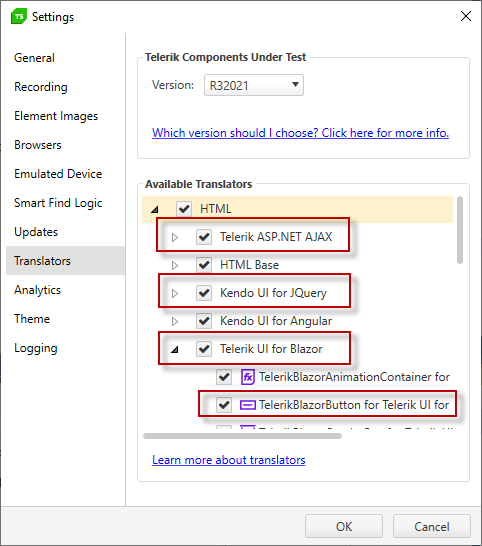
The Available Translators section lists all built-in translators that are currently available in Test Studio. All translators are enabled by default, which is the recommended setup. Each of the built-in translators can be disabled and not used while recording and executing tests, but we strongly advise you to contact the Test Studio Support Team prior to applying changes to the enabled translators.