Invoke Browser-Specific Actions
I would like to invoke browser-specific actions in a standard or coded step. This means the step is only executed if the test is running in the specified browser type.
Soluiton
Use a standard (non-coded) step or use a coded solution.
The RunsAgainst Test Step Property allows you to choose against which browser to run the step:
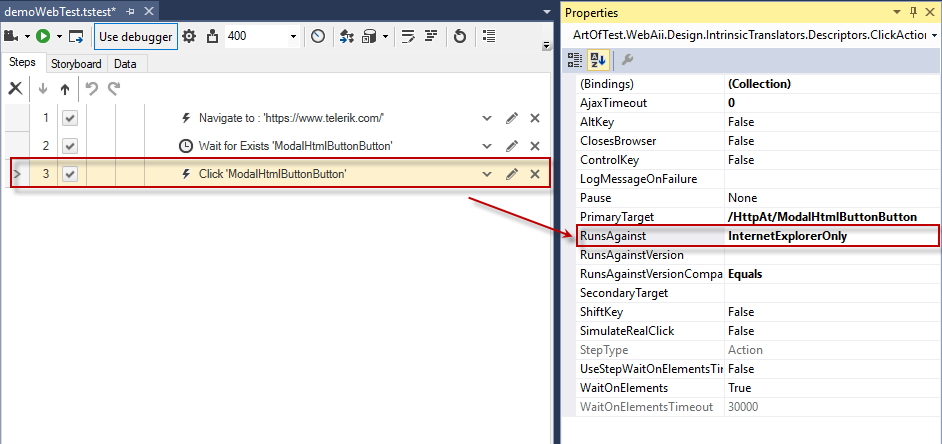
Keep in mind that if you use this feature, the step will run against the specified browser only. You can only choose one browser and not, for instance, two out of three browsers. (To accomplish that, copy and paste the step, then change the RunsAgainst property for the new step.)
You can put together a much more complex use-case by using a coded solution. Here's the code from the test sample. It demonstrates how to use a different search word based on browser type:
    ActiveBrowser.NavigateTo("http://www.telerik.com/");
    //Navigate to the page

    HtmlInputText it = Find.ById<HtmlInputText>("~txtSearchBox_tbSanitized"); //Find the text input field with a "contains" type of search

    Log.WriteLine("Test is executing in the following browser:" + ActiveBrowser.BrowserType.ToString());
    //Write the browser type to the log

                switch (ActiveBrowser.BrowserType) //Input a specific String depending on the browser in which the test is running
                {
                    case BrowserType.InternetExplorer:
                        it.Text = "Internet Explorer";
                        break;

                    case BrowserType.FireFox:
                        it.Text = "FireFox";
                        break;

                    case BrowserType.Chrome:
                        it.Text = "Chrome";
                        break;
                }

    Find.ById<HtmlInputSubmit>("~btnSearchSubmit").Click(); //Click submit button
    System.Threading.Thread.Sleep(2000); //Wait a bit so we can see the result