DockLayout
DockLayoutPanel is a panel that docks its child elements to a predefined-position. The possible Dock positions are Left, Top, Right and Bottom.
Methods and properties:
-
SetDock(RadElement element, Dock dock): A static method that assigns an element a given docking position.
-
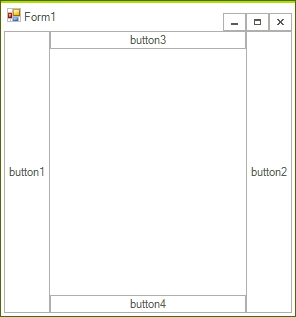
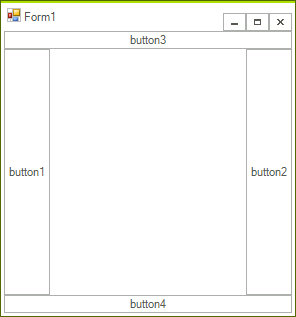
LastChildFill: - Indicates whether the dock position of the last child should be ignored, so that the element stretches to fill the area left by the other children elements. When this property is set to false the dock position of the last child is taken under consideration, thus leaving an empty area in the center of the panel.
The Dock of each element is set through the static SetDock method.
RadButtonElement button = new RadButtonElement("button1");
DockLayoutPanel.SetDock(button, Telerik.WinControls.Layouts.Dock.Left);
Essential for the final layout of the DockLayoutPanel is the sequence in which elements are added to the panel. Consider the following four RadButtonElements:
RadButtonElement button1 = new RadButtonElement("button1");
DockLayoutPanel.SetDock(button1, Telerik.WinControls.Layouts.Dock.Left);
RadButtonElement button2 = new RadButtonElement("button2");
DockLayoutPanel.SetDock(button2, Telerik.WinControls.Layouts.Dock.Right);
RadButtonElement button3 = new RadButtonElement("button3");
DockLayoutPanel.SetDock(button3, Telerik.WinControls.Layouts.Dock.Top);
RadButtonElement button4 = new RadButtonElement("button4");
DockLayoutPanel.SetDock(button4, Telerik.WinControls.Layouts.Dock.Bottom);
Adding the above in the following order results in the layout below:
DockLayoutPanel dockPanel = new DockLayoutPanel();
dockPanel.Children.Add(button1);
dockPanel.Children.Add(button2);
dockPanel.Children.Add(button3);
dockPanel.Children.Add(button4);
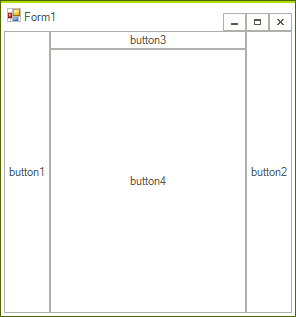
However, if the same elements are added in a reversed order, the outcome will be different:
DockLayoutPanel dockPanel = new DockLayoutPanel();
dockPanel.Children.Add(button4);
dockPanel.Children.Add(button3);
dockPanel.Children.Add(button2);
dockPanel.Children.Add(button1);
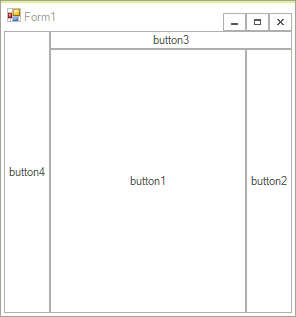
In both examples above the Dock setting of the last added child is ignored, i.e. in the first example button4 is docked, so that it fills the area left by the other buttons. In the second example button1 docking setting is not taken under consideration and the element fills the empty panel area. Setting the LastChildFill property to false , however, transforms the above layouts, so that the last added children are not stretched:
Here is an example of creating a control holding custom DockPanelElement:
class MyDockLayoutPanelControl : RadControl
{
    protected override void CreateChildItems(RadElement parent)
    {
        base.CreateChildItems(parent);
        parent.Children.Add(new MyDockLayoutPanelElement());
    }
}
And here is the element itself:
public class MyDockLayoutPanelElement : RadElement
{
    protected override void CreateChildElements()
    {
        RadButtonElement button1 = new RadButtonElement("button1");
        DockLayoutPanel.SetDock(button1, Telerik.WinControls.Layouts.Dock.Left);
        RadButtonElement button2 = new RadButtonElement("button2");
        DockLayoutPanel.SetDock(button2, Telerik.WinControls.Layouts.Dock.Right);
        RadButtonElement button3 = new RadButtonElement("button3");
        DockLayoutPanel.SetDock(button3, Telerik.WinControls.Layouts.Dock.Top);
        RadButtonElement button4 = new RadButtonElement("button4");
        DockLayoutPanel.SetDock(button4, Telerik.WinControls.Layouts.Dock.Bottom);
        DockLayoutPanel dockPanel = new DockLayoutPanel();
        dockPanel.Children.Add(button4);
        dockPanel.Children.Add(button3);
        dockPanel.Children.Add(button2);
        dockPanel.Children.Add(button1);
    }