Custom Layouts
To create a custom layout class, create a LayoutPanel descendant class and override the MeasureOverride() and ArrangeOverride() methods. The example below demonstrates custom layout logic:
-
MeasureOverride: This implementation iterates and sums the width and height of each child in the Children collection. The Measure method is called for each child. In this example ten
TextBoxPrimitiveitems are added to theCascadeLayoutPanelChildren collection (code for adding primitives not shown). The total width and height for all child items together far exceeds the space allocated by the parent, so that "Element3" is only partially visible and the remaining elements are completely clipped. -
ArrangeOverride: This implementation iterates the Children collection and calls the Arrange method for each child instance. The local "leftTopCorner" Point member is incremented by the width and height of each child, causing each child to be arranged down and to the right of the previous child.
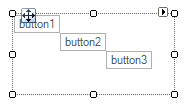
Cascade layout example
public class CascadeLayoutPanel : LayoutPanel
{
    protected override SizeF MeasureOverride(SizeF availableSize)
    {
        SizeF totalSize = SizeF.Empty;
        for (int i = 0; i < this.Children.Count; ++i)
        {
            RadElement child = this.Children[i];
            if (child != null)
            {
                child.Measure(availableSize);
                totalSize.Width += child.DesiredSize.Width;
                totalSize.Height += child.DesiredSize.Height;
            }
        }
        return totalSize;
    }
    protected override SizeF ArrangeOverride(SizeF finalSize)
    {
        PointF leftTopCorner = new Point();
        for (int i = 0; i < this.Children.Count; ++i)
        {
            RadElement child = this.Children[i];
            if (child != null)
            {
                child.Arrange(new RectangleF(leftTopCorner,
                    new SizeF(child.DesiredSize.Width, child.DesiredSize.Height)));
                leftTopCorner.X += child.DesiredSize.Width;
                leftTopCorner.Y += child.DesiredSize.Height;
            }
        }
        return finalSize;
    }
}