New to Telerik UI for WinForms? Start a free 30-day trial
How to Load SVG Images in RadGridView Column
Updated on Aug 27, 2026
Environment
| Product Version | Product | Author |
|---|---|---|
| 2022.3.913 | RadGridView for WinForms | Desislava Yordanova |
Description
Usually, the SVG (vector) images are stored as XML/text content in the database. When RadGridView is bound to such a DataTable, the text representation is displayed in the automatically generated column:
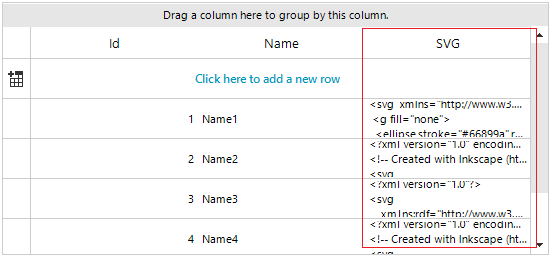
This article demonstrates a sample approach how to add a grid column that supports SVG images.
Solution
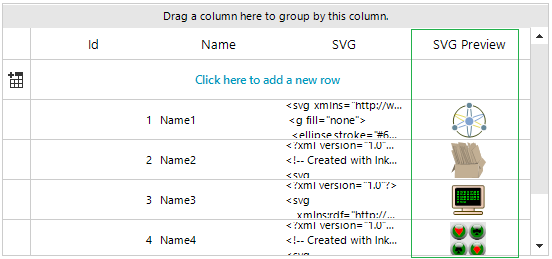
It is necessary to create a derivative of GridViewImageColumn and use a custom cell element that shows the SVG image. The example relies on the fact that the cell's value contains the XML/text content of the image. The achieved result is illustrated in the following image:
C#
public RadForm1()
{
    InitializeComponent();
    DataTable dt = new DataTable();
    dt.Columns.Add("Id", typeof(int));
    dt.Columns.Add("Name", typeof(string));
    dt.Columns.Add("SVG", typeof(string));

    string[] files = System.IO.Directory.GetFiles(@"..\..\..\svg files");
    int id = 0;
    foreach (string file in files)
    {
        string readText = System.IO.File.ReadAllText(file);
        id++;
        dt.Rows.Add(id, "Name" + id, readText);
    }

    this.radGridView1.DataSource = dt;
    SvgColumn svgColumn = new SvgColumn();
    svgColumn.HeaderText = "SVG Preview";
    svgColumn.FieldName = "SVG";
    this.radGridView1.Columns.Add(svgColumn);
    this.radGridView1.AutoSizeColumnsMode = GridViewAutoSizeColumnsMode.Fill;
    this.radGridView1.TableElement.RowHeight = 40;
}

public class SvgColumn : GridViewImageColumn
{
    public override Type GetCellType(GridViewRowInfo row)
    {
        if (row is GridViewDataRowInfo || row is GridViewNewRowInfo)
        {
            return typeof(SvgCellElement);
        }
        return base.GetCellType(row);
    }
}

public class SvgCellElement : GridImageCellElement
{
    public SvgCellElement(GridViewColumn column, GridRowElement row) : base(column, row)
    {
    }

    protected override Type ThemeEffectiveType
    {
        get
        {
            return typeof(GridImageCellElement);
        }
    }

    protected override void SetContentCore(object value)
    {
        base.SetContentCore(value);
        if (this.Value != null)
        {
            this.ImageDrawType = Telerik.WinControls.ImageDrawType.Svg;
            this.ImageLayout = System.Windows.Forms.ImageLayout.Zoom;
            if (this.RowInfo.Tag == null)
            {
                this.RowInfo.Tag = RadSvgImage.FromXml(this.Value + "");
            }
            this.SvgImage = this.RowInfo.Tag as RadSvgImage;
        }
    }
}
Please have in mind that the complexity of the vector images and the number of records may affect the row resizing or scrolling performance.