New to Telerik UI for WinForms? Start a free 30-day trial
How to Achieve Shadow Effect for BarSeries in ChartView
Updated over 1 year ago
Environment
| Product Version | Product | Author |
|---|---|---|
| 2020.2.512 | RadChartView for WinForms | Desislava Yordanova |
Description
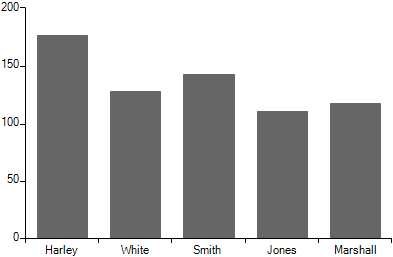
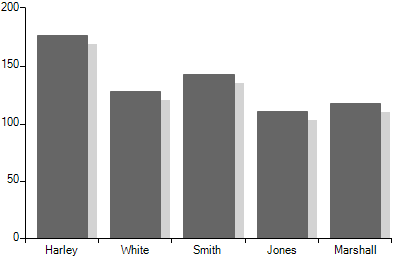
This tutorial aims to demonstrate a sample approach for achieving a shadow effect for the BarSeries in RadChartView.
| No shadow | Shadow |
|---|---|
 |  |
Solution
The custom rendering functionality that RadChartView offers is suitable for drawing a thin rectangle next to default bar element that is being rendered. The main rendering logic for each bar element is executed in the BarSeriesDrawPart class. We will create a derivative of BarSeriesDrawPart and override the DrawSeriesParts method. Then, along with the default rendering of the bar element we will draw a gray rectangle using the RadGdiGraphics:
C#
        public Form1()
        {
            InitializeComponent();

            this.radChartView1.CreateRenderer += new ChartViewCreateRendererEventHandler(radChartView1_CreateRenderer);
            BarSeries barSeries = new BarSeries("Performance", "RepresentativeName");
            barSeries.Name = "Q1";
            barSeries.DataPoints.Add(new CategoricalDataPoint(177, "Harley"));
            barSeries.DataPoints.Add(new CategoricalDataPoint(128, "White"));
            barSeries.DataPoints.Add(new CategoricalDataPoint(143, "Smith"));
            barSeries.DataPoints.Add(new CategoricalDataPoint(111, "Jones"));
            barSeries.DataPoints.Add(new CategoricalDataPoint(118, "Marshall"));
            this.radChartView1.Series.Add(barSeries);
        }

        void radChartView1_CreateRenderer(object sender, ChartViewCreateRendererEventArgs e)
        {
            RenderParameter param = new RenderParameter();
            param.Color = Color.Red;
            e.Renderer = new CustomCartesianRenderer(param, e.Area as CartesianArea);
        }
    }

    public class RenderParameter
    {
        public Color Color { get; set; }

        public RenderParameter()
        {
        }
    }

    public class CustomCartesianRenderer : CartesianRenderer
    {
        internal RenderParameter RenderParameter { get; set; }

        public CustomCartesianRenderer(CartesianArea area) : base(area)
        {
        }
        public CustomCartesianRenderer(RenderParameter renderParameter, CartesianArea area) : base(area)
        {
            RenderParameter = renderParameter ?? throw new ArgumentNullException(nameof(renderParameter));
        }

        protected override void Initialize()
        {
            base.Initialize();

            for (int i = 0; i < this.DrawParts.Count; i++)
            {
                BarSeriesDrawPart linePart = this.DrawParts[i] as BarSeriesDrawPart;
                if (linePart != null)
                {
                    this.DrawParts[i] = new CustomBarSeriesDrawPart((BarSeries)linePart.Element, this);
                }
            }
        }
    }

    public class CustomBarSeriesDrawPart : BarSeriesDrawPart
    {
        public CustomBarSeriesDrawPart(BarSeries series, IChartRenderer renderer) : base(series, renderer)
        {
        }

        public override void DrawSeriesParts()
        {
            CustomCartesianRenderer customRenderer = this.Renderer as CustomCartesianRenderer;
            RenderParameter param= customRenderer.RenderParameter;

            Graphics graphics = customRenderer.Graphics;
            RadGdiGraphics radGraphics = new RadGdiGraphics(graphics);

            for (int j = 0; j < this.Element.DataPoints.Count; j++)
            {
                RadRect slot = this.Element.DataPoints[j].LayoutSlot;
                RectangleF temp = new RectangleF((float)(this.OffsetX + slot.X), (float)(this.OffsetY + slot.Y), (float)slot.Width, (float)slot.Height);
                RectangleF barBounds = new RectangleF(temp.X + 10,temp.Y + 10,temp.Width,temp.Height + 10);

                DataPointElement childElement = (DataPointElement)this.Element.Children[j];

                float realWidth = barBounds.Width * childElement.HeightAspectRatio;
                barBounds.Width = realWidth;

                barBounds.Height = Math.Max(barBounds.Height, 1f);

                radGraphics.FillRectangle(barBounds, Color.LightGray);
            }
            base.DrawSeriesParts();
        }
    }