How to Change PageViewMode for the Nested Levels in RadGridView
Environment
| Product Version | Product | Author |
|---|---|---|
| 2021.2.615 | RadGridView | Desislava Yordanova |
Description
The hierarchy in RadGridView consists of a parent and a child template and a relation between them (e.g. linking parent's ID with a ParentID field in the child template). Hence, for the parent level you need to have any rows which will display the expander ("+") according to the child records the parent has.
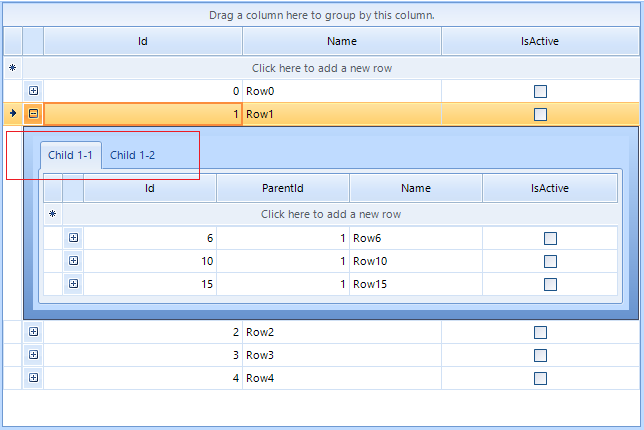
When you add two or more child templates at the same level, they are displayed in tabbed view by default:
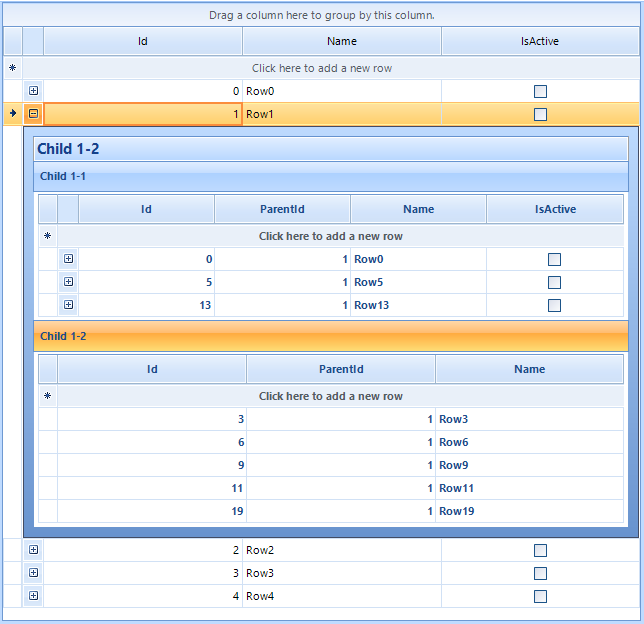
RadGridView internally uses a page view element for displaying the child templates. The TableElement.PageViewMode property gives you control over the page view mode used in child views, e.g. Strip, Stack, Outlook, ExplorerBar.
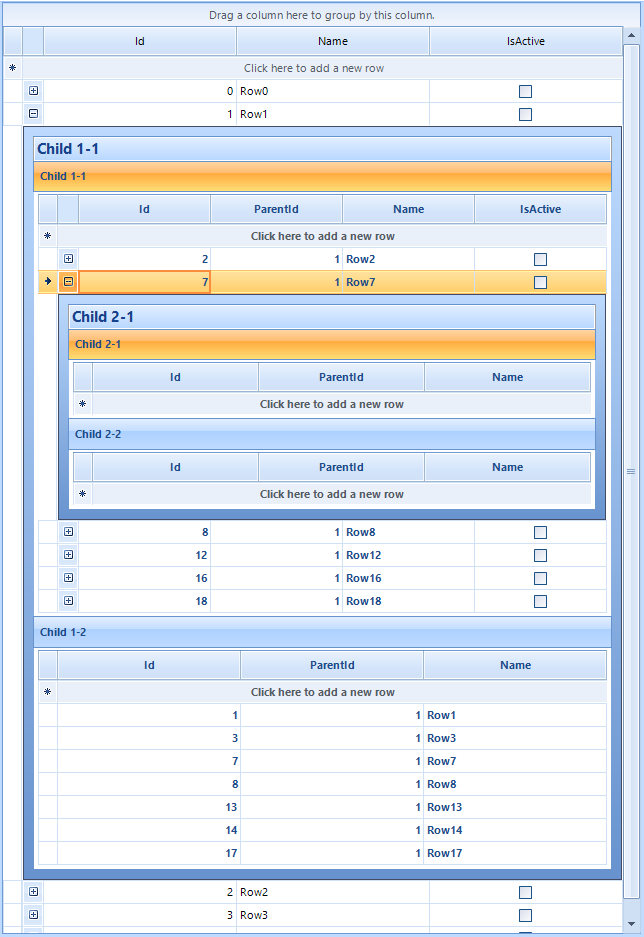
Since RadGridView creates its TableElements for the child levels on demand, you don't have access to the n-level TableElements until you expand a n-1 parent row. That is why the PageViewMode changes the mode only for the first hierarchical level. The inner hierarchical levels have the default strip mode:
This article demonstrates a sample approach how to change the PageViewMode for the inner levels as well.
Solution
It is necessary to create a derivative of the GridDetailViewCellElement class and override its CreatePageViewProvider method. Then, return the desired IRadPageViewProvider, e.g. RadPageViewExplorerBarProvider.
public RadForm1()
{
    InitializeComponent();

    this.radGridView1.CreateCell += RadGridView1_CreateCell;

    Random rand = new Random();
    DataTable dt1 = new DataTable();
    dt1.Columns.Add("Id", typeof(int));
    dt1.Columns.Add("Name", typeof(string));
    dt1.Columns.Add("IsActive", typeof(bool));
    for (int i = 0; i < 5; i++)
    {
        dt1.Rows.Add(i, "Row" + i);
    }

    this.radGridView1.MasterTemplate.DataSource = dt1;
    this.radGridView1.MasterTemplate.AutoSizeColumnsMode = GridViewAutoSizeColumnsMode.Fill;

    //level 1-1

    DataTable dt2 = new DataTable();
    dt2.Columns.Add("Id", typeof(int));
    dt2.Columns.Add("ParentId", typeof(int));
    dt2.Columns.Add("Name", typeof(string));
    dt2.Columns.Add("IsActive", typeof(bool));
    for (int i = 0; i < 20; i++)
    {
        dt2.Rows.Add(i, rand.Next(0, 5), "Row" + i);
    }

    GridViewTemplate template = new GridViewTemplate();
    template.Caption = "Child 1-1";
    template.DataSource = dt2;
    template.AutoSizeColumnsMode = GridViewAutoSizeColumnsMode.Fill;
    radGridView1.MasterTemplate.Templates.Add(template);

    GridViewRelation relation = new GridViewRelation(radGridView1.MasterTemplate);
    relation.ChildTemplate = template;
    relation.RelationName = "Relation1";
    relation.ParentColumnNames.Add("Id");
    relation.ChildColumnNames.Add("ParentId");
    radGridView1.Relations.Add(relation);

    //level 1-2

    DataTable dt3 = new DataTable();
    dt3.Columns.Add("Id", typeof(int));
    dt3.Columns.Add("ParentId", typeof(int));
    dt3.Columns.Add("Name", typeof(string));
    for (int i = 0; i < 20; i++)
    {
        dt3.Rows.Add(i, rand.Next(0, 5), "Row" + i);
    }

    GridViewTemplate template2 = new GridViewTemplate();
    template2.Caption = "Child 1-2";
    template2.DataSource = dt3;
    template2.AutoSizeColumnsMode = GridViewAutoSizeColumnsMode.Fill;
    radGridView1.MasterTemplate.Templates.Add(template2);

    GridViewRelation relation2 = new GridViewRelation(radGridView1.MasterTemplate);
    relation2.ChildTemplate = template2;
    relation2.RelationName = "Relation2";
    relation2.ParentColumnNames.Add("Id");
    relation2.ChildColumnNames.Add("ParentId");
    radGridView1.Relations.Add(relation2);

    this.radGridView1.TableElement.PageViewMode = PageViewMode.ExplorerBar;

    //level 2-1

    DataTable dt4 = new DataTable();
    dt4.Columns.Add("Id", typeof(int));
    dt4.Columns.Add("ParentId", typeof(int));
    dt4.Columns.Add("Name", typeof(string));
    for (int i = 0; i < 20; i++)
    {
        dt4.Rows.Add(i, rand.Next(0, 20), "Row" + i);
    }

    GridViewTemplate template3 = new GridViewTemplate();
    template3.Caption = "Child 2-1";
    template3.DataSource = dt4;
    template3.AutoSizeColumnsMode = GridViewAutoSizeColumnsMode.Fill;
    template.Templates.Add(template3);

    GridViewRelation relation3 = new GridViewRelation(template);
    relation3.ChildTemplate = template3;
    relation3.RelationName = "Relation3";
    relation3.ParentColumnNames.Add("Id");
    relation3.ChildColumnNames.Add("ParentId");
    radGridView1.Relations.Add(relation3);

    //level 2-2

    DataTable dt5 = new DataTable();
    dt5.Columns.Add("Id", typeof(int));
    dt5.Columns.Add("ParentId", typeof(int));
    dt5.Columns.Add("Name", typeof(string));
    for (int i = 0; i < 20; i++)
    {
        dt5.Rows.Add(i, rand.Next(0, 20), "Row" + i);
    }

    GridViewTemplate template4 = new GridViewTemplate();
    template4.Caption = "Child 2-2";
    template4.DataSource = dt3;
    template4.AutoSizeColumnsMode = GridViewAutoSizeColumnsMode.Fill;
    template.Templates.Add(template4);

    GridViewRelation relation4 = new GridViewRelation(template);
    relation4.ChildTemplate = template4;
    relation4.RelationName = "Relation4";
    relation4.ParentColumnNames.Add("Id");
    relation4.ChildColumnNames.Add("ParentId");
    radGridView1.Relations.Add(relation4);

}

private void RadGridView1_CreateCell(object sender, GridViewCreateCellEventArgs e)
{
    if (e.CellType == typeof(GridDetailViewCellElement))
    {
         e.CellElement = new CustomGridDetailViewCellElement(e.Column, e.Row);
    }
}
public class CustomGridDetailViewCellElement : GridDetailViewCellElement
{
    public CustomGridDetailViewCellElement(GridViewColumn column, GridRowElement row) : base(column, row)
    {
    }
    protected override Type ThemeEffectiveType
    {
        get
        {
            return typeof(GridDetailViewCellElement);
        }
    }

    protected override IRadPageViewProvider CreatePageViewProvider()
    {
        IRadPageViewProvider provider = base.CreatePageViewProvider();
        provider = new RadPageViewExplorerBarProvider();
        return provider;
    }
}