Move ListView Items Between Groups in Unbound Mode
Environment
| Product Version | Product | Author |
|---|---|---|
| 2021.2.511 | RadListView for WinForms | Desislava Yordanova |
Description
RadListView supports drag and drop behavior out of the box when using unbound mode. However, if grouping is enabled, there is not default logic to handle the drag and drop operation.
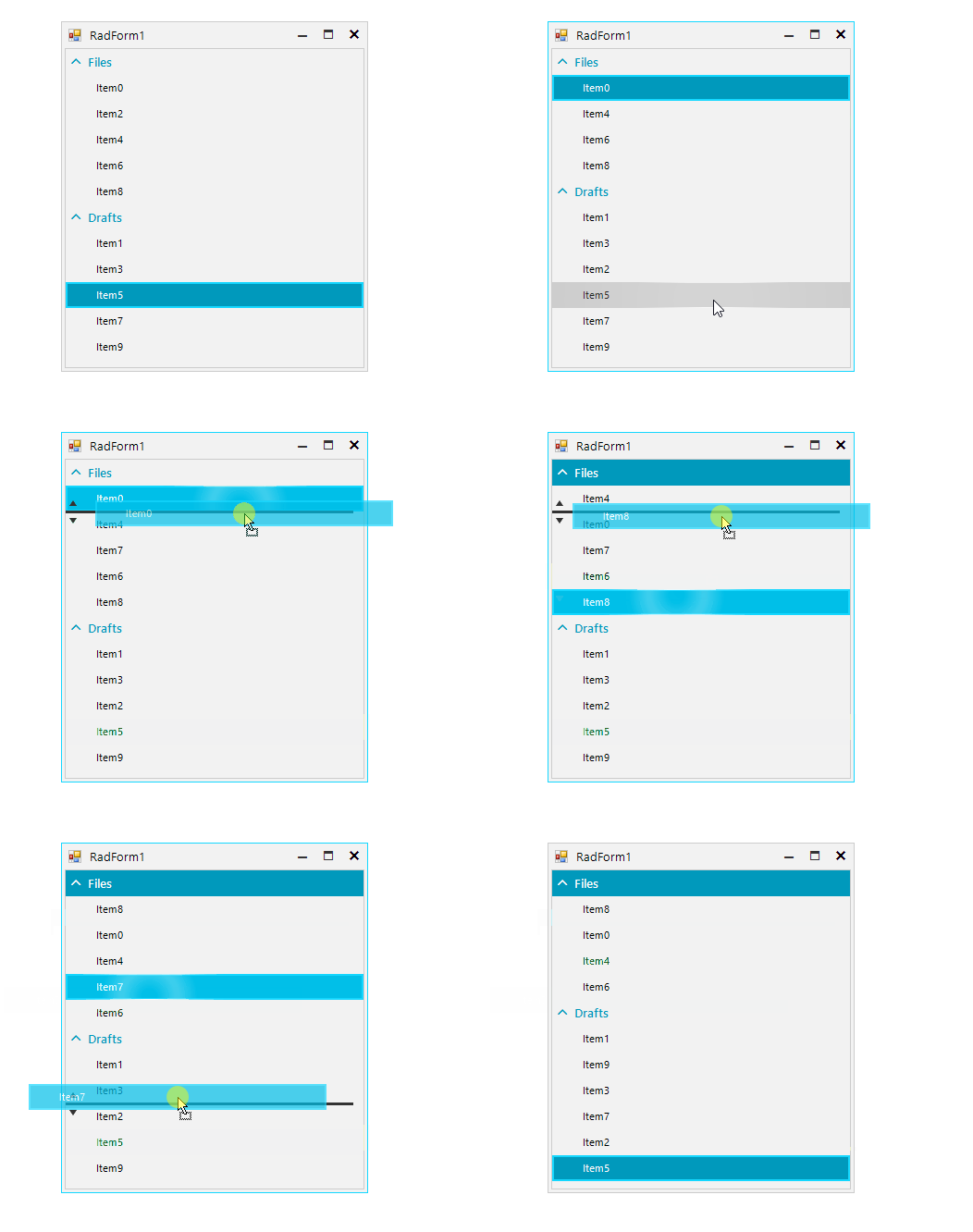
This tutorial demonstrates how to plug into the ListViewDragDropService and achieve moving the items between the groups or within the group itself:
Solution
RadListView handles the whole drag and drop operation by its ListViewDragDropService. The PreviewDragOver event allows you to control on what targets the item(s) being dragged can be dropped on. The PreviewDragDrop event allows you to get a handle on all the aspects of the drag and drop operation, the source (drag) list view, the destination (target) control, as well as the item being dragged. This is where we will initiate the actual physical move of the item(s) from one group to the same or another group.
public RadForm1()
{
    InitializeComponent();

    for (int i = 0; i < 10; i++)
    {
        ListViewDataItem item = new ListViewDataItem();
        item.Value = i;
        item.Text = "Item" + i;
        this.radListView1.Items.Add(item);
    }

    radListView1.EnableGrouping = true;
    radListView1.EnableCustomGrouping = true;
    radListView1.ShowGroups = true;
    ListViewDataItemGroup group1 = new ListViewDataItemGroup("Files");
    ListViewDataItemGroup groupd2 = new ListViewDataItemGroup("Drafts");
    radListView1.Groups.Add(group1);
    radListView1.Groups.Add(groupd2);
    for (int i = 0; i < this.radListView1.Items.Count; i++)
    {
        if (i % 2 == 0)
        {
            this.radListView1.Items[i].Group = group1;
        }
        else
        {
            this.radListView1.Items[i].Group = groupd2;
        }
    }


    this.radListView1.AllowDragDrop = true;
    this.radListView1.ListViewElement.DragDropService.PreviewDragOver += DragDropService_PreviewDragOver;
    this.radListView1.ListViewElement.DragDropService.PreviewDragDrop += DragDropService_PreviewDragDrop;
}

private void DragDropService_PreviewDragOver(object sender, RadDragOverEventArgs e)
{
    SimpleListViewVisualItem targetItem = e.HitTarget as SimpleListViewVisualItem;
    SimpleListViewVisualItem sourceItem = e.DragInstance as SimpleListViewVisualItem;
    if (targetItem != null && sourceItem != null)
    {
        e.CanDrop = true;
    }
    else
    {
        e.CanDrop = false;
    }
}

private void DragDropService_PreviewDragDrop(object sender, RadDropEventArgs e)
{
    e.Handled = true;

    SimpleListViewVisualItem targetItem = e.HitTarget as SimpleListViewVisualItem;
    SimpleListViewVisualItem sourceItem = e.DragInstance as SimpleListViewVisualItem;
    SimpleListViewElement viewElement = e.HitTarget as SimpleListViewElement;
    if ((targetItem == null || sourceItem == null) && viewElement == null)
    {
        return;
    }


    targetIndex = targetItem.Data.ListView.Items.IndexOf(targetItem.Data);
    sourceIndex = sourceItem.Data.ListView.Items.IndexOf(sourceItem.Data);
    target = targetItem.Data;
    source = sourceItem.Data;
    if (sourceIndex<targetIndex)
    {
        targetIndex -= 1;
    }
    ListViewDataItem clonedSourceData = new ListViewDataItem(source.Text);
    ListViewDataItemGroup group = target.Group;
    target.ListView.BeginUpdate();
    for (int i = 0; i < target.ListView.Items.Count; i++)
    {
        if (target.ListView.Items[i].Group == group)
        {
            target.ListView.Items[i].Group = null;
        }
    }
    target.ListView.Items.Insert(targetIndex, clonedSourceData);

    for (int i = 0; i < target.ListView.Items.Count; i++)
    {
        if (target.ListView.Items[i].Group == null)
        {
            target.ListView.Items[i].Group = group;
        }
    }
    target.ListView.Items.Remove(source);

       target.ListView.EndUpdate();
}

ListViewDataItem target = null;
ListViewDataItem source = null;
int targetIndex = -1;
int sourceIndex = -1;