How to arrange elements in a custom RadListView DetailsView cell
Environment
| Product Version | Product | Author |
|---|---|---|
| 2025.4.1111 | RadListView for WinForms | Dinko Krastev |
Description
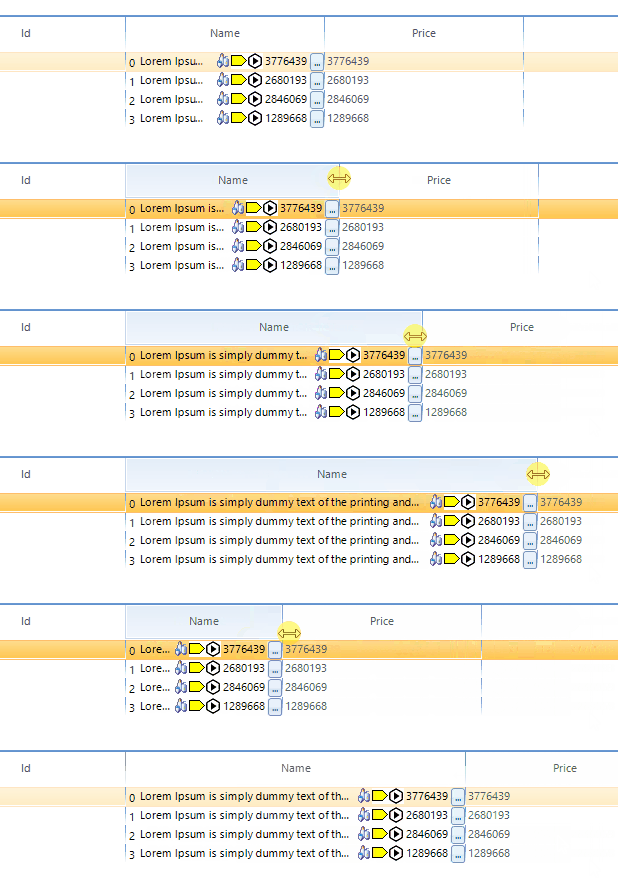
By design, RadListView allows you to create and use your own custom visual items for each of its view types. The Custom items help article demonstrates a step-by-step tutorial on how to use a custom items depending on the applied view. However, a common scenario is to use several elements in a custom item. In this example, we will demonstrate how to arrange elements in a custom DetailsView cell in a way that changing the width of the control will change only the text part while the rest elements will stay static.
Solution
For the purpose of this article, we will populate the RadListView with sample data. In the code snippet, you can observe that we need to subscribe to the CellCreating event. In the event handler, you can replace the default cell element with a custom one.
public partial class Form1 : Form
{
    BindingList<TreeItem> listViewItems = new BindingList<TreeItem>();
    Random rnd = new Random();
    public Form1()
    {
        InitializeComponent();

        for (int i = 0; i < 4; i++)
        {
            listViewItems.Add(new TreeItem() { Id = i, Name = "Lorem Ipsum is simply dummy text of the printing and typesetting industry.", Price= rnd.Next(1000000,5000000) });
        }
		this.radListView1.ViewType = ListViewType.DetailsView;
		this.radListView1.CellCreating += RadListView1_CellCreating;
		this.radListView1.DataSource = listViewItems;
		this.radListView1.DisplayMember = "Name";
    }

    private void RadListView1_CellCreating(object sender, ListViewCellElementCreatingEventArgs e)
	{
		DetailListViewDataCellElement cell = e.CellElement as DetailListViewDataCellElement;
		if (cell != null && cell.Data.Name == "Name")
		{
			e.CellElement = new CustomDetailListViewDataCellElement(cell.RowElement, e.CellElement.Data);
		}
		else if (cell != null && cell.Data.Name != "Name")
		{
			e.CellElement = new DefaultCell(cell.RowElement, e.CellElement.Data);
		}
	}
}
public class TreeItem
{
    public int Id { get; set; }
    public string Name { get; set; }
    public decimal Price { get; set; }

}
Now we need to create our custom cell. We will add different types of elements inside the custom cell. Each element will represent data related to the current cell. In our case, only the nameElement TextPrimitive part will depend on its parent cell width, while the rest of the elements will not overlap each other and stay static. An important step here is to set TextWrap and AutoEllipsis properties of the TextPrimitive__. To arrange the elements correctly you need to override the ArrangeOverride method of the CustomContentElement. In the method, you can calculate the width of all elements except the text part element. The width of the TextPrimitive element will be the remaining space left from the whole cell width, without the width of the other elements.
public class DefaultCell : DetailListViewDataCellElement
{
    public DefaultCell(DetailListViewVisualItem owner, ListViewDetailColumn column) : base(owner, column)
    {
    }
    protected override Type ThemeEffectiveType
    {
        get
        {
            return typeof(DetailListViewHeaderCellElement);
        }
    }
    public override bool IsCompatible(ListViewDetailColumn data, object context)
    {
        if (data.Name != "Name")
        {
            return true;
        }
        return false;
    }
}

public class CustomDetailListViewDataCellElement : DetailListViewDataCellElement
{
    public CustomDetailListViewDataCellElement(DetailListViewVisualItem owner,
        ListViewDetailColumn column) : base(owner, column)
    {
    }

    LightVisualElement numberElement;
    TextPrimitive nameElement;
    ImagePrimitive saveStatusImage;
    ImagePrimitive errorImage;
    ImagePrimitive timeImage;
    TextPrimitive priceText;
    RadDropDownButtonElement detailsButton;
    public override void Synchronize()
    {
        // base.Synchronize();
        TreeItem dataItem = (TreeItem)this.Row.DataBoundItem;
        numberElement.Text = dataItem.Id + "";
        nameElement.Text = dataItem.Name;
        priceText.Text = dataItem.Price + "";
        this.Text = "";
    }

    protected override void CreateChildElements()
    {
        // base.CreateChildElements();

        this.StretchHorizontally = true;

        this.numberElement = new LightVisualElement();
        this.Children.Add(this.numberElement);

        this.nameElement = new TextPrimitive()
        {
            ShouldHandleMouseInput = true,
            NotifyParentOnMouseInput = true,
            TextWrap = false,
            AutoEllipsis = true,
        };

        this.Children.Add(this.nameElement);

        this.saveStatusImage = new ImagePrimitive()
        {
            ShouldHandleMouseInput = true,
            ToolTipText = "asd",
            Image = ConvertByteArrayToImage(Resource1._object)
        };
        this.Children.Add(this.saveStatusImage);

        this.errorImage = new ImagePrimitive()
        {
            Image = ConvertByteArrayToImage(Resource1.error)
        };
        this.Children.Add(this.errorImage);

        this.timeImage = new ImagePrimitive()
        {
            Image = ConvertByteArrayToImage(Resource1.deployed)
        };
        this.Children.Add(this.timeImage);

        this.priceText = new TextPrimitive();
        this.Children.Add(this.priceText);

        this.detailsButton = new RadDropDownButtonElement()
        {
            Text = "...",
            ShowArrow = false
        };
        this.Children.Add(this.detailsButton);
    }

    public Image ConvertByteArrayToImage(byte[] bytes)
    {
        // is your data
        MemoryStream mStream = new MemoryStream();
        mStream.Write(bytes, 0, bytes.Length);
        return Image.FromStream(mStream);
    }

    protected override SizeF MeasureOverride(SizeF availableSize)
    {
        var result = base.MeasureOverride(availableSize);

        var remainingSize = this.GetClientRectangle(this.DrawBorder, availableSize).Size;
        SizeF desiredSize = SizeF.Empty;
        desiredSize.Height = 20;
        this.numberElement.Measure(remainingSize);

        remainingSize.Width -= this.numberElement.DesiredSize.Width;
        desiredSize.Width += this.numberElement.DesiredSize.Width;
        saveStatusImage.Measure(remainingSize);

        remainingSize.Width -= this.saveStatusImage.DesiredSize.Width;
        desiredSize.Width += this.saveStatusImage.DesiredSize.Width;
        errorImage.Measure(remainingSize);

        remainingSize.Width -= this.errorImage.DesiredSize.Width;
        desiredSize.Width += this.errorImage.DesiredSize.Width;
        timeImage.Measure(remainingSize);

        remainingSize.Width -= this.timeImage.DesiredSize.Width;
        desiredSize.Width += this.timeImage.DesiredSize.Width;
        priceText.Measure(remainingSize);

        remainingSize.Width -= this.priceText.DesiredSize.Width;
        desiredSize.Width += this.priceText.DesiredSize.Width;
        detailsButton.Measure(remainingSize);

        remainingSize.Width -= this.detailsButton.DesiredSize.Width;
        desiredSize.Width += this.detailsButton.DesiredSize.Width;

        nameElement.Measure(remainingSize);
        desiredSize.Width += this.nameElement.DesiredSize.Width;

        desiredSize.Width = result.Width;
        return desiredSize;
    }
    protected override bool ShouldArrangeChild(RadElement child)
    {
        if (child == this.numberElement ||
            child == this.nameElement ||
            child == this.saveStatusImage ||
            child == this.errorImage ||
            child == this.timeImage ||
            child == this.priceText ||
            child == this.detailsButton
            )
        {
            return false;
        }
        return base.ShouldArrangeChild(child);
    }
    protected override bool ShouldMeasureChild(RadElement child)
    {
        if (child == this.numberElement ||
            child == this.nameElement ||
            child == this.saveStatusImage ||
            child == this.errorImage ||
            child == this.timeImage ||
            child == this.priceText ||
            child == this.detailsButton
            )
        {
            return false;
        }

        return base.ShouldMeasureChild(child);
    }
    protected override SizeF ArrangeOverride(SizeF finalSize)
    {
        var result = base.ArrangeOverride(finalSize);

        var clientRect = this.GetClientRectangle(this.DrawBorder, finalSize);

        var desiredWidth = this.numberElement.DesiredSize.Width + this.saveStatusImage.DesiredSize.Width + this.errorImage.DesiredSize.Width + this.timeImage.DesiredSize.Width + this.priceText.DesiredSize.Width + this.detailsButton.DesiredSize.Width;

        if (desiredWidth < clientRect.Width)
        {
            PointF topLeftCorner = new PointF(clientRect.X, clientRect.Y);
            this.numberElement.Arrange(new RectangleF(topLeftCorner, numberElement.DesiredSize));

            numberElement.Arrange(LayoutUtils.VAlign(new SizeF(numberElement.Size.Width, nameElement.DesiredSize.Height), new RectangleF(topLeftCorner, new SizeF(numberElement.Size.Width, clientRect.Height)), ContentAlignment.MiddleCenter));

            topLeftCorner = new PointF(topLeftCorner.X + this.numberElement.DesiredSize.Width, 0);

            var nameWidth = clientRect.Width - desiredWidth;

            nameElement.Arrange(LayoutUtils.VAlign(new SizeF(nameWidth, nameElement.DesiredSize.Height), new RectangleF(topLeftCorner, new SizeF(nameWidth, clientRect.Height)), ContentAlignment.MiddleCenter));
            topLeftCorner.X += nameWidth;

            saveStatusImage.Arrange(LayoutUtils.VAlign(new SizeF(saveStatusImage.DesiredSize.Width, nameElement.DesiredSize.Height), new RectangleF(topLeftCorner, new SizeF(saveStatusImage.DesiredSize.Width, clientRect.Height)), ContentAlignment.MiddleCenter));

            topLeftCorner = new PointF(topLeftCorner.X + this.saveStatusImage.DesiredSize.Width, 0);

            errorImage.Arrange(LayoutUtils.VAlign(new SizeF(errorImage.DesiredSize.Width, nameElement.DesiredSize.Height), new RectangleF(topLeftCorner, new SizeF(errorImage.DesiredSize.Width, clientRect.Height)), ContentAlignment.MiddleCenter));
            topLeftCorner = new PointF(topLeftCorner.X + this.errorImage.DesiredSize.Width, 0);

            timeImage.Arrange(LayoutUtils.VAlign(new SizeF(timeImage.DesiredSize.Width, nameElement.DesiredSize.Height), new RectangleF(topLeftCorner, new SizeF(timeImage.DesiredSize.Width, clientRect.Height)), ContentAlignment.MiddleCenter));
            topLeftCorner = new PointF(topLeftCorner.X + this.timeImage.DesiredSize.Width, 0);

            priceText.Arrange(LayoutUtils.VAlign(new SizeF(priceText.DesiredSize.Width, nameElement.DesiredSize.Height), new RectangleF(topLeftCorner, new SizeF(priceText.DesiredSize.Width, clientRect.Height)), ContentAlignment.MiddleCenter));
            topLeftCorner = new PointF(topLeftCorner.X + this.priceText.DesiredSize.Width, 0);

            detailsButton.Arrange(LayoutUtils.VAlign(new SizeF(detailsButton.Size.Width, nameElement.DesiredSize.Height), new RectangleF(topLeftCorner, new SizeF(detailsButton.Size.Width, clientRect.Height)), ContentAlignment.MiddleCenter));
        }

        return result;
    }
    protected override Type ThemeEffectiveType
    {
        get
        {
            return typeof(DetailListViewDataCellElement);
        }
    }

    public override bool IsCompatible(ListViewDetailColumn data, object context)
    {
        if (data.Name != "Name")
        {
            return false;
        }
        return true;
    }
}