How to reorder rows in bound RadGridView
Environment
| Product Version | 2018.2.621 |
| Product | RadGridView for WinForms |
Description
RadGridView supports rows reordering and it can be done by the user at run time. However, rows reordering is only available for grids in unbound mode. This article demonstrates a sample approach how to achieve rows reordering by drag and drop functionality in a bound grid.
Solution
Consider the grid is bound to a collection of custom objects. Note that RadGridView handles the whole drag and drop operation by its RadGridViewDragDropService. We will utilize the service in order to achieve the desired rows reordering by using drag and drop behavior.
Figure 1: Rows reordering in bound grid
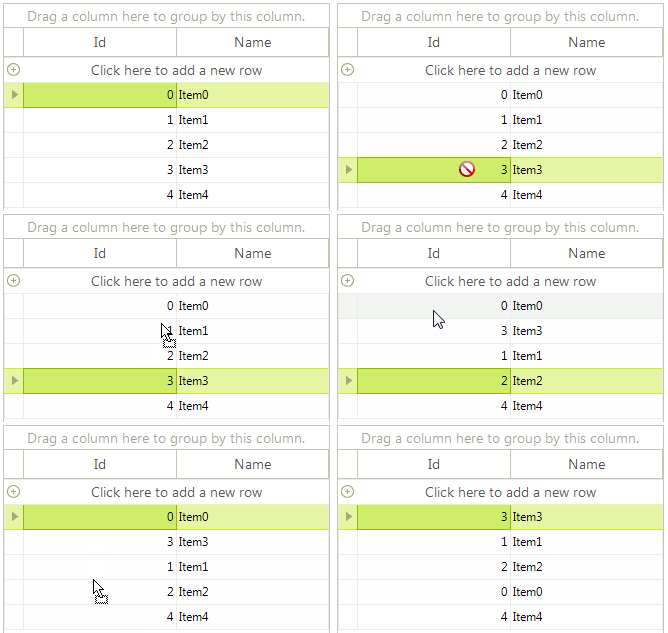
There are two main points for accomplishing the following behavior:
-
Register a custom GridDataRowBehavior which starts the RadGridViewDragDropService when you click with the left mouse button.
-
Handle the RadDragDropService.PreviewDragStart event in order to indicate that RadGridView can start the drag operation. In the RadDragDropService.PreviewDragOver event you can control on what targets the row being dragged can be dropped on. In the PreviewDragDrop event you can perform the actual reordering of the data bound records. Note that it is important to remove the dragged record from the DataSource collection and insert it at the new index. You don't manipulate the RadGridView.Rows collection but the DataSource collection and its records.
You can find below a complete sample code snippet demonstrating how to bind RadGridView to a collection of custom objects and
public GridViewRowsReorderBoundMode()
{
    InitializeComponent();
    BindingList<Item> items = new BindingList<Item>();
    for (int i = 0; i < 5; i++)
    {
        items.Add(new Item(i, "Item" + i));
    }
    this.radGridView1.DataSource = items;
    this.radGridView1.AutoSizeColumnsMode = Telerik.WinControls.UI.GridViewAutoSizeColumnsMode.Fill;
    //register the custom row behavior
    BaseGridBehavior gridBehavior = this.radGridView1.GridBehavior as BaseGridBehavior;
    gridBehavior.UnregisterBehavior(typeof(GridViewDataRowInfo));
    gridBehavior.RegisterBehavior(typeof(GridViewDataRowInfo), new CustomGridDataRowBehavior());
    //handle drag and drop events for the grid through the DragDrop service
    RadDragDropService svc =
        this.radGridView1.GridViewElement.GetService<RadDragDropService>();
    svc.PreviewDragStart += svc_PreviewDragStart;
    svc.PreviewDragDrop += svc_PreviewDragDrop;
    svc.PreviewDragOver += svc_PreviewDragOver;
}
//required to initiate drag and drop when grid is in bound mode
private void svc_PreviewDragStart(object sender, PreviewDragStartEventArgs e)
{
    e.CanStart = true;
}
private void svc_PreviewDragOver(object sender, RadDragOverEventArgs e)
{
    if (e.DragInstance is GridDataRowElement)
    {
        e.CanDrop = e.HitTarget is GridDataRowElement ||
                    e.HitTarget is GridTableElement ||
                    e.HitTarget is GridSummaryRowElement;
    }
}
//initiate the move of selected row
private void svc_PreviewDragDrop(object sender, RadDropEventArgs e)
{
    GridDataRowElement rowElement = e.DragInstance as GridDataRowElement;
    if (rowElement == null)
    {
        return;
    }
    e.Handled = true;
    RadItem dropTarget = e.HitTarget as RadItem;
    RadGridView targetGrid = dropTarget.ElementTree.Control as RadGridView;
    if (targetGrid == null)
    {
        return;
    }
    var dragGrid = rowElement.ElementTree.Control as RadGridView;
    if (targetGrid == dragGrid)
    {
        e.Handled = true;
        GridDataRowElement dropTargetRow = dropTarget as GridDataRowElement;
        int index = dropTargetRow != null ? this.GetTargetRowIndex(dropTargetRow, e.DropLocation) : targetGrid.RowCount;
        GridViewRowInfo rowToDrag = dragGrid.SelectedRows[0];
        this.MoveRows(dragGrid, rowToDrag, index);
    }
}
private int GetTargetRowIndex(GridDataRowElement row, Point dropLocation)
{
    int halfHeight = row.Size.Height / 2;
    int index = row.RowInfo.Index;
    if (dropLocation.Y > halfHeight)
    {
        index++;
    }
    return index;
}
private void MoveRows(RadGridView dragGrid,
    GridViewRowInfo dragRow, int index)
{
    dragGrid.BeginUpdate();
    GridViewRowInfo row = dragRow;
    if (row is GridViewSummaryRowInfo)
    {
        return;
    }
    if (dragGrid.DataSource != null && typeof(System.Collections.IList).IsAssignableFrom(dragGrid.DataSource.GetType()))
    {
        //bound to a list of objects scenario
        var sourceCollection = (System.Collections.IList)dragGrid.DataSource;
        if (row.Index < index)
        {
            index--;
        }
        sourceCollection.Remove(row.DataBoundItem);
        sourceCollection.Insert(index, row.DataBoundItem);
    }
    else
    {
        throw new ApplicationException("Unhandled Scenario");
    }
    dragGrid.EndUpdate(true);
}
public class CustomGridDataRowBehavior : GridDataRowBehavior
{
    protected override bool OnMouseDownLeft(MouseEventArgs e)
    {
        GridDataRowElement row = this.GetRowAtPoint(e.Location) as GridDataRowElement;
        if (row != null)
        {
            RadGridViewDragDropService svc = this.GridViewElement.GetService<RadGridViewDragDropService>();
            svc.AllowAutoScrollColumnsWhileDragging = false;
            svc.AllowAutoScrollRowsWhileDragging = false;
            svc.Start(row);
        }
        return base.OnMouseDownLeft(e);
    }
}
public class Item
{
    public Item(int id, string name)
    {
        this.Id = id;
        this.Name = name;
    }
    public int Id { get; set; }
    public string Name { get; set; }
}
A complete solution providing a C# and VB.NET project is available here.